Compare commits
No commits in common. "master" and "rxswift-1.0" have entirely different histories.
master
...
rxswift-1.
|
|
@ -34,19 +34,3 @@ timeline.xctimeline
|
|||
# Carthage/Checkouts
|
||||
|
||||
Carthage/Build
|
||||
|
||||
|
||||
# Various
|
||||
|
||||
.DS_Store
|
||||
|
||||
|
||||
# Linux
|
||||
|
||||
*.swp
|
||||
*.swo
|
||||
|
||||
# Swift Package Manager
|
||||
|
||||
.build/
|
||||
Packages/
|
||||
|
|
|
|||
278
.jazzy.yml
278
.jazzy.yml
|
|
@ -1,278 +0,0 @@
|
|||
---
|
||||
custom_categories:
|
||||
- name: RxSwift
|
||||
children:
|
||||
- AnyObserver
|
||||
- Cancelable
|
||||
- ConnectableObservableType
|
||||
- Disposable
|
||||
- Errors
|
||||
- Event
|
||||
- ImmediateSchedulerType
|
||||
- Observable+Extensions
|
||||
- Observable
|
||||
- ObservableConvertibleType
|
||||
- ObservableType
|
||||
- ObserverType
|
||||
- Rx
|
||||
- RxMutableBox
|
||||
- SchedulerType
|
||||
- name: RxSwift/Concurrency
|
||||
children:
|
||||
- AsyncLock
|
||||
- Lock
|
||||
- LockOwnerType
|
||||
- SynchronizedDisposeType
|
||||
- SynchronizedOnType
|
||||
- SynchronizedSubscribeType
|
||||
- SynchronizedUnsubscribeType
|
||||
- name: RxSwift/DataStructures
|
||||
children:
|
||||
- Bag
|
||||
- InfiniteSequence
|
||||
- PriorityQueue
|
||||
- Queue
|
||||
- name: RxSwift/Disposables
|
||||
children:
|
||||
- AnonymousDisposable
|
||||
- BinaryDisposable
|
||||
- BooleanDisposable
|
||||
- CompositeDisposable
|
||||
- DisposeBag
|
||||
- DisposeBase
|
||||
- NAryDisposable
|
||||
- NopDisposable
|
||||
- RefCountDisposable
|
||||
- ScheduledDisposable
|
||||
- SerialDisposable
|
||||
- SingleAssignmentDisposable
|
||||
- StableCompositeDisposable
|
||||
- SubscriptionDisposable
|
||||
- name: RxSwift/Extensions
|
||||
children:
|
||||
- String+Rx
|
||||
- name: RxSwift/Observables/Implementations
|
||||
children:
|
||||
- AddRef
|
||||
- Amb
|
||||
- AnonymousObservable
|
||||
- Buffer
|
||||
- Catch
|
||||
- CombineLatest+arity
|
||||
- CombineLatest+CollectionType
|
||||
- CombineLatest
|
||||
- Concat
|
||||
- ConnectableObservable
|
||||
- Debug
|
||||
- Deferred
|
||||
- DelaySubscription
|
||||
- DistinctUntilChanged
|
||||
- Do
|
||||
- ElementAt
|
||||
- Empty
|
||||
- Error
|
||||
- Filter
|
||||
- Generate
|
||||
- Just
|
||||
- Map
|
||||
- Merge
|
||||
- Multicast
|
||||
- Never
|
||||
- ObserveOn
|
||||
- ObserveOnSerialDispatchQueue
|
||||
- Producer
|
||||
- Range
|
||||
- Reduce
|
||||
- RefCount
|
||||
- Repeat
|
||||
- RetryWhen
|
||||
- Sample
|
||||
- Scan
|
||||
- Sequence
|
||||
- ShareReplay1
|
||||
- ShareReplay1WhileConnected
|
||||
- SingleAsync
|
||||
- Sink
|
||||
- Skip
|
||||
- SkipUntil
|
||||
- SkipWhile
|
||||
- StartWith
|
||||
- SubscribeOn
|
||||
- Switch
|
||||
- Take
|
||||
- TakeLast
|
||||
- TakeUntil
|
||||
- TakeWhile
|
||||
- Throttle
|
||||
- Timeout
|
||||
- Timer
|
||||
- ToArray
|
||||
- Using
|
||||
- Window
|
||||
- WithLatestFrom
|
||||
- Zip+arity
|
||||
- Zip+CollectionType
|
||||
- Zip
|
||||
- name: RxSwift/Observables
|
||||
children:
|
||||
- Observable+Aggregate
|
||||
- Observable+Binding
|
||||
- Observable+Concurrency
|
||||
- Observable+Creation
|
||||
- Observable+Debug
|
||||
- Observable+Multiple
|
||||
- Observable+Single
|
||||
- Observable+StandardSequenceOperators
|
||||
- Observable+Time
|
||||
- name: RxSwift/Observers
|
||||
children:
|
||||
- AnonymousObserver
|
||||
- ObserverBase
|
||||
- TailRecursiveSink
|
||||
- name: RxSwift/Platform
|
||||
children:
|
||||
- Platform.Darwin
|
||||
- Platform.Linux
|
||||
- name: RxSwift/Schedulers
|
||||
children:
|
||||
- ConcurrentDispatchQueueScheduler
|
||||
- ConcurrentMainScheduler
|
||||
- CurrentThreadScheduler
|
||||
- DispatchQueueSchedulerQOS
|
||||
- HistoricalScheduler
|
||||
- HistoricalSchedulerTimeConverter
|
||||
- ImmediateScheduler
|
||||
- MainScheduler
|
||||
- OperationQueueScheduler
|
||||
- RecursiveScheduler
|
||||
- SchedulerServices+Emulation
|
||||
- SerialDispatchQueueScheduler
|
||||
- VirtualTimeConverterType
|
||||
- VirtualTimeScheduler
|
||||
- name: RxSwift/Schedulers/Internal
|
||||
children:
|
||||
- AnonymousInvocable
|
||||
- InvocableScheduledItem
|
||||
- InvocableType
|
||||
- ScheduledItem
|
||||
- ScheduledItemType
|
||||
- name: RxSwift/Subjects
|
||||
children:
|
||||
- BehaviorSubject
|
||||
- PublishSubject
|
||||
- ReplaySubject
|
||||
- SubjectType
|
||||
- Variable
|
||||
- name: RxCocoa/Common
|
||||
children:
|
||||
- CLLocationManager+Rx
|
||||
- DelegateProxy
|
||||
- DelegateProxyType
|
||||
- KVORepresentable+CoreGraphics
|
||||
- KVORepresentable+Swift
|
||||
- KVORepresentable
|
||||
- Logging
|
||||
- NSLayoutConstraint+Rx
|
||||
- Observable+Bind
|
||||
- Reactive
|
||||
- RxCocoa
|
||||
- RxTarget
|
||||
- RxTextInput
|
||||
- SectionedViewDataSourceType
|
||||
- name: RxCocoa/Common/CocoaUnits
|
||||
children:
|
||||
- ControlEvent
|
||||
- ControlProperty
|
||||
- UIBindingObserver
|
||||
- name: RxCocoa/Common/CocoaUnits/Driver
|
||||
children:
|
||||
- ControlEvent+Driver
|
||||
- ControlProperty+Driver
|
||||
- Driver+Operators+arity
|
||||
- Driver+Operators
|
||||
- Driver+Subscription
|
||||
- Driver
|
||||
- ObservableConvertibleType+Driver
|
||||
- Variable+Driver
|
||||
- name: RxCocoa/Common/Observables/Implementations
|
||||
children:
|
||||
- ControlTarget
|
||||
- DeallocObservable
|
||||
- KVOObservable
|
||||
- KVOObserver
|
||||
- MessageSentObserver
|
||||
- name: RxCocoa/Common/Observables
|
||||
children:
|
||||
- NSNotificationCenter+Rx
|
||||
- NSObject+Rx+KVORepresentable
|
||||
- NSObject+Rx+RawRepresentable
|
||||
- NSObject+Rx
|
||||
- NSURLSession+Rx
|
||||
- name: RxCocoa/Common/Proxies
|
||||
children:
|
||||
- RxCLLocationManagerDelegateProxy
|
||||
- name: RxCocoa/iOS/DataSources
|
||||
children:
|
||||
- RxCollectionViewReactiveArrayDataSource
|
||||
- RxTableViewReactiveArrayDataSource
|
||||
- name: RxCocoa/iOS/Events
|
||||
children:
|
||||
- ItemEvents
|
||||
- name: RxCocoa/iOS
|
||||
children:
|
||||
- NSTextStorage+Rx
|
||||
- UIActivityIndicatorView+Rx
|
||||
- UIAlertAction+Rx
|
||||
- UIApplication+Rx
|
||||
- UIBarButtonItem+Rx
|
||||
- UIButton+Rx
|
||||
- UICollectionView+Rx
|
||||
- UIControl+Rx
|
||||
- UIDatePicker+Rx
|
||||
- UIGestureRecognizer+Rx
|
||||
- UIImagePickerController+Rx
|
||||
- UIImageView+Rx
|
||||
- UILabel+Rx
|
||||
- UINavigationItem+Rx
|
||||
- UIPageControl+Rx
|
||||
- UIPickerView+Rx
|
||||
- UIProgressView+Rx
|
||||
- UIRefreshControl+Rx
|
||||
- UIScrollView+Rx
|
||||
- UISearchBar+Rx
|
||||
- UISearchController+Rx
|
||||
- UISegmentedControl+Rx
|
||||
- UISlider+Rx
|
||||
- UIStepper+Rx
|
||||
- UISwitch+Rx
|
||||
- UITabBarItem+Rx
|
||||
- UITableView+Rx
|
||||
- UITextField+Rx
|
||||
- UITextView+Rx
|
||||
- UIView+Rx
|
||||
- UIViewController+Rx
|
||||
- name: RxCocoa/iOS/Protocols
|
||||
children:
|
||||
- RxCollectionViewDataSourceType
|
||||
- RxTableViewDataSourceType
|
||||
- name: RxCocoa/iOS/Proxies
|
||||
children:
|
||||
- RxCollectionViewDataSourceProxy
|
||||
- RxCollectionViewDelegateProxy
|
||||
- RxImagePickerDelegateProxy
|
||||
- RxPickerViewDelegateProxy
|
||||
- RxScrollViewDelegateProxy
|
||||
- RxSearchBarDelegateProxy
|
||||
- RxSearchControllerDelegateProxy
|
||||
- RxTableViewDataSourceProxy
|
||||
- RxTableViewDelegateProxy
|
||||
- RxTextStorageDelegateProxy
|
||||
- RxTextViewDelegateProxy
|
||||
- name: RxCocoa/OSX
|
||||
children:
|
||||
- NSButton+Rx
|
||||
- NSControl+Rx
|
||||
- NSImageView+Rx
|
||||
- NSSlider+Rx
|
||||
- NSTextField+Rx
|
||||
- NSView+Rx
|
||||
11
.travis.yml
11
.travis.yml
|
|
@ -1,13 +1,10 @@
|
|||
language: objective-c
|
||||
|
||||
osx_image: xcode8
|
||||
osx_image: xcode6.4
|
||||
xcode_sdk: iphonesimulator8.4
|
||||
|
||||
notifications:
|
||||
slack: rxswift:3ykt2Z61f8GkdvhCZTYPduOL
|
||||
email: false
|
||||
|
||||
script:
|
||||
- "bundle exec danger --verbose"
|
||||
- xcodebuild -version
|
||||
- xcodebuild -showsdks
|
||||
- ./scripts/all-tests.sh
|
||||
|
||||
script: ./scripts/pre-release-tests.sh
|
||||
|
|
|
|||
574
CHANGELOG.md
574
CHANGELOG.md
|
|
@ -1,574 +0,0 @@
|
|||
# Change Log
|
||||
All notable changes to this project will be documented in this file.
|
||||
|
||||
---
|
||||
|
||||
## Master
|
||||
|
||||
## [3.0.0.alpha.1](https://github.com/ReactiveX/RxSwift/releases/tag/3.0.0.alpha.1) (Xcode 8 beta 6 compatible 8S201h)
|
||||
|
||||
#### Features
|
||||
|
||||
* Modernizes API to be more consistent with Swift 3.0 API Design Guidelines
|
||||
* Replaces `rx_*` prefix with `rx.*` extensions. (Inspired by `.lazy` collections API). We've tried annotate deprecated APIs with `@available(*, deprecated, renamed: "new method")` but trivial replacements aren't annotated.
|
||||
* `rx_text` -> `rx.text`
|
||||
* `rx_tap` -> `rx.tap`
|
||||
* `rx_date` -> `rx.date`
|
||||
* ...
|
||||
* Deprecates `subscribeNext`, `subscribeError`, `subscribeCompleted` in favor of `subscribe(onNext:onError:onCompleted:onDisposed)` (The downsides of old extensions were inconsistencies with Swift API guidelines. They also weren't expressing that calling them actually performes additional subscriptions and thus potentially additional work beside just registering observers).
|
||||
* Deprecates `doOnNext`, `doOnCompleted`, `doOnError` in favor of `do(onNext:onCompleted:onError:onSubscribe:onDisposed:)`
|
||||
* Adds `onSubscribe` and `onDisposed` to `do` operator.
|
||||
* Adds namespace for immutable disposables called `Disposables`
|
||||
* Deprecates `AnonymousDisposable` in favor of `Disposables.create(with:)`
|
||||
* Deprecates `NopDisposable` in favor of `Disposables.create()`
|
||||
* Deprecates `BinaryDisposable` in favor of `Disposables.create(_:_:)`
|
||||
* Deprecates `toObservable` in favor of `Observable.from()`.
|
||||
* Replaces old javascript automation tests with Swift UI Tests.
|
||||
* ...
|
||||
|
||||
#### Anomalies
|
||||
|
||||
* There is a problem using `UISwitch` extensions because it seems that a bug exists in UIKit that causes all `UISwitch` instances to leak. https://github.com/ReactiveX/RxSwift/issues/842
|
||||
|
||||
## [2.6.0](https://github.com/ReactiveX/RxSwift/releases/tag/2.6.0)
|
||||
|
||||
#### Features
|
||||
|
||||
* Adds Swift 2.3 compatibility.
|
||||
* Adds `UIViewController.rx_title` extension.
|
||||
* Adds `UIScrollView.rx_scrollEnabled` extension.
|
||||
* Resolve static analysis issues relating to non-use of an assigned value, and potential null dereferences in RxCocoa's Objective-C classes.
|
||||
* Changes `forwardDelegate` property type on `DelegateProxy` from `assign` to `weak`.
|
||||
* Simplifies UITable/CollectionView data source generic parameters.
|
||||
* Adds simple usage examples to UITable/CollectionView data source extensions.
|
||||
* Documents UITable/CollectionView data source extensions memory management and adds unit tests to cover that documentation.
|
||||
* Adds `.jazzy.yml`
|
||||
* Adds `UITabBar` extensions and delegate proxy wrapper
|
||||
* rx_didSelectItem
|
||||
* rx_willBeginCustomizing
|
||||
* rx_didBeginCustomizing
|
||||
* rx_willEndCustomizing
|
||||
* rx_didEndCustomizing
|
||||
* Adds `UIPickerView` delegate proxy and extensions:
|
||||
* rx_itemSelected
|
||||
* Adds `UIAlertAction.rx_enabled` extension.
|
||||
* Adds `UIButton.rx_title(controlState: UIControlState = .Normal)` extension.
|
||||
* Adds `UIPageControl.rx_currentPage` extension.
|
||||
* Adds `hasObservers` property to `*Subject`.
|
||||
|
||||
#### Anomalies
|
||||
|
||||
* Fixes problem with UITable/CollectionView releasing of data sources when result subscription disposable wasn't retained.
|
||||
* Fixes all Xcode analyzer warnings
|
||||
|
||||
|
||||
## [2.5.0](https://github.com/ReactiveX/RxSwift/releases/tag/2.5.0)
|
||||
|
||||
#### Features
|
||||
|
||||
* Exposes `installForwardDelegate`.
|
||||
* Adds `proxyForObject` as protocol extension and deprecates global function version.
|
||||
* Improves `installForwardDelegate` assert messaging.
|
||||
* Improves gesture recognizer extensions to use typed gesture recognizers in `rx_event`.
|
||||
* Adds `RxTextInput` protocol to enable creating reactive extensions for `UITextInput/NSTextInput`.
|
||||
* Adds `rx_willDisplayCell` and `rx_didEndDisplayingCell` extensions to `UITableView`.
|
||||
* Improves playgrounds.
|
||||
|
||||
|
||||
#### Anomalies
|
||||
|
||||
* Fixes in documentation.
|
||||
* Turns off Bitcode for `RxTests` CocoaPods integration.
|
||||
* Fixes `UITextField.rx_text` and `UITextView.rx_text` integrations to be more robust when used with two way binding.
|
||||
* Fixes two way binding example code so it now properly handles IME used in Asian cultures and adds explanations how to properly perform two way bindings. https://github.com/ReactiveX/RxSwift/issues/649
|
||||
* Removes `distinctUntilChanged` from control extensions. https://github.com/ReactiveX/RxSwift/issues/626
|
||||
|
||||
|
||||
## [2.4.0](https://github.com/ReactiveX/RxSwift/releases/tag/2.4)
|
||||
|
||||
#### Features
|
||||
|
||||
* adds `Driver.drive` with `Variable` parameter.
|
||||
* exposes `RxSearchBarDelegateProxy`
|
||||
* adds `rx_cancelButtonClicked` to `UISearchBar`.
|
||||
* adds `rx_searchButtonClicked` to `UISearchBar`.
|
||||
* adds `UISearchController` extensions:
|
||||
* `rx_didDismiss`
|
||||
* `rx_didPresent`
|
||||
* `rx_present`
|
||||
* `rx_willDismiss`
|
||||
* `rx_willPresent`
|
||||
|
||||
|
||||
#### Anomalies
|
||||
|
||||
* Fixes anomaly with `multicast` disposing subscription.
|
||||
* Small grammar fixes in code.
|
||||
* Fixes in documentation.
|
||||
|
||||
## [2.3.1](https://github.com/ReactiveX/RxSwift/releases/tag/2.3.1)
|
||||
|
||||
#### Features
|
||||
|
||||
* Xcode 7.3 / Swift 2.2 support
|
||||
|
||||
## [2.3.0](https://github.com/ReactiveX/RxSwift/releases/tag/2.3.0)
|
||||
|
||||
#### Features
|
||||
|
||||
* Adds `rx_badgeValue` to `UITabBarItem`.
|
||||
* Adds `rx_progress` to `UIProgresView`.
|
||||
* Adds `rx_selectedScopeButtonIndex` to `UISearchBar`.
|
||||
* Adds `asyncInstance` to `MainScheduler`.
|
||||
* Makes `name` parmeter optional for `rx_notification` extension.
|
||||
* Adds `UnitTests.md`.
|
||||
* Adds `Tips.md`.
|
||||
* Updates playground inline documentation with running instructions.
|
||||
* Synchronizes copy of `RxDataSources` source files inside example project to `0.6` release.
|
||||
|
||||
#### Anomalies
|
||||
|
||||
* Fixes anomaly with synchronization in disposable setter of `SingleAssignmentDisposable`.
|
||||
* Improves `DelegateProxy` memory management.
|
||||
* Fixes anomaly during two way binding of `UITextView` text value.
|
||||
* Improves `single` operator so it handles reentrancy better.
|
||||
|
||||
## [2.2.0](https://github.com/ReactiveX/RxSwift/releases/tag/2.2.0)
|
||||
|
||||
#### Public Interface anomalies
|
||||
|
||||
* Fixes problem with `timer` operator. Changes return type from `Observable<Int64>` to `Observable<T>`. This could potentially cause code breakage, but it was an API anomaly.
|
||||
* Curried functions were marked deprecated so they were replaced in `UITableView` and `UICollectionView` extensions with equivalent lambdas. This shouldn't break anyone's code, but it is a change in public interface.
|
||||
|
||||
This is example of those changes:
|
||||
|
||||
```swift
|
||||
- public func rx_itemsWithCellFactory<S : Sequence, O : ObservableType where O.E == S>
|
||||
(source: O)
|
||||
(cellFactory: (UITableView, Int, S.Iterator.Element) -> UITableViewCell) -> Disposable
|
||||
+ public func rx_itemsWithCellFactory<S : Sequence, O : ObservableType where O.E == S>
|
||||
(source: O)
|
||||
-> (cellFactory: (UITableView, Int, S.Iterator.Element) -> UITableViewCell) -> Disposable
|
||||
```
|
||||
|
||||
* Fixes anomaly in `CLLocationManager` extensions
|
||||
|
||||
```swift
|
||||
- public var rx_didFinishDeferredUpdatesWithError: RxSwift.Observable<NSError> { get }
|
||||
+ public var rx_didFinishDeferredUpdatesWithError: RxSwift.Observable<NSError?> { get }
|
||||
```
|
||||
|
||||
#### Features
|
||||
|
||||
* Adds `UIBindingObserver`.
|
||||
* Adds `doOnNext` convenience operator (also added to `Driver`).
|
||||
* Adds `doOnError` convenience operator.
|
||||
* Adds `doOnCompleted` convenience operator (also added to `Driver`).
|
||||
* Adds `skip`, `startWith` to `Driver`.
|
||||
* Adds `rx_active` extension to `NSLayoutConstraint`.
|
||||
* Adds `rx_refreshing` extension to `UIRefreshControl`.
|
||||
* Adds `interval` and `timer` to `Driver`.
|
||||
* Adds `rx_itemAccessoryButtonTapped` to `UITableView` extensions.
|
||||
* Adds `rx_networkActivityIndicatorVisible` to `UIApplication`.
|
||||
* Adds `rx_selected` to `UIControl`.
|
||||
|
||||
#### Anomalies
|
||||
|
||||
* Fixes anomaly with registering multiple observers to `UIBarButtonItem`.
|
||||
* Fixes anomaly with blocking operators possibly over-stopping the `RunLoop`.
|
||||
|
||||
## [2.1.0](https://github.com/ReactiveX/RxSwift/releases/tag/2.1.0)
|
||||
|
||||
#### Features
|
||||
|
||||
* Adds `UIImagePickerController` delegate wrappers.
|
||||
* Adds `SectionedViewDataSourceType` that enables third party data sources to use existing `rx_modelSelected`/`rx_modelDeselected` wrappers.
|
||||
* Adds `rx_modelDeselected` to `UITableView`
|
||||
* Adds `rx_itemDeselected` to `UITableView`
|
||||
* Adds `rx_modelDeselected` to `UICollectionView`
|
||||
* Adds `rx_itemDeselected` to `UICollectionView`
|
||||
* Adds `rx_state` to `NSButton`
|
||||
* Adds `rx_enabled` to `NSControl`
|
||||
* Adds `UIImagePickerController` usage example to Example app.
|
||||
|
||||
#### Anomalies
|
||||
|
||||
* Removes usage of `OSSpinLock`s from all `Darwin` platforms because of problems with inversion of priority on iOS. [Original thread on swift mailing list is here](https://lists.swift.org/pipermail/swift-dev/Week-of-Mon-20151214/000321.html)
|
||||
* Reduces verbose output from `RxCocoa` project in debug mode. `TRACE_RESOURCES` is now also treated as a verbosity level setting. It is possible to get old output by using `TRACE_RESOURCES` with verbosity level `>= 2`. [#397](https://github.com/ReactiveX/RxSwift/issues/397)
|
||||
* Fixes anomaly with logging of HTTP body of requests in `RxCocoa` project.
|
||||
|
||||
## [2.0.0](https://github.com/ReactiveX/RxSwift/releases/tag/2.0.0)
|
||||
|
||||
#### Features
|
||||
|
||||
* Changes package names to `io.rx.[library]`
|
||||
* Packages data sources from `RxDataSourceStarterKit` into it's own repository [RxDataSources](https://github.com/RxSwiftCommunity/RxDataSources) under `RxSwiftCommunity`.
|
||||
* Removes deprecated APIs.
|
||||
|
||||
#### Anomalies
|
||||
|
||||
* Replaces hacky code that solved anomaly caused by interaction between autocorrect and text controls notification mechanism with proper solution. #333
|
||||
|
||||
## [2.0.0-rc.0](https://github.com/ReactiveX/RxSwift/releases/tag/2.0.0-rc.0)
|
||||
|
||||
#### Features
|
||||
|
||||
* Adds generic `public func rx_sentMessage(selector: Selector) -> Observable<[AnyObject]>` that enables observing of messages
|
||||
sent to any object. (This is enabled if DISABLE_SWIZZLING isn't set).
|
||||
* use cases like `cell.rx_sentMessage("prepareForReuse")` are now supported.
|
||||
* Linux support (proof of concept, but single threaded mode works)
|
||||
* more info in [Documentation/Linux.md](https://github.com/ReactiveX/RxSwift/blob/master/Documentation/Linux.md)
|
||||
* Initial support for `Swift Package Manager`
|
||||
* works on `Linux` (`RxSwift`, `RxBlocking`, `RxTests`)
|
||||
* doesn't work on OSX because it can't compile `RxCocoa` and `RxTests` (because of inclusion of `XCTest` extensions), but OSX has two other package managers and manual method.
|
||||
* Project content is linked to `Sources` automagically using custom tool
|
||||
* more info in [Documentation/Linux.md](https://github.com/ReactiveX/RxSwift/blob/master/Documentation/Linux.md)
|
||||
* Adds `VirtualTimeScheduler` to `RxSwift`
|
||||
* Adds `HistoricalScheduler` to `RxSwift`
|
||||
* Improves performance of virtual schedulers using priority queue.
|
||||
* Adds new `RxTests` library to enable testing of custom Rx operators.
|
||||
This library contains everything needed to write unit tests in the following way:
|
||||
```swift
|
||||
func testMap() {
|
||||
let scheduler = TestScheduler(initialClock: 0)
|
||||
|
||||
let xs = scheduler.createHotObservable([
|
||||
next(150, 1),
|
||||
next(210, 0),
|
||||
next(220, 1),
|
||||
next(230, 2),
|
||||
next(240, 4),
|
||||
completed(300)
|
||||
])
|
||||
|
||||
let res = scheduler.start { xs.map { $0 * 2 } }
|
||||
|
||||
let correctEvents = [
|
||||
next(210, 0 * 2),
|
||||
next(220, 1 * 2),
|
||||
next(230, 2 * 2),
|
||||
next(240, 4 * 2),
|
||||
completed(300)
|
||||
]
|
||||
|
||||
let correctSubscriptions = [
|
||||
Subscription(200, 300)
|
||||
]
|
||||
|
||||
XCTAssertEqual(res.events, correctEvents)
|
||||
XCTAssertEqual(xs.subscriptions, correctSubscriptions)
|
||||
}
|
||||
```
|
||||
|
||||
* Adds test project for `RxExample-iOS` that demonstrates how to easily write marble tests using `RxTests` project.
|
||||
```swift
|
||||
let (
|
||||
usernameEvents,
|
||||
passwordEvents,
|
||||
repeatedPasswordEvents,
|
||||
loginTapEvents,
|
||||
|
||||
expectedValidatedUsernameEvents,
|
||||
expectedSignupEnabledEvents
|
||||
) = (
|
||||
scheduler.parseEventsAndTimes("e---u1----u2-----u3-----------------", values: stringValues).first!,
|
||||
scheduler.parseEventsAndTimes("e----------------------p1-----------", values: stringValues).first!,
|
||||
scheduler.parseEventsAndTimes("e---------------------------p2---p1-", values: stringValues).first!,
|
||||
scheduler.parseEventsAndTimes("------------------------------------", values: events).first!,
|
||||
|
||||
scheduler.parseEventsAndTimes("e---v--f--v--f---v--o----------------", values: validations).first!,
|
||||
scheduler.parseEventsAndTimes("f--------------------------------t---", values: booleans).first!
|
||||
)
|
||||
```
|
||||
|
||||
* Adds example app for GitHub signup example that shows the same example written with and without `Driver`.
|
||||
* Documents idea behind units and `Driver` in `Units.md`.
|
||||
* Example of table view with editing is polished to use more functional approach.
|
||||
* Adds `deferred` to `Driver` unit.
|
||||
* Removes implicitly unwrapped optionals from `CLLocationManager` extensions.
|
||||
* Removes implicitly unwrapped optionals from `NSURLSession` extensions.
|
||||
* Polishes the `debug` operator format.
|
||||
* Adds optional `cellType` parameter to Table/Collection view `rx_itemsWithCellIdentifier` method.
|
||||
* Polish for calculator example in `RxExample` app.
|
||||
* Documents and adds unit tests for tail recursive optimizations of `concat` operator.
|
||||
* Moves `Event` equality operator to `RxTests` project.
|
||||
* Adds `seealso` references to `reactivex.io`.
|
||||
* Polishes headers in source files and adds tests to enforce standard header format.
|
||||
* Adds `driveOnScheduler` to enable scheduler mocking for `Driver` during unit tests.
|
||||
* Adds assertions to `drive*` family of functions that makes sure they are always called from main thread.
|
||||
* Refactoring and polishing of internal ObjC runtime interception architecture.
|
||||
|
||||
#### Deprecated
|
||||
|
||||
* Changes `ConnectableObservable`, generic argument is now type of elements in observable sequence and not type of underlying subject. (BREAKING CHANGE)
|
||||
* Removes `RxBox` and `RxMutable` box from public interface. (BREAKING CHANGE)
|
||||
* `SchedulerType` now isn't parametrized on `Time` and `TimeInterval`.
|
||||
* Deprecates `Variable` implementing `ObservableType` in favor of `asObservable()`.
|
||||
* Now variable also sends `.Completed` to observable sequence returned from `asObservable` when deallocated.
|
||||
If you were (mis)using variable to return single value
|
||||
```
|
||||
Variable(1).map { x in ... }
|
||||
```
|
||||
... you can just use `just` operator
|
||||
```
|
||||
Observable.just(1).map { x in ... }
|
||||
```
|
||||
* Deprecates free functions in favor of `Observable` factory methods, and deprecates versions of operators with hidden external parameters (scheduler, count) in favor of ones with explicit parameter names.
|
||||
E.g.
|
||||
|
||||
`Observable.just(1)` instead of `just(1)`
|
||||
|
||||
`Observable.empty()` instead of `empty()`
|
||||
|
||||
`Observable.error()` instead of `failWith()`
|
||||
|
||||
`Observable.of(1, 2, 3)` instead of `sequenceOf(1, 2, 3)`
|
||||
|
||||
`.debounce(0.2, scheduler: MainScheduler.sharedInstance)` instead of `.debounce(0.2, MainScheduler.sharedInstance)`
|
||||
|
||||
`Observable.range(start:0, count: 10)` instead of `range(0, 10)`
|
||||
|
||||
`Observable.generate(initialState: 0, condition: { $0 < 10 }) { $0 + 1 }` instead of `generate(0, condition: { $0 < 10 }) { $0 + 1 }`
|
||||
|
||||
`Observable<Int>.interval(1, scheduler: MainScheduler.sharedInstance)` instead of `interval(1, MainScheduler.sharedInstance)`
|
||||
|
||||
...
|
||||
|
||||
If you want to continue using free functions form, you can define your free function aliases for `Observable` factory methods (basically copy deprecated methods).
|
||||
* Deprecates `UIAlertView` extensions.
|
||||
* These extensions could be stored locally if needed.
|
||||
* Deprecates `UIActionSheet` extensions.
|
||||
* These extensions could be stored locally if needed.
|
||||
* Deprecates `rx_controlEvents` in favor of `rx_controlEvent`.
|
||||
* Deprecates `MainScheduler.sharedInstance` in favor of `MainScheduler.instance`
|
||||
* Deprecates `ConcurrentMainScheduler.sharedInstance` in favor of `ConcurrentMainScheduler.instance`
|
||||
* Deprecates factory methods from `Drive` in favor of `Driver` factory methods.
|
||||
* Deprecates `sampleLatest` in favor of `withLatestFrom`.
|
||||
* Deprecates `ScopedDisposable` and `scopedDispose()` in favor of `DisposeBag`.
|
||||
|
||||
#### Fixed
|
||||
|
||||
* Improves and documents resource leak code in `RxExample`.
|
||||
* Replaces `unowned` reference with `weak` references in `RxCocoa` project.
|
||||
* Fixes `debug` operator not using `__FILE__` and `__LINE__` properly.
|
||||
* Fixes anomaly with `timeout` operator.
|
||||
* Fixes problem with spell-checker and `UIText*` losing focus.
|
||||
|
||||
## [2.0.0-beta.4](https://github.com/ReactiveX/RxSwift/releases/tag/2.0.0-beta.4)
|
||||
|
||||
#### Updated
|
||||
|
||||
* Adds `ignoreElements` operator.
|
||||
* Adds `timeout` operator (2 overloads).
|
||||
* Adds `shareReplayLatestWhileConnected` operator.
|
||||
* Changes `Driver` to internally use `shareReplayLatestWhileConnected` for subscription sharing instead of `shareReplay(1)`.
|
||||
* Adds `flatMapFirst` to `Driver` unit.
|
||||
* Adds `replayAll` operator.
|
||||
* Adds `createUnbounded` factory method to `ReplaySubject`.
|
||||
* Adds optional type hints to `empty`, `failWith` and `never` (`empty(Int)` now works and means empty observable sequence of `Int`s).
|
||||
* Adds `rx_hidden` to `UIView`.
|
||||
* Adds `rx_alpha` to `UIView`.
|
||||
* Adds `rx_attributedText` to `UILabel`.
|
||||
* Adds `rx_animating` to `UIActivityIndicatorView`.
|
||||
* Adds `rx_constant` to `NSLayoutConstraint`.
|
||||
* Removes implicitly unwrapped optional from `NSURLSession.rx_response`.
|
||||
* Exposes `rx_createDataSourceProxy`, `rx_createDelegateProxy` on `UITableView`/`UICollectionView`.
|
||||
* Exposes `rx_createDelegateProxy` on `UITextView`.
|
||||
* Exposes `rx_createDelegateProxy` on `UIScrollView`.
|
||||
* Exposes `RxCollectionViewDataSourceProxy`.
|
||||
* Exposes `RxCollectionViewDelegateProxy`.
|
||||
* Exposes `RxScrollViewDelegateProxy`.
|
||||
* Exposes `RxTableViewDataSourceProxy`.
|
||||
* Exposes `RxTableViewDelegateProxy`.
|
||||
* Deprecates `proxyForObject` in favor of `proxyForObject<P : DelegateProxyType>(type: P.Type, _ object: AnyObject) -> P`.
|
||||
* Deprecates `rx_modelSelected<T>()` in favor of `rx_modelSelected<T>(modelType: T.Type)`.
|
||||
* Adds `func bindTo(variable: Variable<E>) -> Disposable` extension to `ObservableType`.
|
||||
* Exposes `ControlEvent` init.
|
||||
* Exposes `ControlProperty` init.
|
||||
* Refactoring of example app
|
||||
* Divides examples into sections
|
||||
* Adds really simple examples of how to do simple calculated bindings with vanilla Rx.
|
||||
* Adds really simple examples of table view extensions (sectioned and non sectioned version).
|
||||
* Refactoring of `GitHub sign in example` to use MVVM paradigm.
|
||||
|
||||
#### Fixed
|
||||
|
||||
* Fixes documentation for `flatMapFirst`
|
||||
* Fixes problem with delegate proxies not detecting all delegate methods in delegate proxy hierarchy.
|
||||
|
||||
## [2.0.0-beta.3](https://github.com/ReactiveX/RxSwift/releases/tag/2.0.0-beta.3)
|
||||
|
||||
#### Updated
|
||||
|
||||
* Improves KVO mechanism.
|
||||
* Type of observed object is now first argument `view.rx_observe(CGRect.self, "frame")`
|
||||
* Support for observing ObjC bridged enums and `RawRepresentable` protocol
|
||||
* Support for easier extending of KVO using `KVORepresentable` protocol
|
||||
* Deprecates KVO extensions that don't accept type as first argument in favor of ones that do.
|
||||
* Adds `flatMapLatest` (also added to `Driver` unit).
|
||||
* Adds `flatMapFirst` operator (also added to `Driver` unit).
|
||||
* Adds `retryWhen` operator.
|
||||
* Adds `window` operator.
|
||||
* Adds `single` operator.
|
||||
* Adds `single` (blocking version) operator.
|
||||
* Adds `rx_primaryAction` on `UIButton` for `tvOS`.
|
||||
* Transforms error types in `RxSwift`/`RxCocoa` projects from `NSError`s to Swift enum types.
|
||||
* `RxError`
|
||||
* `RxCocoaError`
|
||||
* `RxCocoaURLError`
|
||||
* ...
|
||||
* `NSURLSession` extensions now return `Observable<(NSData!, NSHTTPURLResponse)>` instead of `Observable<(NSData!, NSURLResponse!)>`.
|
||||
* Optimizes consecutive map operators. For example `map(validate1).map(validate2).map(parse)` is now internally optimized to one `map` operator.
|
||||
* Adds overloads for `just`, `sequenceOf`, `toObservable` that accept scheduler.
|
||||
* Deprecates `asObservable` extension of `Sequence` in favor of `toObservable`.
|
||||
* Adds `toObservable` extension to `Array`.
|
||||
* Improves table view animated data source example.
|
||||
* Polishing of `RxDataSourceStarterKit`
|
||||
* `differentiateForSectionedView` operator
|
||||
* `rx_itemsAnimatedWithDataSource` extension
|
||||
* Makes blocking operators run current thread's runloop while blocking and thus disabling deadlocks.
|
||||
|
||||
#### Fixed
|
||||
|
||||
* Fixes example with `Variable` in playgrounds so it less confusing regarding memory management.
|
||||
* Fixes `UIImageView` extensions to use `UIImage?` instead of `UIImage!`.
|
||||
* Fixes improper usage of `CustomStringConvertible` and replaces it with `CustomDebugStringConvertible`.
|
||||
|
||||
## [2.0.0-beta.2](https://github.com/ReactiveX/RxSwift/releases/tag/2.0.0-beta.2)
|
||||
|
||||
#### Updated
|
||||
|
||||
* Optimizations. System now performs significantly fewer allocations and is several times faster then 2.0.0-beta.1
|
||||
* Makes `AnonymousObservable` private in favor of `create` method.
|
||||
* Adds `toArray` operator (non blocking version).
|
||||
* Adds `withLatestFrom` operator, and also extends `Driver` with that operation.
|
||||
* Adds `elementAt` operator (non blocking version).
|
||||
* Adds `takeLast` operator.
|
||||
* Improves `RxExample` app. Adds retries example when network becomes available again.
|
||||
* Adds composite extensions to `Bag` (`on`, `disposeAllIn`).
|
||||
* Renames mistyped extension on `ObserverType` from `onComplete` to `onCompleted`.
|
||||
|
||||
#### Fixed
|
||||
|
||||
* Fixes minimal platform version in OSX version of library to 10.9
|
||||
|
||||
## [2.0.0-beta.1](https://github.com/ReactiveX/RxSwift/releases/tag/2.0.0-beta.1)
|
||||
|
||||
#### Updated
|
||||
|
||||
* Adds `Driver` unit. This unit uses Swift compiler to prove certain properties about observable sequences. Specifically
|
||||
* that fallback error handling is put in place
|
||||
* results are observed on main thread
|
||||
* work is performed only when there is a need (at least one subscriber)
|
||||
* computation results are shared between different observers (replay latest element)
|
||||
* Renames `ObserverOf` to `AnyObserver`.
|
||||
* Adds new interface `ObservableConvertibleType`.
|
||||
* Adds `BlockingObservable` to `RxBlocking` and makes it more consistent with `RxJava`.
|
||||
* Renames `func subscribe(next:error:completed:disposed:)` to `func subscribe(onNext:onError:onCompleted:onDisposed:)`
|
||||
* Adds concat convenience method `public func concat<O : ObservableConvertibleType where O.E == E>(second: O) -> RxSwift.Observable<Self.E>`
|
||||
* Adds `skipUntil` operator.
|
||||
* Adds `takeWhile` operator.
|
||||
* Renames `takeWhile` indexed version to `takeWhileWithIndex`
|
||||
* Adds `skipWhile` operator.
|
||||
* Adds `skipWhileWithIndex` operator.
|
||||
* Adds `using` operator.
|
||||
* Renames `func doOn(next:error:completed:)` to `func doOn(onNext:onError:onCompleted:)`.
|
||||
* Makes `RecursiveImmediateSchedulerOf` private.
|
||||
* Makes `RecursiveSchedulerOf` private.
|
||||
* Adds `ConcurrentMainScheduler`.
|
||||
* Adds overflow error so now in case of overflow, operators will return `RxErrorCode.Overflow`.
|
||||
* Adds `rx_modelAtIndexPath` to `UITableView` and `UICollectionView`.
|
||||
* Adds `var rx_didUpdateFocusInContextWithAnimationCoordinator: ControlEvent<(context:animationCoordinator:)>` to `UITableView` and `UICollectionView`
|
||||
* Makes `resultSelector` argument in `combineLatest` explicit `func combineLatest<O1, O2, R>(source1: O1, _ source2: O2, resultSelector: (O1.E, O2.E) throws -> R) -> RxSwift.Observable<R>`.
|
||||
* Makes `resultSelector` argument in `zip` explicit `func combineLatest<O1, O2, R>(source1: O1, _ source2: O2, resultSelector: (O1.E, O2.E) throws -> R) -> RxSwift.Observable<R>`.
|
||||
* Adds activity indicator example in `RxExample` app.
|
||||
* Adds two way binding example in `RxExample` app.
|
||||
* many other small features
|
||||
|
||||
#### Fixed
|
||||
|
||||
* Problem with xcodebuild 7.0.1 treating tvOS shared schemes as osx schemes.
|
||||
|
||||
## [2.0.0-alpha.4](https://github.com/ReactiveX/RxSwift/releases/tag/2.0.0-alpha.4)
|
||||
|
||||
#### Updated
|
||||
|
||||
* Adds `tvOS` support
|
||||
* Adds `watchOS` support
|
||||
* Adds auto loading example to example app
|
||||
* Restores old `Variable` behavior. Variable doesn't send anything on dealloc.
|
||||
* Adds performance tests target.
|
||||
* Adds more detailed resource tracing during unit tests (important for further optimizations).
|
||||
* Adds `UIStepper` extensions.
|
||||
* Adds `UIBarButtonItem` enabled property wrapper.
|
||||
* Adds response data to userInfo of error for `rx_response` extensions of `NSURLSession`.
|
||||
* Adds `onNext`, `onError` and `onCompleted` convenience methods to `ObserverType`.
|
||||
|
||||
#### Fixed
|
||||
|
||||
* Fixes problem on some systems with unregistering `CurrentThreadScheduler` from current thread.
|
||||
* Fixes retry parameter naming (`maxAttemptCount`).
|
||||
* Fixes a lot of unit test warnings.
|
||||
* Removes embedding of Swift library with built frameworks.
|
||||
|
||||
## [2.0.0-alpha.3](https://github.com/ReactiveX/RxSwift/releases/tag/2.0.0-alpha.3)
|
||||
|
||||
#### Updated
|
||||
|
||||
* Renames `ImmediateScheduler` protocol to `ImmediateSchedulerType`
|
||||
* Renames `Scheduler` protocol to `SchedulerType`
|
||||
* Adds `CurrentThreadScheduler`
|
||||
* Adds `generate` operator
|
||||
* Cleanup of dead observer code.
|
||||
* Removes `SpinLock`s in disposables in favor of more performant `OSAtomicCompareAndSwap32`.
|
||||
* Adds `buffer` operator (version with time and count).
|
||||
* Adds `range` operator.
|
||||
* Adds `repeat` operator.
|
||||
|
||||
## [2.0.0-alpha.2](https://github.com/ReactiveX/RxSwift/releases/tag/2.0.0-alpha.2)
|
||||
|
||||
#### Updated
|
||||
|
||||
* Renames `ScopedDispose` to `ScopedDisposable`
|
||||
* Deprecates `observeSingleOn` in favor of `observeOn`
|
||||
* Adds inline documentation
|
||||
* Renames `from` to `asObservable` extension method on `Sequence`
|
||||
* Renames `catchErrorResumeNext` in favor of `catchErrorJustReturn`
|
||||
* Deprecates `catchErrorToResult`, the preferred way is to use Swift `do/try/catch` mechanism.
|
||||
* Deprecates `RxResult`, the preferred way is to use Swift `do/try/catch` mechanism.
|
||||
* Deprecates `sendNext` on `Variable` in favor of just using `value` setter.
|
||||
* Renames `rx_searchText` to `rx_text` on `UISearchBar+Rx`.
|
||||
* Changes parameter type for `rx_imageAnimated` to be transitionType (kCATransitionFade, kCATransitionMoveIn, ...).
|
||||
|
||||
## [2.0.0-alpha.1](https://github.com/ReactiveX/RxSwift/releases/tag/2.0-alpha.1)
|
||||
|
||||
#### Fixed
|
||||
|
||||
* Problem in RxExample with missing `observeOn` for images.
|
||||
|
||||
#### Updated
|
||||
|
||||
* Removes deprecated APIs
|
||||
* Adds `ObservableType`
|
||||
* Moved from using `>-` operator to protocol extensions
|
||||
* Change from `disposeBag.addDisposable` to `disposable.addDisposableTo`
|
||||
* Changes in RxCocoa extensions to enable fluent style
|
||||
* Rename of `do*` to `doOn*`
|
||||
* Deprecates `returnElement` in favor of `just`
|
||||
* Deprecates `aggregate` in favor of `reduce`
|
||||
* Deprecates `variable` in favor of `shareReplay(1)` (to be consistent with RxJS version)
|
||||
* Method `next` on `Variable` in favor of `sendNext`
|
||||
|
||||
|
||||
#### Fixed
|
||||
|
||||
## [1.9.1](https://github.com/ReactiveX/RxSwift/releases/tag/1.9.1)
|
||||
|
||||
#### Updated
|
||||
|
||||
* Adds Calculator example app
|
||||
* Performance improvements for Queue
|
||||
|
||||
#### Fixed
|
||||
|
||||
* Crash in `rx_didChangeAuthorizationStatus`. [#89](https://github.com/ReactiveX/RxSwift/issues/89)
|
||||
|
|
@ -1,74 +0,0 @@
|
|||
# Contributor Covenant Code of Conduct
|
||||
|
||||
## Our Pledge
|
||||
|
||||
In the interest of fostering an open and welcoming environment, we as
|
||||
contributors and maintainers pledge to making participation in our project and
|
||||
our community a harassment-free experience for everyone, regardless of age, body
|
||||
size, disability, ethnicity, gender identity and expression, level of experience,
|
||||
nationality, personal appearance, race, religion, or sexual identity and
|
||||
orientation.
|
||||
|
||||
## Our Standards
|
||||
|
||||
Examples of behavior that contributes to creating a positive environment
|
||||
include:
|
||||
|
||||
* Using welcoming and inclusive language
|
||||
* Being respectful of differing viewpoints and experiences
|
||||
* Gracefully accepting constructive criticism
|
||||
* Focusing on what is best for the community
|
||||
* Showing empathy towards other community members
|
||||
|
||||
Examples of unacceptable behavior by participants include:
|
||||
|
||||
* The use of sexualized language or imagery and unwelcome sexual attention or
|
||||
advances
|
||||
* Trolling, insulting/derogatory comments, and personal or political attacks
|
||||
* Public or private harassment
|
||||
* Publishing others' private information, such as a physical or electronic
|
||||
address, without explicit permission
|
||||
* Other conduct which could reasonably be considered inappropriate in a
|
||||
professional setting
|
||||
|
||||
## Our Responsibilities
|
||||
|
||||
Project maintainers are responsible for clarifying the standards of acceptable
|
||||
behavior and are expected to take appropriate and fair corrective action in
|
||||
response to any instances of unacceptable behavior.
|
||||
|
||||
Project maintainers have the right and responsibility to remove, edit, or
|
||||
reject comments, commits, code, wiki edits, issues, and other contributions
|
||||
that are not aligned to this Code of Conduct, or to ban temporarily or
|
||||
permanently any contributor for other behaviors that they deem inappropriate,
|
||||
threatening, offensive, or harmful.
|
||||
|
||||
## Scope
|
||||
|
||||
This Code of Conduct applies both within project spaces and in public spaces
|
||||
when an individual is representing the project or its community. Examples of
|
||||
representing a project or community include using an official project e-mail
|
||||
address, posting via an official social media account, or acting as an appointed
|
||||
representative at an online or offline event. Representation of a project may be
|
||||
further defined and clarified by project maintainers.
|
||||
|
||||
## Enforcement
|
||||
|
||||
Instances of abusive, harassing, or otherwise unacceptable behavior may be
|
||||
reported by contacting one of the project maintainers https://github.com/ReactiveX/RxSwift/graphs/contributors. All
|
||||
complaints will be reviewed and investigated and will result in a response that
|
||||
is deemed necessary and appropriate to the circumstances. The project team is
|
||||
obligated to maintain confidentiality with regard to the reporter of an incident.
|
||||
Further details of specific enforcement policies may be posted separately.
|
||||
|
||||
Project maintainers who do not follow or enforce the Code of Conduct in good
|
||||
faith may face temporary or permanent repercussions as determined by other
|
||||
members of the project's leadership.
|
||||
|
||||
## Attribution
|
||||
|
||||
This Code of Conduct is adapted from the [Contributor Covenant][homepage], version 1.4,
|
||||
available at [http://contributor-covenant.org/version/1/4][version]
|
||||
|
||||
[homepage]: http://contributor-covenant.org
|
||||
[version]: http://contributor-covenant.org/version/1/4/
|
||||
|
|
@ -2,7 +2,7 @@
|
|||
|
||||
There are multiple ways you can contribute to this project.
|
||||
|
||||
The easiest way to contribute is to report possible bugs, request features, [discuss ideas](https://github.com/ReactiveX/RxSwift/issues) and share excitement about this project.
|
||||
The easiest way to contribute is to report possible bugs, request features, [discuss ideas](mailto:krunoslav.zaher@gmail.com?subject=[RxSwift] I have an idea) and share excitement about this project.
|
||||
|
||||
You can also make pull requests.
|
||||
|
||||
|
|
@ -10,16 +10,10 @@ There are some best practices that will be followed during the development of th
|
|||
|
||||
So what does this mean in practice:
|
||||
|
||||
* Please target your PR to **develop** branch
|
||||
* If you want to make a bigger contribution to the project, please [open an issue first](https://github.com/ReactiveX/RxSwift/issues/new) so we can plan that work, discuss the architecture and brainstorm around that idea first.
|
||||
|
||||
## Submitting a Pull Request
|
||||
|
||||
Before submitting a pull request please make sure **`./scripts/all-tests.sh`** is passing (exits with 0), otherwise we won't be able to pull your code.
|
||||
|
||||
To be able to run `./scripts/all-tests.sh`, you'll need to install [xcpretty](https://github.com/supermarin/xcpretty).
|
||||
|
||||
`sudo gem install xcpretty`
|
||||
* If you notice a bug in **documentation** only, that could be considered non risky hotfix, so please make a PR to **master** branch
|
||||
* If you notice a bug in **source code** please make a PR to **develop** branch because otherwise it could get a lot worse :) If needed, hotfix will be created from commit with the fix and applied to master branch after the PR has been merged into develop and tested.
|
||||
* If you want to make a small contribution (dozen lines of code) that is not a bug fix please make a pull request to **develop** branch.
|
||||
* If you want to make a big contribution to the project, please [discuss it](mailto:krunoslav.zaher@gmail.com?subject=[RxSwift] I have an idea) first with me so we can make sure project is going in the right direction. All pull requests with **source code** contributions should be targeted to **develop** branch.
|
||||
|
||||
## Developer's Certificate of Origin 1.1
|
||||
|
||||
|
|
|
|||
33
Dangerfile
33
Dangerfile
|
|
@ -1,33 +0,0 @@
|
|||
# Warn about develop branch
|
||||
current_branch = env.request_source.pr_json["base"]["ref"]
|
||||
warn("Please target PRs to `develop` branch") if current_branch != "develop" && current_branch != "swift-3.0"
|
||||
|
||||
# Sometimes it's a README fix, or something like that - which isn't relevant for
|
||||
# including in a project's CHANGELOG for example
|
||||
declared_trivial = pr_title.include? "#trivial"
|
||||
|
||||
# Make it more obvious that a PR is a work in progress and shouldn't be merged yet
|
||||
warn("PR is classed as Work in Progress") if pr_title.include? "[WIP]"
|
||||
|
||||
# Warn no CHANGELOG
|
||||
warn("No CHANGELOG changes made") if lines_of_code > 50 && !modified_files.include?("CHANGELOG.yml") && !declared_trivial
|
||||
|
||||
# Warn pod spec changes
|
||||
warn("RxCocoa.podspec changed") if modified_files.include?("RxCocoa.podspec")
|
||||
warn("RxSwift.podspec changed") if modified_files.include?("RxSwift.podspec")
|
||||
warn("RxTests.podspec changed") if modified_files.include?("RxTests.podspec")
|
||||
warn("RxBlocking.podspec changed") if modified_files.include?("RxBlocking.podspec")
|
||||
|
||||
# Warn summary on pull request
|
||||
if pr_body.length < 5
|
||||
warn "Please provide a summary in the Pull Request description"
|
||||
end
|
||||
|
||||
# If these are all empty something has gone wrong, better to raise it in a comment
|
||||
if modified_files.empty? && added_files.empty? && deleted_files.empty?
|
||||
fail "This PR has no changes at all, this is likely a developer issue."
|
||||
end
|
||||
|
||||
# Warn when there is a big PR
|
||||
warn("Big PR") if lines_of_code > 500
|
||||
|
||||
|
|
@ -3,7 +3,7 @@ API
|
|||
|
||||
## RxSwift supported operators
|
||||
|
||||
In some cases there are multiple aliases for the same operator, because on different platforms / implementations, the same operation is sometimes named differently. Sometimes this is because of historical reasons, while sometimes because of reserved language keywords.
|
||||
In some cases there are multiple aliases for the same operator, because on different platforms / implementations, the same operation is sometimes called differently. Sometimes this is because historical reasons, sometimes because of reserved language keywords.
|
||||
|
||||
When lacking a strong community consensus, RxSwift will usually include multiple aliases.
|
||||
|
||||
|
|
@ -13,39 +13,28 @@ Operators are stateless by default.
|
|||
|
||||
* [`asObservable`](http://reactivex.io/documentation/operators/from.html)
|
||||
* [`create`](http://reactivex.io/documentation/operators/create.html)
|
||||
* [`deferred`](http://reactivex.io/documentation/operators/defer.html)
|
||||
* [`defer`](http://reactivex.io/documentation/operators/defer.html)
|
||||
* [`empty`](http://reactivex.io/documentation/operators/empty-never-throw.html)
|
||||
* [`error`](http://reactivex.io/documentation/operators/empty-never-throw.html)
|
||||
* [`toObservable` (array)](http://reactivex.io/documentation/operators/from.html)
|
||||
* [`failWith`](http://reactivex.io/documentation/operators/empty-never-throw.html)
|
||||
* [`from` (array)](http://reactivex.io/documentation/operators/from.html)
|
||||
* [`interval`](http://reactivex.io/documentation/operators/interval.html)
|
||||
* [`never`](http://reactivex.io/documentation/operators/empty-never-throw.html)
|
||||
* [`just`](http://reactivex.io/documentation/operators/just.html)
|
||||
* [`of`](http://reactivex.io/documentation/operators/from.html)
|
||||
* [`range`](http://reactivex.io/documentation/operators/range.html)
|
||||
* [`repeatElement`](http://reactivex.io/documentation/operators/repeat.html)
|
||||
* [`returnElement` / `just`](http://reactivex.io/documentation/operators/just.html)
|
||||
* [`returnElements`](http://reactivex.io/documentation/operators/from.html)
|
||||
* [`timer`](http://reactivex.io/documentation/operators/timer.html)
|
||||
|
||||
#### Transforming Observables
|
||||
|
||||
* [`buffer`](http://reactivex.io/documentation/operators/buffer.html)
|
||||
* [`flatMap`](http://reactivex.io/documentation/operators/flatmap.html)
|
||||
* [`flatMapFirst`](http://reactivex.io/documentation/operators/flatmap.html)
|
||||
* [`flatMapLatest`](http://reactivex.io/documentation/operators/flatmap.html)
|
||||
* [`map`](http://reactivex.io/documentation/operators/map.html)
|
||||
* [`map` / `select`](http://reactivex.io/documentation/operators/map.html)
|
||||
* [`scan`](http://reactivex.io/documentation/operators/scan.html)
|
||||
* [`window`](http://reactivex.io/documentation/operators/window.html)
|
||||
|
||||
#### Filtering Observables
|
||||
|
||||
* [`debounce` / `throttle`](http://reactivex.io/documentation/operators/debounce.html)
|
||||
* [`distinctUntilChanged`](http://reactivex.io/documentation/operators/distinct.html)
|
||||
* [`elementAt`](http://reactivex.io/documentation/operators/elementat.html)
|
||||
* [`filter`](http://reactivex.io/documentation/operators/filter.html)
|
||||
* [`filter` / `where`](http://reactivex.io/documentation/operators/filter.html)
|
||||
* [`sample`](http://reactivex.io/documentation/operators/sample.html)
|
||||
* [`skip`](http://reactivex.io/documentation/operators/skip.html)
|
||||
* [`take`](http://reactivex.io/documentation/operators/take.html)
|
||||
* [`takeLast`](http://reactivex.io/documentation/operators/takelast.html)
|
||||
* [`single`](http://reactivex.io/documentation/operators/first.html)
|
||||
|
||||
#### Combining Observables
|
||||
|
||||
|
|
@ -59,7 +48,6 @@ Operators are stateless by default.
|
|||
|
||||
* [`catch`](http://reactivex.io/documentation/operators/catch.html)
|
||||
* [`retry`](http://reactivex.io/documentation/operators/retry.html)
|
||||
* [`retryWhen`](http://reactivex.io/documentation/operators/retry.html)
|
||||
|
||||
#### Observable Utility Operators
|
||||
|
||||
|
|
@ -68,15 +56,10 @@ Operators are stateless by default.
|
|||
* [`observeOn` / `observeSingleOn`](http://reactivex.io/documentation/operators/observeon.html)
|
||||
* [`subscribe`](http://reactivex.io/documentation/operators/subscribe.html)
|
||||
* [`subscribeOn`](http://reactivex.io/documentation/operators/subscribeon.html)
|
||||
* [`timeout`](http://reactivex.io/documentation/operators/timeout.html)
|
||||
* [`using`](http://reactivex.io/documentation/operators/using.html)
|
||||
* debug
|
||||
|
||||
#### Conditional and Boolean Operators
|
||||
|
||||
* [`amb`](http://reactivex.io/documentation/operators/amb.html)
|
||||
* [`skipWhile`](http://reactivex.io/documentation/operators/skipwhile.html)
|
||||
* [`skipUntil`](http://reactivex.io/documentation/operators/skipuntil.html)
|
||||
* [`takeUntil`](http://reactivex.io/documentation/operators/takeuntil.html)
|
||||
* [`takeWhile`](http://reactivex.io/documentation/operators/takewhile.html)
|
||||
|
||||
|
|
@ -84,7 +67,6 @@ Operators are stateless by default.
|
|||
|
||||
* [`concat`](http://reactivex.io/documentation/operators/concat.html)
|
||||
* [`reduce` / `aggregate`](http://reactivex.io/documentation/operators/reduce.html)
|
||||
* [`toArray`](http://reactivex.io/documentation/operators/to.html)
|
||||
|
||||
#### Connectable Observable Operators
|
||||
|
||||
|
|
@ -92,7 +74,7 @@ Operators are stateless by default.
|
|||
* [`publish`](http://reactivex.io/documentation/operators/publish.html)
|
||||
* [`refCount`](http://reactivex.io/documentation/operators/refcount.html)
|
||||
* [`replay`](http://reactivex.io/documentation/operators/replay.html)
|
||||
* [`shareReplay`](http://reactivex.io/documentation/operators/replay.html)
|
||||
* variable / sharedWithCachedLastResult
|
||||
|
||||
Creating new operators is also pretty straightforward.
|
||||
|
||||
|
|
@ -102,13 +84,13 @@ Creating new operators is also pretty straightforward.
|
|||
|
||||
```swift
|
||||
|
||||
extension Reactive where Base: NSObject {
|
||||
extension NSObject {
|
||||
|
||||
public var deallocated: Observable<Void> {}
|
||||
public var rx_deallocated: Observable<Void> {}
|
||||
|
||||
#if !DISABLE_SWIZZLING
|
||||
|
||||
public var deallocating: Observable<Void> {}
|
||||
public var rx_deallocating: Observable<Void> {}
|
||||
|
||||
#endif
|
||||
|
||||
|
|
@ -118,20 +100,18 @@ extension Reactive where Base: NSObject {
|
|||
|
||||
|
||||
```swift
|
||||
extension Reactive where Base: NSObject {
|
||||
extension NSObject {
|
||||
|
||||
public func observe<Element>(
|
||||
type: E.Type,
|
||||
_ keyPath: String,
|
||||
public func rx_observe<Element>(
|
||||
keyPath: String,
|
||||
options: NSKeyValueObservingOptions = .New | .Initial,
|
||||
retainSelf: Bool = true
|
||||
) -> Observable<Element?> {}
|
||||
|
||||
#if !DISABLE_SWIZZLING
|
||||
|
||||
public func observeWeakly<Element>(
|
||||
type: E.Type,
|
||||
_ keyPath: String,
|
||||
public func rx_observeWeakly<Element>(
|
||||
keyPath: String,
|
||||
options: NSKeyValueObservingOptions = .New | .Initial
|
||||
) -> Observable<Element?> {}
|
||||
|
||||
|
|
@ -140,23 +120,23 @@ extension Reactive where Base: NSObject {
|
|||
```
|
||||
|
||||
```swift
|
||||
extension Reactive where Base: NSURLSession {
|
||||
extension NSURLSession {
|
||||
|
||||
public func response(request: NSURLRequest) -> Observable<(NSData, NSURLResponse)> {}
|
||||
public func rx_response(request: NSURLRequest) -> Observable<(NSData!, NSURLResponse!)> {}
|
||||
|
||||
public func data(request: NSURLRequest) -> Observable<NSData> {}
|
||||
public func rx_data(request: NSURLRequest) -> Observable<NSData> {}
|
||||
|
||||
public func JSON(request: NSURLRequest) -> Observable<AnyObject> {}
|
||||
public func rx_JSON(request: NSURLRequest) -> Observable<AnyObject!> {}
|
||||
|
||||
public func JSON(URL: NSURL) -> Observable<AnyObject> {}
|
||||
public func rx_JSON(URL: NSURL) -> Observable<AnyObject!> {}
|
||||
|
||||
}
|
||||
```
|
||||
|
||||
```swift
|
||||
extension Reactive where Base: NSNotificationCenter {
|
||||
extension NSNotificationCenter {
|
||||
|
||||
public func notification(name: String, object: AnyObject?) -> Observable<NSNotification> {}
|
||||
public func rx_notification(name: String, object: AnyObject?) -> Observable<NSNotification> {}
|
||||
|
||||
}
|
||||
```
|
||||
|
|
@ -170,39 +150,39 @@ class DelegateProxy {
|
|||
```
|
||||
|
||||
```swift
|
||||
extension Reactive where Base: CLLocationManager {
|
||||
extension CLLocationManager {
|
||||
|
||||
public var delegate: DelegateProxy {}
|
||||
public var rx_delegate: DelegateProxy {}
|
||||
|
||||
public var didUpdateLocations: Observable<[CLLocation]> {}
|
||||
public var rx_didUpdateLocations: Observable<[CLLocation]!> {}
|
||||
|
||||
public var didFailWithError: Observable<NSError> {}
|
||||
public var rx_didFailWithError: Observable<NSError!> {}
|
||||
|
||||
public var didFinishDeferredUpdatesWithError: Observable<NSError> {}
|
||||
public var rx_didFinishDeferredUpdatesWithError: Observable<NSError!> {}
|
||||
|
||||
public var didPauseLocationUpdates: Observable<Void> {}
|
||||
public var rx_didPauseLocationUpdates: Observable<Void> {}
|
||||
|
||||
public var didResumeLocationUpdates: Observable<Void> {}
|
||||
public var rx_didResumeLocationUpdates: Observable<Void> {}
|
||||
|
||||
public var didUpdateHeading: Observable<CLHeading> {}
|
||||
public var rx_didUpdateHeading: Observable<CLHeading!> {}
|
||||
|
||||
public var didEnterRegion: Observable<CLRegion> {}
|
||||
public var rx_didEnterRegion: Observable<CLRegion!> {}
|
||||
|
||||
public var didExitRegion: Observable<CLRegion> {}
|
||||
public var rx_didExitRegion: Observable<CLRegion!> {}
|
||||
|
||||
public var didDetermineStateForRegion: Observable<(state: CLRegionState, region: CLRegion)> {}
|
||||
public var rx_didDetermineStateForRegion: Observable<(state: CLRegionState, region: CLRegion!)> {}
|
||||
|
||||
public var monitoringDidFailForRegionWithError: Observable<(region: CLRegion?, error: NSError)> {}
|
||||
public var rx_monitoringDidFailForRegionWithError: Observable<(region: CLRegion!, error: NSError!)> {}
|
||||
|
||||
public var didStartMonitoringForRegion: Observable<CLRegion> {}
|
||||
public var rx_didStartMonitoringForRegion: Observable<CLRegion!> {}
|
||||
|
||||
public var didRangeBeaconsInRegion: Observable<(beacons: [CLBeacon], region: CLBeaconRegion)> {}
|
||||
public var rx_didRangeBeaconsInRegion: Observable<(beacons: [CLBeacon]!, region: CLBeaconRegion!)> {}
|
||||
|
||||
public var rangingBeaconsDidFailForRegionWithError: Observable<(region: CLBeaconRegion, error: NSError)> {}
|
||||
public var rx_rangingBeaconsDidFailForRegionWithError: Observable<(region: CLBeaconRegion!, error: NSError!)> {}
|
||||
|
||||
public var didVisit: Observable<CLVisit> {}
|
||||
public var rx_didVisit: Observable<CLVisit!> {}
|
||||
|
||||
public var didChangeAuthorizationStatus: Observable<CLAuthorizationStatus> {}
|
||||
public var rx_didChangeAuthorizationStatus: Observable<CLAuthorizationStatus> {}
|
||||
|
||||
}
|
||||
```
|
||||
|
|
@ -211,281 +191,260 @@ extension Reactive where Base: CLLocationManager {
|
|||
|
||||
```swift
|
||||
|
||||
extension Reactive where Base: UIControl {
|
||||
extension UIControl {
|
||||
|
||||
public func controlEvent(controlEvents: UIControlEvents) -> ControlEvent<Void> {}
|
||||
public func rx_controlEvents(controlEvents: UIControlEvents) -> Observable<Void> { }
|
||||
|
||||
public func rx_subscribeEnabledTo(source: Observable<Bool>) -> Disposable {}
|
||||
|
||||
public var enabled: ObserverOf<Bool> {}
|
||||
}
|
||||
|
||||
```
|
||||
|
||||
```swift
|
||||
extension Reactive where Base: UIButton {
|
||||
extension UIButton {
|
||||
|
||||
public var tap: ControlEvent<Void> {}
|
||||
public var rx_tap: Observable<Void> {}
|
||||
|
||||
}
|
||||
```
|
||||
|
||||
```swift
|
||||
extension Reactive where Base: UITextField {
|
||||
extension UITextField {
|
||||
|
||||
public var text: ControlProperty<String> {}
|
||||
public var rx_text: Observable<String> {}
|
||||
|
||||
}
|
||||
```
|
||||
|
||||
```swift
|
||||
extension Reactive where Base: UITextView {
|
||||
extension UITextView {
|
||||
|
||||
override func createDelegateProxy() -> RxScrollViewDelegateProxy {}
|
||||
override func rx_createDelegateProxy() -> RxScrollViewDelegateProxy { }
|
||||
|
||||
public var text: ControlProperty<String> {}
|
||||
public var rx_text: Observable<String> { }
|
||||
|
||||
}
|
||||
```
|
||||
|
||||
```swift
|
||||
extension Reactive where Base: UISearchBar {
|
||||
extension UISearchBar {
|
||||
|
||||
public var delegate: DelegateProxy {}
|
||||
public var rx_delegate: DelegateProxy {}
|
||||
|
||||
public var searchText: ControlProperty<String> {}
|
||||
public var rx_searchText: Observable<String> {}
|
||||
|
||||
}
|
||||
```
|
||||
|
||||
```swift
|
||||
extension Reactive where Base: UILabel {
|
||||
extension UILabel {
|
||||
|
||||
public var text: ObserverOf<String> {}
|
||||
public func rx_subscribeTextTo(source: Observable<String>) -> Disposable {}
|
||||
|
||||
}
|
||||
```
|
||||
|
||||
```swift
|
||||
extension Reactive where Base: UIDatePicker {
|
||||
extension UIDatePicker {
|
||||
|
||||
public var date: ControlProperty<NSDate> {}
|
||||
public var rx_date: Observable<NSDate> {}
|
||||
|
||||
}
|
||||
```
|
||||
|
||||
```swift
|
||||
extension Reactive where Base: UIImageView {
|
||||
extension UIImageView {
|
||||
|
||||
public var image: ObserverOf<UIImage!> {}
|
||||
public func rx_subscribeImageTo(source: Observable<UIImage?>) -> Disposable {}
|
||||
|
||||
public func imageAnimated(transitionType: String?) -> AnyObserver<UIImage?>
|
||||
public func rx_subscribeImageTo
|
||||
(animated: Bool)
|
||||
(source: Observable<UIImage?>)
|
||||
-> Disposable {}
|
||||
|
||||
}
|
||||
```
|
||||
|
||||
```swift
|
||||
extension Reactive where Base: UIScrollView {
|
||||
extension UIScrollView {
|
||||
|
||||
public var delegate: DelegateProxy {}
|
||||
public var rx_delegate: DelegateProxy {}
|
||||
|
||||
public func setDelegate(delegate: UIScrollViewDelegate) {}
|
||||
public func rx_setDelegate(delegate: UIScrollViewDelegate) {}
|
||||
|
||||
public var contentOffset: ControlProperty<CGPoint> {}
|
||||
public var rx_contentOffset: Observable<CGPoint> {}
|
||||
|
||||
}
|
||||
```
|
||||
|
||||
```swift
|
||||
extension Reactive where Base: UIBarButtonItem {
|
||||
extension UIBarButtonItem {
|
||||
|
||||
public var tap: ControlEvent<Void> {}
|
||||
public var rx_tap: Observable<Void> {}
|
||||
|
||||
}
|
||||
```
|
||||
|
||||
```swift
|
||||
extension Reactive where Base: UISlider {
|
||||
extension UISlider {
|
||||
|
||||
public var value: ControlProperty<Float> {}
|
||||
public var rx_value: Observable<Float> {}
|
||||
|
||||
}
|
||||
```
|
||||
|
||||
```swift
|
||||
extension Reactive where Base: UITableView {
|
||||
extension UITableView {
|
||||
|
||||
public var dataSource: DelegateProxy {}
|
||||
public var rx_dataSource: DelegateProxy {}
|
||||
|
||||
public func setDataSource(dataSource: UITableViewDataSource) -> Disposable {}
|
||||
public func rx_setDataSource(dataSource: UITableViewDataSource) -> Disposable {}
|
||||
|
||||
public func itemsWithCellFactory(source: O)(cellFactory: (UITableView, Int, S.Iterator.Element) -> UITableViewCell) -> Disposable {}
|
||||
public func rx_subscribeWithReactiveDataSource<DataSource: protocol<RxTableViewDataSourceType, UITableViewDataSource>>(dataSource: DataSource)
|
||||
-> Observable<DataSource.Element> -> Disposable {}
|
||||
|
||||
public func itemsWithCellIdentifier(cellIdentifier: String, cellType: Cell.Type = Cell.self)(source: O)(configureCell: (Int, S.Iterator.Element, Cell) -> Void) -> Disposable {}
|
||||
public func rx_subscribeItemsTo<Item>(cellFactory: (UITableView, Int, Item) -> UITableViewCell)
|
||||
-> Observable<[Item]> -> Disposable {}
|
||||
|
||||
public func itemsWithDataSource(dataSource: DataSource)(source: O) -> Disposable {}
|
||||
public func rx_subscribeItemsToWithCellIdentifier<Item, Cell: UITableViewCell>(cellIdentifier: String, configureCell: (NSIndexPath, Item, Cell) -> Void)
|
||||
-> Observable<[Item]> -> Disposable {}
|
||||
|
||||
public var itemSelected: ControlEvent<IndexPath> {}
|
||||
public var rx_itemSelected: Observable<NSIndexPath> {}
|
||||
|
||||
public var itemDeselected: ControlEvent<IndexPath> {}
|
||||
public var rx_itemInserted: Observable<NSIndexPath> {}
|
||||
|
||||
public var itemInserted: ControlEvent<IndexPath> {}
|
||||
public var rx_itemDeleted: Observable<NSIndexPath> {}
|
||||
|
||||
public var itemDeleted: ControlEvent<IndexPath> {}
|
||||
public var rx_itemMoved: Observable<ItemMovedEvent> {}
|
||||
|
||||
public var itemMoved: ControlEvent<ItemMovedEvent> {}
|
||||
|
||||
// This method only works in case one of the `rx.itemsWith*` methods was used, or data source implements `SectionedViewDataSourceType`
|
||||
public func modelSelected<T>(modelType: T.Type) -> ControlEvent<T> {}
|
||||
|
||||
// This method only works in case one of the `rx.itemsWith*` methods was used, or data source implements `SectionedViewDataSourceType`
|
||||
public func modelDeselected<T>(modelType: T.Type) -> ControlEvent<T> {}
|
||||
// This method only works in case one of the `rx_subscribeItemsTo` methods was used.
|
||||
public func rx_modelSelected<T>() -> Observable<T> {}
|
||||
|
||||
}
|
||||
```
|
||||
|
||||
```swift
|
||||
extension Reactive where Base: UICollectionView {
|
||||
extension UICollectionView {
|
||||
|
||||
public var dataSource: DelegateProxy {}
|
||||
public var rx_dataSource: DelegateProxy {}
|
||||
|
||||
public func setDataSource(dataSource: UICollectionViewDataSource) -> Disposable {}
|
||||
public func rx_setDataSource(dataSource: UICollectionViewDataSource) -> Disposable {}
|
||||
|
||||
public func itemsWithCellFactory(source: O)(cellFactory: (UICollectionView, Int, S.Iterator.Element) -> UICollectionViewCell) -> Disposable {}
|
||||
public func rx_subscribeWithReactiveDataSource<DataSource: protocol<RxCollectionViewDataSourceType, UICollectionViewDataSource>>(dataSource: DataSource)
|
||||
-> Observable<DataSource.Element> -> Disposable {}
|
||||
|
||||
public func itemsWithCellIdentifier(cellIdentifier: String, cellType: Cell.Type = Cell.self)(source: O)(configureCell: (Int, S.Iterator.Element, Cell) -> Void) -> Disposable {}
|
||||
public func rx_subscribeItemsTo<Item>(cellFactory: (UICollectionView, Int, Item) -> UICollectionViewCell)
|
||||
-> Observable<[Item]> -> Disposable {}
|
||||
|
||||
public func itemsWithDataSource(dataSource: DataSource)(source: O) -> Disposable {}
|
||||
public func rx_subscribeItemsToWithCellIdentifier<Item, Cell: UICollectionViewCell>(cellIdentifier: String, configureCell: (Int, Item, Cell) -> Void)
|
||||
-> Observable<[Item]> -> Disposable {}
|
||||
|
||||
public var itemSelected: ControlEvent<IndexPath> {}
|
||||
public var rx_itemSelected: Observable<NSIndexPath> {}
|
||||
|
||||
public var itemDeselected: ControlEvent<IndexPath> {}
|
||||
|
||||
// This method only works in case one of the `rx.itemsWith*` methods was used, or data source implements `SectionedViewDataSourceType`
|
||||
public func modelSelected<T>(modelType: T.Type) -> ControlEvent<T> {}
|
||||
|
||||
// This method only works in case one of the `rx.itemsWith*` methods was used, or data source implements `SectionedViewDataSourceType`
|
||||
public func modelSelected<T>(modelType: T.Type) -> ControlEvent<T> {}
|
||||
// This method only works in case one of the `rx_subscribeItemsTo` methods was used.
|
||||
public func rx_modelSelected<T>() -> Observable<T> {}
|
||||
}
|
||||
```
|
||||
|
||||
```swift
|
||||
extension Reactive where Base: UIGestureRecognizer {
|
||||
extension UIGestureRecognizer {
|
||||
|
||||
public var event: ControlEvent<UIGestureRecognizer> {}
|
||||
public var rx_event: Observable<UIGestureRecognizer> {}
|
||||
|
||||
}
|
||||
```
|
||||
|
||||
```swift
|
||||
extension Reactive where Base: UIImagePickerController {
|
||||
extension UIActionSheet {
|
||||
|
||||
public var didFinishPickingMediaWithInfo: Observable<[String : AnyObject]> {}
|
||||
public var rx_delegate: DelegateProxy {}
|
||||
|
||||
public var didCancel: Observable<()> {}
|
||||
public var rx_clickedButtonAtIndex: Observable<Int> {}
|
||||
|
||||
public var rx_willDismissWithButtonIndex: Observable<Int> {}
|
||||
|
||||
public var rx_didDismissWithButtonIndex: Observable<Int> {}
|
||||
|
||||
}
|
||||
```
|
||||
|
||||
|
||||
```swift
|
||||
extension UIAlertView {
|
||||
|
||||
public var rx_delegate: DelegateProxy {}
|
||||
|
||||
public var rx_clickedButtonAtIndex: Observable<Int> {}
|
||||
|
||||
public var rx_willDismissWithButtonIndex: Observable<Int> {}
|
||||
|
||||
public var rx_didDismissWithButtonIndex: Observable<Int> {}
|
||||
|
||||
}
|
||||
```
|
||||
|
||||
```swift
|
||||
extension Reactive where Base: UISegmentedControl {
|
||||
extension UISegmentedControl {
|
||||
|
||||
public var value: ControlProperty<Int> {}
|
||||
public var rx_value: Observable<Int> {}
|
||||
|
||||
}
|
||||
```
|
||||
|
||||
```swift
|
||||
extension Reactive where Base: UISwitch {
|
||||
extension UISwitch {
|
||||
|
||||
public var value: ControlProperty<Bool> {}
|
||||
public var rx_value: Observable<Bool> {}
|
||||
|
||||
}
|
||||
```
|
||||
|
||||
```swift
|
||||
extension Reactive where Base: UIActivityIndicatorView {
|
||||
|
||||
public var animating: AnyObserver<Bool> {}
|
||||
|
||||
}
|
||||
```
|
||||
|
||||
```swift
|
||||
extension Reactive where Base: UINavigationItem {
|
||||
|
||||
public var title: AnyObserver<String?> {}
|
||||
}
|
||||
```
|
||||
|
||||
**OSX**
|
||||
|
||||
```swift
|
||||
extension Reactive where Base: NSControl {
|
||||
extension NSControl {
|
||||
|
||||
public var controlEvent: ControlEvent<()> {}
|
||||
|
||||
public var enabled: AnyObserver<Bool> {}
|
||||
public var rx_controlEvents: Observable<()> {}
|
||||
|
||||
}
|
||||
```
|
||||
|
||||
```swift
|
||||
|
||||
extension Reactive where Base: NSSlider {
|
||||
extension NSSlider {
|
||||
|
||||
public var value: ControlProperty<Double> {}
|
||||
public var rx_value: Observable<Double> {}
|
||||
|
||||
}
|
||||
```
|
||||
|
||||
```swift
|
||||
extension Reactive where Base: NSButton {
|
||||
extension NSButton {
|
||||
|
||||
public var tap: ControlEvent<Void> {}
|
||||
|
||||
public var state: ControlProperty<Int> {}
|
||||
public var rx_tap: Observable<Void> {}
|
||||
|
||||
}
|
||||
```
|
||||
|
||||
```swift
|
||||
extension Reactive where Base: NSImageView {
|
||||
extension NSImageView {
|
||||
|
||||
public var image: ObserverOf<NSImage?> {}
|
||||
public func rx_subscribeImageTo(source: Observable<NSImage?>) -> Disposable {}
|
||||
|
||||
public func imageAnimated(transitionType: String?) -> AnyObserver<NSImage?>
|
||||
public func rx_subscribeImageTo
|
||||
(animated: Bool)
|
||||
(source: Observable<NSImage?>) -> Disposable {}
|
||||
}
|
||||
```
|
||||
|
||||
```swift
|
||||
extension Reactive where Base: NSTextField {
|
||||
extension NSTextField {
|
||||
|
||||
public var delegate: DelegateProxy {}
|
||||
public var rx_delegate: DelegateProxy {}
|
||||
|
||||
public var text: ControlProperty<String> {}
|
||||
|
||||
}
|
||||
```
|
||||
|
||||
```swift
|
||||
extension Reactive where Base: UITabBarItem {
|
||||
|
||||
public var badgeValue: AnyObserver<String?> {}
|
||||
|
||||
}
|
||||
```
|
||||
|
||||
```swift
|
||||
extension Reactive where Base: UITabBar {
|
||||
|
||||
public var didSelectItem: ControlEvent<UITabBarItem> {}
|
||||
|
||||
public var willBeginCustomizing: ControlEvent<[UITabBarItem]> {}
|
||||
|
||||
public var didBeginCustomizing: ControlEvent<[UITabBarItem]> {}
|
||||
|
||||
public var willEndCustomizing: ControlEvent<(items: [UITabBarItem], changed: Bool)> {}
|
||||
|
||||
public var didEndCustomizing: ControlEvent<(items: [UITabBarItem], changed: Bool)> {}
|
||||
public var rx_text: Observable<String> {}
|
||||
|
||||
public func rx_subscribeTextTo(source: Observable<String>) -> Disposable {}
|
||||
}
|
||||
```
|
||||
|
|
|
|||
|
|
@ -1,19 +0,0 @@
|
|||
## Comparison with ReactiveCocoa
|
||||
|
||||
RxSwift is somewhat similar to ReactiveCocoa since ReactiveCocoa borrows a large number of concepts from Rx.
|
||||
|
||||
One of the main goals of this project was to create a significantly simpler interface that is more aligned with other Rx implementations, offers a richer concurrency model, offers more optimization opportunities and is more aligned with built-in Swift error handling mechanisms.
|
||||
|
||||
We've also decided to only rely on the Swift/llvm compiler and not introduce any external dependencies.
|
||||
|
||||
Probably the main difference between these projects is in their approach in building abstractions.
|
||||
|
||||
The main goal of RxSwift project is to provide environment agnostic compositional computation glue abstracted in the form of observable sequences.
|
||||
We then aim to improve the experience of using RxSwift on specific platforms. To do this, RxCocoa uses generic computations to build more practical abstractions and wrap Foundation/Cocoa/UKit frameworks. That means that other libraries give context and semantics to the generic computation engine RxSwift provides such as `Driver`, `ControlProperty`, `ControlEvent`s and more.
|
||||
|
||||
One of the benefits to representing all of these abstractions as a single concept - _observable sequences_ - is that all computation abstractions built on top of them are also composable in the same fundamental way. They all follow the same contract and implement the same interface.
|
||||
It is also easy to create flexible subscription (resource) sharing strategies or use one of the built-in ones: `share`, `shareReplay`, `publish`, `multicast`, `shareReplayLatestWhileConnected`...
|
||||
|
||||
This library also offers a fine-tunable concurrency model. If concurrent schedulers are used, observable sequence operators will preserve sequence properties. The same observable sequence operators will also know how to detect and optimally use known serial schedulers. ReactiveCocoa has a more limited concurrency model and only allows serial schedulers.
|
||||
|
||||
Multithreaded programming is really hard and detecting non trivial loops is even harder. That's why all operators are built in a fault tolerant way. Even if element generation occurs during element processing (recursion), operators will try to handle that situation and prevent deadlocks. This means that in the worst possible case programming error will cause stack overflow, but users won't have to manually kill the app, and you will get a crash report in error reporting systems so you can find and fix the problem.
|
||||
|
|
@ -11,29 +11,29 @@ enum Event<Element> {
|
|||
}
|
||||
```
|
||||
|
||||
Let's discuss the pros and cons of `ErrorType` being generic.
|
||||
Let's discuss pros and cons of `ErrorType` being generic.
|
||||
|
||||
If you have a generic error type, you create additional impedance mismatch between two observables.
|
||||
If you have generic error type you create additional impedance mismatch between two observables.
|
||||
|
||||
Let's say you have:
|
||||
|
||||
`Observable<String, E1>` and `Observable<String, E2>`
|
||||
|
||||
There isn't much you can do with them without figuring out what the resulting error type will be.
|
||||
There isn't much you can do with them without figuring out what will be the resulting error type.
|
||||
|
||||
Will it be `E1`, `E2` or some new `E3` maybe? So, you would need a new set of operators just to solve that impedance mismatch.
|
||||
Will it be `E1`, `E2` or some new `E3` maybe? So you need a new set of operators just to solve that impedance mismatch.
|
||||
|
||||
This hurts composition properties, and Rx isn't concerned with why a sequence fails, it just usually forwards failures further down the observable chain.
|
||||
This for sure hurts composition properties, and Rx really doesn't care about why sequence fails, it just usually forwards failure further down the observable chain.
|
||||
|
||||
There is an additional problem that, in some cases, operators might fail due to some internal error, in which case you wouldn't be able to construct a resulting error and report failure.
|
||||
There is additional problem that maybe in some cases operators will fail for some internal error, and in that case you won't be able to construct resulting error and report failure.
|
||||
|
||||
But OK, let's ignore that and assume we can use that to model sequences that don't error out. Could it be useful for that purpose?
|
||||
But ok, let's ignore that and assume we can use that to model sequences that don't error out. It looks like it could be useful for that purpose?
|
||||
|
||||
Well yes, it potentially could be, but let's consider why you would want to use sequences that don't error out.
|
||||
Well yes, it potentially could be, but lets consider why would you want to use sequences that don't error out.
|
||||
|
||||
One obvious application would be for permanent streams in the UI layer that drive the entire UI. When you consider that case, it's not really sufficient to only use the compiler to prove that sequences don't error out, you also need to prove other properties. For instance, that elements are observed on `MainScheduler`.
|
||||
One obvious application would be for permanent streams in UI layer that drive entire UI. But when you consider that case, it's not really only sufficient to use compiler to prove that sequences don't error out, you also need to prove other properties. Like that elements are observed on `MainScheduler`.
|
||||
|
||||
What you really need is a generic way to prove traits for observable sequences. There are a lot of properties you could be interested in. For example:
|
||||
What you really need is a generic way to prove traits for sequences (`Observables`). And you could be interested in a lot of properties. For example:
|
||||
|
||||
* sequence terminates in finite time (server side)
|
||||
* sequence contains only one element (if you are running some computation)
|
||||
|
|
@ -41,19 +41,155 @@ What you really need is a generic way to prove traits for observable sequences.
|
|||
* sequence doesn't error out, never terminates and elements are delivered on main scheduler, and has refcounted sharing (UI)
|
||||
* sequence doesn't error out, never terminates and elements are delivered on specific background scheduler (audio engine)
|
||||
|
||||
What you really want is a general compiler-enforced system of traits for observable sequences, and a set of invariant operators for those wanted properties.
|
||||
What you really want is a general compiler enforced system of traits for observable sequences, and a set of invariant operators for those wanted properties.
|
||||
|
||||
A good analogy would be:
|
||||
A good analogy IMHO would be
|
||||
|
||||
```
|
||||
1, 3.14, e, 2.79, 1 + 1i <-> Observable<E>
|
||||
1m/s, 1T, 5kg, 1.3 pounds <-> Errorless observable, UI observable, Finite observable ...
|
||||
```
|
||||
|
||||
There are many ways to do such a thing in Swift by either using composition or inheritance of observables.
|
||||
There are many ways how to do that in Swift by either using composition or inheritance of observables.
|
||||
|
||||
An additional benefit of using a unit system is that you can prove that UI code is executing on the same scheduler and thus use lockless operators for all transformations.
|
||||
Additional benefit of using unit system is that you can prove that UI code is executing on same scheduler and thus use lockless operators for all transformations.
|
||||
|
||||
Since RxSwift already doesn't have locks for single sequence operations, and all of the locks that do exist are in stateful components (e.g. UI), there are practically no locks in RxSwift code, which allows for such details to be compiler enforced.
|
||||
Since Rx already doesn't have locks for single sequence operations, and all of the remaining locks are in statefull components (aka UI), that would practically remove all of the remaining locks out of Rx code and create compiler enforced lockless Rx code.
|
||||
|
||||
There really is no benefit to using typed Errors that couldn't be achieved in other cleaner ways while preserving Rx compositional semantics.
|
||||
So IMHO, there really is no benefit of using typed Errors that couldn't be achieved cleaner in other ways while preserving Rx compositional semantics. And other ways also have huge other benefits.
|
||||
|
||||
## Pipe operator
|
||||
|
||||
This is the definition of `>-` operator.
|
||||
|
||||
```swift
|
||||
func >- <In, Out>(lhs: In, rhs: In -> Out) -> Out {
|
||||
return rhs(lhs)
|
||||
}
|
||||
```
|
||||
|
||||
This enables us to write
|
||||
|
||||
```swift
|
||||
a >- map { $0 * 2 } >- filter { $0 > 0 }
|
||||
```
|
||||
|
||||
instead of
|
||||
|
||||
```swift
|
||||
a.map { $0 * 2 }.filter { $0 > 0 }
|
||||
```
|
||||
|
||||
This is another explanation:
|
||||
|
||||
```swift
|
||||
a >- b >- c is equivalent to c(b(a))
|
||||
```
|
||||
|
||||
So why was this introduced and not just use "." and extensions? Short answer is that Swift extensions weren't powerful enough, but there are other reasons as well.
|
||||
|
||||
Next version of RxSwift for Swift 2.0 will probably also include extensions that will enable the use of
|
||||
`.`.
|
||||
|
||||
">-" also enables us to chain results easily. For example, if using protocol extensions typical example would look like this.
|
||||
|
||||
```swift
|
||||
disposeBag.addDisposable(
|
||||
observable
|
||||
.map { n in
|
||||
n * 2
|
||||
}
|
||||
.subscribeNext { n in
|
||||
print(n)
|
||||
}
|
||||
)
|
||||
```
|
||||
|
||||
This code could be written more elegantly using `>-` operator.
|
||||
|
||||
```swift
|
||||
observable
|
||||
>- map { n in
|
||||
n * 2
|
||||
}
|
||||
>- subscribeNext { n in
|
||||
print(n)
|
||||
}
|
||||
>- disposeBag.addDisposable
|
||||
```
|
||||
|
||||
None of the Rx public interfaces depend on the >- operator.
|
||||
|
||||
It was actually introduced quite late and you can use Rx operators (map, filter ...) without it.
|
||||
|
||||
### Replacing `>-` with your own operator
|
||||
|
||||
If you dislike `>-` operator and want to use `|>` or `~>` operators, just define them in your project in this form:
|
||||
|
||||
```swift
|
||||
infix operator |> { associativity left precedence 91 }
|
||||
|
||||
public func |> <In, Out>(source: In, @noescape transform: In -> Out) -> Out {
|
||||
return transform(source)
|
||||
}
|
||||
```
|
||||
|
||||
or
|
||||
|
||||
```swift
|
||||
infix operator ~> { associativity left precedence 91 }
|
||||
|
||||
public func ~> <In, Out>(source: In, @noescape transform: In -> Out) -> Out {
|
||||
return transform(source)
|
||||
}
|
||||
```
|
||||
|
||||
and you can use them instead of `>-` operator.
|
||||
|
||||
```swift
|
||||
let a /*: Observable<Int>*/ = Variable(1)
|
||||
let b /*: Observable<Int>*/ = Variable(2)
|
||||
|
||||
combineLatest(a, b) { $0 + $1 }
|
||||
|> filter { $0 >= 0 }
|
||||
|> map { "\($0) is positive" }
|
||||
|> subscribeNext { println($0) }
|
||||
```
|
||||
|
||||
```swift
|
||||
let a /*: Observable<Int>*/ = Variable(1)
|
||||
let b /*: Observable<Int>*/ = Variable(2)
|
||||
|
||||
combineLatest(a, b) { $0 + $1 }
|
||||
~> filter { $0 >= 0 }
|
||||
~> map { "\($0) is positive" }
|
||||
~> subscribeNext { println($0) }
|
||||
```
|
||||
|
||||
### Why wasn't standard function application operator used?
|
||||
|
||||
I've first tried to find a similar operator in swift core libraries, but couldn't find it. That meant that I'll need to define something myself or find some third party library that contains reference function application operator definition and use it.
|
||||
Otherwise all of the example code would be unreadable.
|
||||
|
||||
### Why wasn't some standard library used for that operator?
|
||||
|
||||
Well, I'm not sure there is a clear consensus in the community about funtion application operators or libraries that define them.
|
||||
|
||||
### Why wasn't function application operator defined only for `Observables` and `Disposables`?
|
||||
|
||||
One of the solutions could have been to provide a specialized operator that just works for `Observables` and `Disposables`.
|
||||
In that case, if an identically named general purpose function application operator is defined somewhere else, there would still be collision, priority or ambiguity problems.
|
||||
|
||||
### Why wasn't some more standard operator like `|>` or `~>` used?
|
||||
|
||||
`|>` or `~>` are probably more commonly used operators in swift, so if there was another definition for them in Rx as general purpose function application operators, there is a high probability they would collide with definitions in other frameworks or project.
|
||||
|
||||
The simplest and safest solution IMHO was to create some new operator that made sense in this context and there is a low probability anyone else uses it.
|
||||
In case the operator naming choice was wrong, name is rare and community eventually reaches consensus on the matter, it's more easier to find and replace it in user projects.
|
||||
|
||||
### Rationale why `>-` was chosen
|
||||
|
||||
* It's short, only two characters
|
||||
* It looks like a sink to the right, which is a function it actually performs, so it's intuitive.
|
||||
* It doesn't create a lot of visual noise. `|>` compared to `>-` IMHO looks a lot more intrusive. When my visual cortex parses `|>` it creates an illusion of a filled triangle, and when it parses `>-`, it sees three lines that don't cover any surface area, but are easily recognizable. Of course, that experience can be different for other people, but since I really wanted to create something that's pleasurable for me to use, that's a good argument. I'm just hoping that other people have the same experience.
|
||||
* In the worst case scenario, if this operator is awkward to somebody, they can easily replace it using instructions above.
|
||||
|
|
|
|||
|
|
@ -1,13 +0,0 @@
|
|||
|
||||
## RxExamples
|
||||
|
||||
To run the example app:
|
||||
|
||||
* Open `Rx.xcworkspace`
|
||||
* Choose one of example schemes (RxExample-iOS, RxExample-OSX) and hit `Run`.
|
||||
|
||||
You can also run the example app using CocoaPods.
|
||||
|
||||
```
|
||||
pod try RxSwift
|
||||
```
|
||||
|
|
@ -1,90 +1,100 @@
|
|||
Examples
|
||||
========
|
||||
|
||||
[Definition of `>-` operator is here](DesignRationale.md#pipe-operator)
|
||||
|
||||
1. [Calculated variable](#calculated-variable)
|
||||
1. [Simple UI bindings](#simple-ui-bindings)
|
||||
1. [Autocomplete](#autocomplete)
|
||||
1. [more examples](../RxExample)
|
||||
1. [Playgrounds](Playgrounds.md)
|
||||
1. [Playgrounds](../Playgrounds)
|
||||
|
||||
## Calculated variable
|
||||
|
||||
First, let's start with some imperative code.
|
||||
The purpose of this example is to bind the identifier `c` to a value calculated from `a` and `b` if some condition is satisfied.
|
||||
Let's first start with some imperative swift code.
|
||||
The purpose of example is to bind identifier `c` to a value calculated from `a` and `b` if some condition is satisfied.
|
||||
|
||||
Here is the imperative code that calculates the value of `c`:
|
||||
Here is the imperative swift code that calculates the value of `c`:
|
||||
|
||||
```swift
|
||||
// this is standard imperative code
|
||||
// this is usual imperative code
|
||||
var c: String
|
||||
var a = 1 // this will only assign the value `1` to `a` once
|
||||
var b = 2 // this will only assign the value `2` to `b` once
|
||||
var a = 1 // this will only assign value `1` to `a` once
|
||||
var b = 2 // this will only assign value `2` to `b` once
|
||||
|
||||
if a + b >= 0 {
|
||||
c = "\(a + b) is positive" // this will only assign the value to `c` once
|
||||
c = "\(a + b) is positive" // this will only assign value to `c` once
|
||||
}
|
||||
```
|
||||
|
||||
The value of `c` is now `3 is positive`. However, if we change the value of `a` to `4`, `c` will still contain the old value.
|
||||
The value of `c` is now `3 is positive`. But if we change the value of `a` to `4`, `c` will still contain the old value.
|
||||
|
||||
```swift
|
||||
a = 4 // `c` will still be equal to "3 is positive" which is not good
|
||||
// we want `c` to be equal to "6 is positive" since 4 + 2 = 6
|
||||
a = 4 // c will still be equal "3 is positive" which is not good
|
||||
// c should be equal to "6 is positive" because 4 + 2 = 6
|
||||
```
|
||||
|
||||
This is not the desired behavior.
|
||||
This is not the wanted behavior.
|
||||
|
||||
This is the improved logic using RxSwift:
|
||||
To integrate RxSwift framework into your project just include framework in your project and write `import RxSwit`.
|
||||
|
||||
This is the same logic using RxSwift.
|
||||
|
||||
```swift
|
||||
let a /*: Observable<Int>*/ = Variable(1) // a = 1
|
||||
let b /*: Observable<Int>*/ = Variable(2) // b = 2
|
||||
|
||||
// combines latest values of variables `a` and `b` using `+`
|
||||
let c = Observable.combineLatest(a.asObservable(), b.asObservable()) { $0 + $1 }
|
||||
.filter { $0 >= 0 } // if `a + b >= 0` is true, `a + b` is passed to the map operator
|
||||
.map { "\($0) is positive" } // maps `a + b` to "\(a + b) is positive"
|
||||
// This will "bind" rx variable `c` to definition
|
||||
// if a + b >= 0 {
|
||||
// c = "\(a + b) is positive"
|
||||
// }
|
||||
let c = combineLatest(a, b) { $0 + $1 } // combines latest values of variables `a` and `b` using `+`
|
||||
>- filter { $0 >= 0 } // if `a + b >= 0` is true, `a + b` is passed to map operator
|
||||
>- map { "\($0) is positive" } // maps `a + b` to "\(a + b) is positive"
|
||||
|
||||
// Since the initial values are a = 1 and b = 2
|
||||
// 1 + 2 = 3 which is >= 0, so `c` is initially equal to "3 is positive"
|
||||
// Since initial values are a = 1, b = 2
|
||||
// 1 + 2 = 3 which is >= 0, `c` is intially equal to "3 is positive"
|
||||
|
||||
// To pull values out of the Rx `Observable` `c`, subscribe to values from `c`.
|
||||
// `subscribe(onNext:)` means subscribe to the next (fresh) values of `c`.
|
||||
// That also includes the initial value "3 is positive".
|
||||
c.subscribe(onNext: { print($0) }) // prints: "3 is positive"
|
||||
// To pull values out of rx variable `c`, subscribe to values from `c`.
|
||||
// `subscribeNext` means subscribe to next (fresh) values of variable `c`.
|
||||
// That also includes the inital value "3 is positive".
|
||||
c >- subscribeNext { println($0) } // prints: "3 is positive"
|
||||
|
||||
// Now, let's increase the value of `a`
|
||||
a.value = 4 // prints: 6 is positive
|
||||
// The sum of the latest values, `4` and `2`, is now `6`.
|
||||
// Since this is `>= 0`, the `map` operator produces "6 is positive"
|
||||
// and that result is "assigned" to `c`.
|
||||
// Since the value of `c` changed, `{ print($0) }` will get called,
|
||||
// and "6 is positive" will be printed.
|
||||
// Now let's increase the value of `a`
|
||||
// a = 4 is in RxSwift
|
||||
a.next(4) // prints: 6 is positive
|
||||
// Sum of latest values is now `4 + 2`, `6` is >= 0, map operator
|
||||
// produces "6 is positive" and that result is "assigned" to `c`.
|
||||
// Since the value of `c` changed, `{ println($0) }` will get called,
|
||||
// and "6 is positive" is printed.
|
||||
|
||||
// Now, let's change the value of `b`
|
||||
b.value = -8 // doesn't print anything
|
||||
// The sum of the latest values, `4 + (-8)`, is `-4`.
|
||||
// Since this is not `>= 0`, `map` doesn't get executed.
|
||||
// This means that `c` still contains "6 is positive"
|
||||
// Since `c` hasn't been updated, a new "next" value hasn't been produced,
|
||||
// and `{ print($0) }` won't be called.
|
||||
// Now let's change the value of `b`
|
||||
// b = -8 is in RxSwift
|
||||
b.next(-8) // doesn't print anything
|
||||
// Sum of latest values is `4 + (-8)`, `-4` is not >= 0, map doesn't
|
||||
// get executed.
|
||||
// That means that `c` still contains "6 is positive" and that's correct.
|
||||
// Since `c` hasn't been updated, that means next value hasn't been produced,
|
||||
// and `{ println($0) }` won't be called.
|
||||
|
||||
// ...
|
||||
```
|
||||
|
||||
## Simple UI bindings
|
||||
|
||||
* Instead of binding to variables, let's bind to `UITextField` values using the `rx.text` property
|
||||
* Next, `map` the `String` into an `Int` and determine if the number is prime using an async API
|
||||
* If the text is changed before the async call completes, a new async call will replace it via `concat`
|
||||
* Bind the results to a `UILabel`
|
||||
* instead of binding to variables, let's bind to text field values (rx_text)
|
||||
* next, parse that into an int and calculate if the number is prime using an async API (map)
|
||||
* if text field value is changed before async call completes, new async call will be enqueued (concat)
|
||||
* bind results to label (resultLabel.rx_subscribeTextTo)
|
||||
|
||||
```swift
|
||||
let subscription/*: Disposable */ = primeTextField.rx.text // type is Observable<String>
|
||||
.map { WolframAlphaIsPrime(Int($0) ?? 0) } // type is Observable<Observable<Prime>>
|
||||
.concat() // type is Observable<Prime>
|
||||
.map { "number \($0.n) is prime? \($0.isPrime)" } // type is Observable<String>
|
||||
.bindTo(resultLabel.rx.text) // return Disposable that can be used to unbind everything
|
||||
let subscription/*: Disposable */ = primeTextField.rx_text // type is Observable<String>
|
||||
>- map { WolframAlphaIsPrime($0.toInt() ?? 0) } // type is Observable<Observable<Prime>>
|
||||
>- concat // type is Observable<Prime>
|
||||
>- map { "number \($0.n) is prime? \($0.isPrime)" } // type is Observable<String>
|
||||
>- resultLabel.rx_subscribeTextTo // return Disposable that can be used to unbind everything
|
||||
|
||||
// This will set `resultLabel.text` to "number 43 is prime? true" after
|
||||
// This will set resultLabel.text to "number 43 is prime? true" after
|
||||
// server call completes.
|
||||
primeTextField.text = "43"
|
||||
|
||||
|
|
@ -94,13 +104,13 @@ primeTextField.text = "43"
|
|||
subscription.dispose()
|
||||
```
|
||||
|
||||
All of the operators used in this example are the same operators used in the first example with variables. There's nothing special about it.
|
||||
All of the operators used in this example are the same operators used in the first example with variables. Nothing special about it.
|
||||
|
||||
## Autocomplete
|
||||
|
||||
If you are new to Rx, the next example will probably be a little overwhelming at first. However, it's here to demonstrate how RxSwift code looks in the real-world.
|
||||
If you are new to Rx, next example will probably be a little overwhelming, but it's here to demonstrate how RxSwift code looks like in real world examples.
|
||||
|
||||
This example contains complex async UI validation logic with progress notifications.
|
||||
The third example is a real world, complex UI async validation logic, with progress notifications.
|
||||
All operations are cancelled the moment `disposeBag` is deallocated.
|
||||
|
||||
Let's give it a shot.
|
||||
|
|
@ -108,63 +118,61 @@ Let's give it a shot.
|
|||
```swift
|
||||
// bind UI control values directly
|
||||
// use username from `usernameOutlet` as username values source
|
||||
self.usernameOutlet.rx.text
|
||||
.map { username in
|
||||
self.usernameOutlet.rx_text >- map { username in
|
||||
|
||||
// synchronous validation, nothing special here
|
||||
if username.isEmpty {
|
||||
// Convenience for constructing synchronous result.
|
||||
// In case there is mixed synchronous and asynchronous code inside the same
|
||||
// method, this will construct an async result that is resolved immediately.
|
||||
return Observable.just((valid: false, message: "Username can't be empty."))
|
||||
}
|
||||
|
||||
// ...
|
||||
|
||||
// User interfaces should probably show some state while async operations
|
||||
// are executing.
|
||||
// Let's assume that we want to show "Checking availability" while waiting for a result.
|
||||
// Valid parameters can be:
|
||||
// * true - is valid
|
||||
// * false - is not valid
|
||||
// * nil - validation pending
|
||||
typealias LoadingInfo = (valid: String?, message: String?)
|
||||
let loadingValue : LoadingInfo = (valid: nil, message: "Checking availability ...")
|
||||
|
||||
// This will fire a server call to check if the username already exists.
|
||||
// Its type is `Observable<ValidationResult>`
|
||||
return API.usernameAvailable(username)
|
||||
.map { available in
|
||||
if available {
|
||||
return (true, "Username available")
|
||||
}
|
||||
else {
|
||||
return (false, "Username already taken")
|
||||
}
|
||||
}
|
||||
// use `loadingValue` until server responds
|
||||
.startWith(loadingValue)
|
||||
// synchronous validation, nothing special here
|
||||
if count(username) == 0 {
|
||||
// Convenience for constructing synchronous result.
|
||||
// In case there is mixed synchronous and asychronous code inside the same
|
||||
// method, this will construct an async result that is resolved immediatelly.
|
||||
return returnElement((valid: false, message: "Username can't be empty."))
|
||||
}
|
||||
|
||||
...
|
||||
|
||||
// Every user interface probably shows some state while async operation
|
||||
// is executing.
|
||||
// Let's assume that we want to show "Checking availability" while waiting for result.
|
||||
// valid parameter can be
|
||||
// * true - is valid
|
||||
// * false - not valid
|
||||
// * nil - validation pending
|
||||
let loadingValue = (valid: nil, message: "Checking availability ...")
|
||||
|
||||
// This will fire a server call to check if the username already exists.
|
||||
// Guess what, its type is `Observable<ValidationResult>`
|
||||
return API.usernameAvailable(username) >- map { available in
|
||||
if available {
|
||||
return (true, "Username available")
|
||||
}
|
||||
else {
|
||||
return (false, "Username already taken")
|
||||
}
|
||||
}
|
||||
// use `loadingValue` until server responds
|
||||
>- startWith(loadingValue)
|
||||
}
|
||||
// Since we now have `Observable<Observable<ValidationResult>>`
|
||||
// we need to somehow return to a simple `Observable<ValidationResult>`.
|
||||
// We could use the `concat` operator from the second example, but we really
|
||||
// want to cancel pending asynchronous operations if a new username is provided.
|
||||
// That's what `switchLatest` does.
|
||||
.switchLatest()
|
||||
// we somehow need to return to normal `Observable` world.
|
||||
// We could use `concat` operator from second example, but we really
|
||||
// want to cancel pending asynchronous operation if new username is
|
||||
// provided.
|
||||
// That's what `switchLatest` does
|
||||
>- switchLatest
|
||||
// Now we need to bind that to the user interface somehow.
|
||||
// Good old `subscribe(onNext:)` can do that.
|
||||
// Good old `subscribeNext` can do that
|
||||
// That's the end of `Observable` chain.
|
||||
.subscribe(onNext: { valid in
|
||||
errorLabel.textColor = validationColor(valid)
|
||||
errorLabel.text = valid.message
|
||||
})
|
||||
// This will produce a `Disposable` object that can unbind everything and cancel
|
||||
// pending async operations.
|
||||
// Instead of doing it manually, which is tedious,
|
||||
// let's dispose everything automagically upon view controller dealloc.
|
||||
.addDisposableTo(disposeBag)
|
||||
>- subscribeNext { valid in
|
||||
errorLabel.textColor = validationColor(valid)
|
||||
errorLabel.text = valid.message
|
||||
}
|
||||
// Why would we do it manually, that's tedious,
|
||||
// let's dispose everything automagically on view controller dealloc.
|
||||
>- disposeBag.addDisposable
|
||||
```
|
||||
|
||||
It doesn't get any simpler than that. There are [more examples](../RxExample) in the repository, so feel free to check them out.
|
||||
Can't get any simpler than this. There are [more examples](../RxExample) in the repository, so feel free to check them out.
|
||||
|
||||
They include examples on how to use Rx in the context of MVVM pattern or without it.
|
||||
They include examples on how to use it in the context of MVVM pattern or without it.
|
||||
|
|
|
|||
File diff suppressed because it is too large
Load Diff
|
|
@ -1,56 +0,0 @@
|
|||
## Build / Install / Run
|
||||
|
||||
Rx doesn't contain any external dependencies.
|
||||
|
||||
These are currently supported options:
|
||||
|
||||
### Manual
|
||||
|
||||
Open Rx.xcworkspace, choose `RxExample` and hit run. This method will build everything and run sample app
|
||||
|
||||
### [CocoaPods](https://guides.cocoapods.org/using/using-cocoapods.html)
|
||||
|
||||
**:warning: IMPORTANT! For tvOS support CocoaPods `0.39` is required. :warning:**
|
||||
|
||||
```
|
||||
# Podfile
|
||||
use_frameworks!
|
||||
|
||||
target 'YOUR_TARGET_NAME' do
|
||||
pod 'RxSwift', '~> 2.0'
|
||||
pod 'RxCocoa', '~> 2.0'
|
||||
pod 'RxBlocking', '~> 2.0'
|
||||
pod 'RxTests', '~> 2.0'
|
||||
end
|
||||
```
|
||||
|
||||
replace `YOUR_TARGET_NAME`, then type in the `Podfile` directory:
|
||||
|
||||
```
|
||||
$ pod install
|
||||
```
|
||||
|
||||
### [Carthage](https://github.com/Carthage/Carthage)
|
||||
|
||||
**Xcode 7.1 required**
|
||||
|
||||
Add this to `Cartfile`
|
||||
|
||||
```
|
||||
github "ReactiveX/RxSwift" ~> 2.0
|
||||
```
|
||||
|
||||
```
|
||||
$ carthage update
|
||||
```
|
||||
|
||||
### Manually using git submodules
|
||||
|
||||
* Add RxSwift as a submodule
|
||||
|
||||
```
|
||||
$ git submodule add git@github.com:ReactiveX/RxSwift.git
|
||||
```
|
||||
|
||||
* Drag `Rx.xcodeproj` into Project Navigator
|
||||
* Go to `Project > Targets > Build Phases > Link Binary With Libraries`, click `+` and select `RxSwift-[Platform]` and `RxCocoa-[Platform]` targets
|
||||
|
|
@ -1,31 +0,0 @@
|
|||
Linux
|
||||
=====
|
||||
|
||||
We've made a proof of concept for Linux.
|
||||
|
||||
To test it, create `Package.swift` in your test directory with the following content:
|
||||
|
||||
```
|
||||
import PackageDescription
|
||||
|
||||
let package = Package(
|
||||
name: "MyShinyUnicornCat",
|
||||
dependencies: [
|
||||
.Package(url: "https://github.com/ReactiveX/RxSwift.git", Version(2, 0, 0))
|
||||
]
|
||||
)
|
||||
```
|
||||
|
||||
What works:
|
||||
* Distribution using Swift Package Manager
|
||||
* Single Threaded mode (CurrentThreadScheduler)
|
||||
* Half of the unit tests are passing.
|
||||
* Projects that can be compiled and "used":
|
||||
* RxSwift
|
||||
* RxBlocking
|
||||
* RxTests
|
||||
|
||||
What doesn't work:
|
||||
* Schedulers - because they are dependent on https://github.com/apple/swift-corelibs-libdispatch and it still hasn't been released
|
||||
* Multithreading - still no access to c11 locks
|
||||
* For some reason it looks like Swift compiler generates wrong code when using `Swift.Error` on `Linux`, so don't use errors, otherwise you can get weird crashes.
|
||||
|
|
@ -3,18 +3,19 @@ Math Behind Rx
|
|||
|
||||
## Duality between Observer and Iterator / Enumerator / Generator / Sequences
|
||||
|
||||
There is a duality between the observer and generator patterns. This is what enables us to transition from the async callback world to the synchronous world of sequence transformations.
|
||||
There is a duality between observer and generator pattern. That's what enables transition from async callback world to synchronous world of sequence transformations.
|
||||
|
||||
In short, the enumerator and observer patterns both describe sequences. It's fairly obvious why the enumerator defines a sequence, but the observer is slightly more complicated.
|
||||
In short, enumerator and observer pattern both describe sequences. It's pretty obvious why does enumerator defined sequence, but what about observer.
|
||||
|
||||
There is, however, a pretty simple example that doesn't require a lot of mathematical knowledge. Assume that you are observing the position of your mouse cursor on screen at given times. Over time, these mouse positions form a sequence. This is, in essence, an observable sequence.
|
||||
There is also a pretty simple explanation that doesn't include a lot of math. Assume that you are observing mouse movements. Every received mouse movement is an element of a sequence of mouse movements over time.
|
||||
|
||||
There are two basic ways elements of a sequence can be accessed:
|
||||
In short, there are two basic ways elements of a sequence can be accessed.
|
||||
|
||||
* Push interface - Observer (observed elements over time make a sequence)
|
||||
* Pull interface - Iterator / Enumerator / Generator
|
||||
|
||||
You can also see a more formal explanation in this video:
|
||||
To learn more about this, these videos should help
|
||||
|
||||
* [Expert to Expert: Brian Beckman and Erik Meijer - Inside the .NET Reactive Framework (Rx) (video)](https://www.youtube.com/watch?v=looJcaeboBY)
|
||||
* [Reactive Programming Overview (Jafar Husain from Netflix)](https://www.youtube.com/watch?v=dwP1TNXE6fc)
|
||||
You can also see a more formal explanation explained in a fun way in this video:
|
||||
|
||||
[Expert to Expert: Brian Beckman and Erik Meijer - Inside the .NET Reactive Framework (Rx) (video)](https://www.youtube.com/watch?v=looJcaeboBY)
|
||||
|
|
|
|||
|
|
@ -1,26 +0,0 @@
|
|||
# Migration from RxSwift 1.9 to RxSwift 2.0
|
||||
|
||||
The migration should be pretty straightforward. Changes are mostly cosmetic, so all features are still there.
|
||||
|
||||
* Find replace all `>- ` to `.`
|
||||
* Find replace all `variable` to `shareReplay(1)`
|
||||
* Find replace all `catch` to `catchErrorJustReturn`
|
||||
* Find replace all `returnElement` to `Observable.just`
|
||||
* Find replace all `failWith` to `Observable.error`
|
||||
* Find replace all `never` to `Observable.never`
|
||||
* Find replace all `empty` to `Observable.empty`
|
||||
* Since we've moved from `>-` to `.`, free functions are now methods, so use `.switchLatest()`, `.distinctUntilChanged()`, ... instead of `>- switchLatest`, `>- distinctUntilChanged`
|
||||
* We've moved from free functions to extensions so it's now `[a, b, c].concat()`, `.merge()`, ... instead of `concat([a, b, c])`, `merge(sequences)`
|
||||
* Similarly, it's now `subscribe { n in ... }.addDisposableTo(disposeBag)` instead of `>- disposeBag.addDisposable`
|
||||
* The method `next` on `Variable` is now `value` setter
|
||||
* If you want to use `UITableView` and/or `UICollectionView`, this is the basic use case now:
|
||||
|
||||
```swift
|
||||
viewModel.rows
|
||||
.bindTo(resultsTableView.rx_itemsWithCellIdentifier("WikipediaSearchCell", cellType: WikipediaSearchCell.self)) { (_, viewModel, cell) in
|
||||
cell.viewModel = viewModel
|
||||
}
|
||||
.addDisposableTo(disposeBag)
|
||||
```
|
||||
|
||||
If you have any doubts about how some concept in RxSwift 2.0 works, check out the [Example app](../RxExample) or playgrounds.
|
||||
|
|
@ -1,20 +0,0 @@
|
|||
**Please copy the following template [here](https://github.com/ReactiveX/RxSwift/issues/new) and fill in the missing fields so we can help you as soon as possible.**
|
||||
|
||||
```
|
||||
*Short description of missing functionality*:
|
||||
|
||||
E.g. I want this library to implement xxx operator.
|
||||
|
||||
*Short code example of how you would like to use the API*:
|
||||
|
||||
code goes here
|
||||
|
||||
*The reason why I need this functionality*:
|
||||
|
||||
E.g. I was trying to ....
|
||||
|
||||
*Code I have right now*:
|
||||
|
||||
code snippet that demonstrates how you've attempted to solve the problem
|
||||
|
||||
```
|
||||
|
|
@ -1,8 +0,0 @@
|
|||
## Playgrounds
|
||||
|
||||
To use playgrounds:
|
||||
|
||||
* Open `Rx.xcworkspace`
|
||||
* Build the `RxSwift-OSX` scheme
|
||||
* Open `Rx` playground in the `Rx.xcworkspace` tree view.
|
||||
* Choose `View > Debug Area > Show Debug Area`
|
||||
|
|
@ -5,37 +5,37 @@ Schedulers
|
|||
1. [Custom schedulers](#custom-schedulers)
|
||||
1. [Builtin schedulers](#builtin-schedulers)
|
||||
|
||||
Schedulers abstract away the mechanism for performing work.
|
||||
Schedulers abstract away mechanism for performing work.
|
||||
|
||||
Different mechanisms for performing work include the current thread, dispatch queues, operation queues, new threads, thread pools, and run loops.
|
||||
Different mechanisms for performing work include, current thread, dispatch queues, operation queues, new threads, thread pools, run loops ...
|
||||
|
||||
There are two main operators that work with schedulers, `observeOn` and `subscribeOn`.
|
||||
There are two main operators that work with schedulers. `observeOn` and `subscribeOn`.
|
||||
|
||||
If you want to perform work on a different scheduler just use `observeOn(scheduler)` operator.
|
||||
If you want to perform work on different scheduler just use `>- observeOn(scheduler)` operator.
|
||||
|
||||
You would usually use `observeOn` a lot more often than `subscribeOn`.
|
||||
You would usually use `observeOn` a lot more often then `subscribeOn`.
|
||||
|
||||
In case `observeOn` isn't explicitly specified, work will be performed on whichever thread/scheduler elements are generated.
|
||||
In case `observeOn` isn't explicitly specified, work will be performed on which ever thread/scheduler elements are generated.
|
||||
|
||||
Example of using the `observeOn` operator:
|
||||
Example of using `observeOn` operator
|
||||
|
||||
```
|
||||
sequence1
|
||||
.observeOn(backgroundScheduler)
|
||||
.map { n in
|
||||
print("This is performed on the background scheduler")
|
||||
>- observeOn(backgroundScheduler)
|
||||
>- map { n in
|
||||
println("This is performed on background scheduler")
|
||||
}
|
||||
.observeOn(MainScheduler.instance)
|
||||
.map { n in
|
||||
print("This is performed on the main scheduler")
|
||||
>- observeOn(MainScheduler.sharedInstance)
|
||||
>- map { n in
|
||||
println("This is performed on main scheduler")
|
||||
}
|
||||
```
|
||||
|
||||
If you want to start sequence generation (`subscribe` method) and call dispose on a specific scheduler, use `subscribeOn(scheduler)`.
|
||||
If you want to start sequence generation (`subscribe` method) and call dispose on a specific scheduler, use `>- subscribeOn(scheduler)`.
|
||||
|
||||
In case `subscribeOn` isn't explicitly specified, the `subscribe` method will be called on the same thread/scheduler on which `subscribe(onNext:)` or `subscribe` is called.
|
||||
In case `subscribeOn` isn't explicitly specified, `subscribe` method will be called on the same thread/scheduler that `subscribeNext` or `subscribe` is called.
|
||||
|
||||
In case `subscribeOn` isn't explicitly specified, the `dispose` method will be called on the same thread/scheduler that initiated disposing.
|
||||
In case `subscribeOn` isn't explicitly specified, `dispose` method will be called on the same thread/scheduler that initiated disposing.
|
||||
|
||||
In short, if no explicit scheduler is chosen, those methods will be called on current thread/scheduler.
|
||||
|
||||
|
|
@ -43,19 +43,19 @@ In short, if no explicit scheduler is chosen, those methods will be called on cu
|
|||
|
||||
Since schedulers can really be anything, and all operators that transform sequences need to preserve additional [implicit guarantees](GettingStarted.md#implicit-observable-guarantees), it is important what kind of schedulers are you creating.
|
||||
|
||||
In case the scheduler is concurrent, Rx's `observeOn` and `subscribeOn` operators will make sure everything works perfectly.
|
||||
In case scheduler is concurrent, Rx's `observeOn` and `subscribeOn` operators will make sure everything works perfect.
|
||||
|
||||
If you use some scheduler that Rx can prove is serial, it will be able to perform additional optimizations.
|
||||
If you use some scheduler that for which Rx can prove that it's serial, it will able to perform additional optimizations.
|
||||
|
||||
So far it only performs those optimizations for dispatch queue schedulers.
|
||||
So far it only performing those optimizations for dispatch queue schedulers.
|
||||
|
||||
In case of serial dispatch queue schedulers, `observeOn` is optimized to just a simple `dispatch_async` call.
|
||||
In case of serial dispatch queue schedulers `observeOn` is optimized to just a simple `dispatch_async` call.
|
||||
|
||||
# Custom schedulers
|
||||
|
||||
Besides current schedulers, you can write your own schedulers.
|
||||
|
||||
If you just want to describe who needs to perform work immediately, you can create your own scheduler by implementing the `ImmediateScheduler` protocol.
|
||||
If you just want to describe who needs to perform work immediately, you can create your own scheduler by implementing `ImmediateScheduler` protocol.
|
||||
|
||||
```swift
|
||||
public protocol ImmediateScheduler {
|
||||
|
|
@ -63,12 +63,12 @@ public protocol ImmediateScheduler {
|
|||
}
|
||||
```
|
||||
|
||||
If you want to create a new scheduler that supports time based operations, then you'll need to implement the `Scheduler` protocol:
|
||||
If you want to create new scheduler that supports time based operations, then you'll need to implement.
|
||||
|
||||
```swift
|
||||
public protocol Scheduler: ImmediateScheduler {
|
||||
associatedtype TimeInterval
|
||||
associatedtype Time
|
||||
typealias TimeInterval
|
||||
typealias Time
|
||||
|
||||
var now : Time {
|
||||
get
|
||||
|
|
@ -78,7 +78,7 @@ public protocol Scheduler: ImmediateScheduler {
|
|||
}
|
||||
```
|
||||
|
||||
In case the scheduler only has periodic scheduling capabilities, you can inform Rx by implementing the `PeriodicScheduler` protocol:
|
||||
In case scheduler only has periodic scheduling capabilities, you can inform Rx by implementing `PeriodicScheduler` protocol
|
||||
|
||||
```swift
|
||||
public protocol PeriodicScheduler : Scheduler {
|
||||
|
|
@ -86,47 +86,36 @@ public protocol PeriodicScheduler : Scheduler {
|
|||
}
|
||||
```
|
||||
|
||||
In case the scheduler doesn't support `PeriodicScheduling` capabilities, Rx will emulate periodic scheduling transparently.
|
||||
In case scheduler doesn't support `PeriodicScheduling` capabilities, Rx will emulate periodic scheduling transparently.
|
||||
|
||||
# Builtin schedulers
|
||||
|
||||
Rx can use all types of schedulers, but it can also perform some additional optimizations if it has proof that scheduler is serial.
|
||||
|
||||
These are the currently supported schedulers:
|
||||
|
||||
## CurrentThreadScheduler (Serial scheduler)
|
||||
|
||||
Schedules units of work on the current thread.
|
||||
This is the default scheduler for operators that generate elements.
|
||||
|
||||
This scheduler is also sometimes called a "trampoline scheduler".
|
||||
|
||||
If `CurrentThreadScheduler.instance.schedule(state) { }` is called for the first time on some thread, the scheduled action will be executed immediately and a hidden queue will be created where all recursively scheduled actions will be temporarily enqueued.
|
||||
|
||||
If some parent frame on the call stack is already running `CurrentThreadScheduler.instance.schedule(state) { }`, the scheduled action will be enqueued and executed when the currently running action and all previously enqueued actions have finished executing.
|
||||
These are currently supported schedulers
|
||||
|
||||
## MainScheduler (Serial scheduler)
|
||||
|
||||
Abstracts work that needs to be performed on `MainThread`. In case `schedule` methods are called from main thread, it will perform the action immediately without scheduling.
|
||||
Abstracts work that needs to be performed on `MainThread`. In case `schedule` methods are called from main thread, it will perform action immediately without scheduling.
|
||||
|
||||
This scheduler is usually used to perform UI work.
|
||||
|
||||
## SerialDispatchQueueScheduler (Serial scheduler)
|
||||
|
||||
Abstracts the work that needs to be performed on a specific `dispatch_queue_t`. It will make sure that even if a concurrent dispatch queue is passed, it's transformed into a serial one.
|
||||
Abstracts the work that needs to be performed on a specific `dispatch_queue_t`. It will make sure that even if concurrent dispatch queue is passed, it's transformed into a serial one.
|
||||
|
||||
Serial schedulers enable certain optimizations for `observeOn`.
|
||||
|
||||
The main scheduler is an instance of `SerialDispatchQueueScheduler`.
|
||||
Main scheduler is an instance of `SerialDispatchQueueScheduler`.
|
||||
|
||||
## ConcurrentDispatchQueueScheduler (Concurrent scheduler)
|
||||
|
||||
Abstracts the work that needs to be performed on a specific `dispatch_queue_t`. You can also pass a serial dispatch queue, it shouldn't cause any problems.
|
||||
Abstracts the work that needs to be peformed on a specific `dispatch_queue_t`. You can also pass a serial dispatch queue, it shouldn't cause any problems.
|
||||
|
||||
This scheduler is suitable when some work needs to be performed in the background.
|
||||
This scheduler is suitable when some work needs to be performed in background.
|
||||
|
||||
## OperationQueueScheduler (Concurrent scheduler)
|
||||
|
||||
Abstracts the work that needs to be performed on a specific `NSOperationQueue`.
|
||||
Abstracts the work that needs to be peformed on a specific `NSOperationQueue`.
|
||||
|
||||
This scheduler is suitable for cases when there is some bigger chunk of work that needs to be performed in the background and you want to fine tune concurrent processing using `maxConcurrentOperationCount`.
|
||||
This scheduler is suitable for cases when there is some bigger chunk of work that needs to be performed in background and you want to fine tune concurrent processing using `maxConcurrentOperationCount`.
|
||||
|
|
|
|||
|
|
@ -1,50 +0,0 @@
|
|||
Tips
|
||||
====
|
||||
|
||||
* Always strive to model your systems or their parts as pure functions. Those pure functions can be tested easily and can be used to modify operator behaviors.
|
||||
* When you are using Rx, first try to compose built-in operators.
|
||||
* If using some combination of operators often, create your convenience operators.
|
||||
|
||||
e.g.
|
||||
```swift
|
||||
extension ObservableType where E: MaybeCool {
|
||||
|
||||
@warn_unused_result(message="http://git.io/rxs.uo")
|
||||
public func coolElements()
|
||||
-> Observable<E> {
|
||||
return filter { e -> Bool in
|
||||
return e.isCool
|
||||
}
|
||||
}
|
||||
}
|
||||
```
|
||||
|
||||
* Rx operators are as general as possible, but there will always be edge cases that will be hard to model. In those cases you can just create your own operator and possibly use one of the built-in operators as a reference.
|
||||
|
||||
* Always use operators to compose subscriptions.
|
||||
|
||||
**Avoid nesting subscribe calls at all cost. This is a code smell.**
|
||||
|
||||
```swift
|
||||
textField.rx_text.subscribeNext { text in
|
||||
performURLRequest(text).subscribeNext { result in
|
||||
...
|
||||
}
|
||||
.addDisposableTo(disposeBag)
|
||||
}
|
||||
.addDisposableTo(disposeBag)
|
||||
```
|
||||
|
||||
**Preferred way of chaining disposables by using operators.**
|
||||
|
||||
```swift
|
||||
textField.rx_text
|
||||
.flatMapLatest { text in
|
||||
// Assuming this doesn't fail and returns result on main scheduler,
|
||||
// otherwise `catchError` and `observeOn(MainScheduler.instance)` can be used to
|
||||
// correct this.
|
||||
return performURLRequest(text)
|
||||
}
|
||||
...
|
||||
.addDisposableTo(disposeBag) // only one top most disposable
|
||||
```
|
||||
|
|
@ -1,97 +0,0 @@
|
|||
Unit Tests
|
||||
==========
|
||||
|
||||
## Testing custom operators
|
||||
|
||||
RxSwift uses `RxTests` for all operator tests, located in the AllTests-* target inside the project `Rx.xcworkspace`.
|
||||
|
||||
This is an example of a typical `RxSwift` operator unit test:
|
||||
|
||||
```swift
|
||||
func testMap_Range() {
|
||||
// Initializes test scheduler.
|
||||
// Test scheduler implements virtual time that is
|
||||
// detached from local machine clock.
|
||||
// This enables running the simulation as fast as possible
|
||||
// and proving that all events have been handled.
|
||||
let scheduler = TestScheduler(initialClock: 0)
|
||||
|
||||
// Creates a mock hot observable sequence.
|
||||
// The sequence will emit events at desginated
|
||||
// times, no matter if there are observers subscribed or not.
|
||||
// (that's what hot means).
|
||||
// This observable sequence will also record all subscriptions
|
||||
// made during its lifetime (`subscriptions` property).
|
||||
let xs = scheduler.createHotObservable([
|
||||
next(150, 1), // first argument is virtual time, second argument is element value
|
||||
next(210, 0),
|
||||
next(220, 1),
|
||||
next(230, 2),
|
||||
next(240, 4),
|
||||
completed(300) // virtual time when completed is sent
|
||||
])
|
||||
|
||||
// `start` method will by default:
|
||||
// * Run the simulation and record all events
|
||||
// using observer referenced by `res`.
|
||||
// * Subscribe at virtual time 200
|
||||
// * Dispose subscription at virtual time 1000
|
||||
let res = scheduler.start { xs.map { $0 * 2 } }
|
||||
|
||||
let correctMessages = [
|
||||
next(210, 0 * 2),
|
||||
next(220, 1 * 2),
|
||||
next(230, 2 * 2),
|
||||
next(240, 4 * 2),
|
||||
completed(300)
|
||||
]
|
||||
|
||||
let correctSubscriptions = [
|
||||
Subscription(200, 300)
|
||||
]
|
||||
|
||||
XCTAssertEqual(res.events, correctMessages)
|
||||
XCTAssertEqual(xs.subscriptions, correctSubscriptions)
|
||||
}
|
||||
```
|
||||
|
||||
## Testing operator compositions (view models, components)
|
||||
|
||||
Examples of how to test operator compositions are contained inside `Rx.xcworkspace` > `RxExample-iOSTests` target.
|
||||
|
||||
It's easy to define `RxTests` extensions so you can write your tests in a readable way. Provided examples inside `RxExample-iOSTests` are just suggestions on how you can write those extensions, but there are a lot of possibilities on how to write those tests.
|
||||
|
||||
```swift
|
||||
// expected events and test data
|
||||
let (
|
||||
usernameEvents,
|
||||
passwordEvents,
|
||||
repeatedPasswordEvents,
|
||||
loginTapEvents,
|
||||
|
||||
expectedValidatedUsernameEvents,
|
||||
expectedSignupEnabledEvents
|
||||
) = (
|
||||
scheduler.parseEventsAndTimes("e---u1----u2-----u3-----------------", values: stringValues).first!,
|
||||
scheduler.parseEventsAndTimes("e----------------------p1-----------", values: stringValues).first!,
|
||||
scheduler.parseEventsAndTimes("e---------------------------p2---p1-", values: stringValues).first!,
|
||||
scheduler.parseEventsAndTimes("------------------------------------", values: events).first!,
|
||||
|
||||
scheduler.parseEventsAndTimes("e---v--f--v--f---v--o----------------", values: validations).first!,
|
||||
scheduler.parseEventsAndTimes("f--------------------------------t---", values: booleans).first!
|
||||
)
|
||||
```
|
||||
|
||||
## Integration tests
|
||||
|
||||
It is also possible to write integration tests by using `RxBlocking` operators.
|
||||
|
||||
Importing operators from `RxBlocking` library will enable blocking the current thread and wait for sequence results.
|
||||
|
||||
```swift
|
||||
let result = try fetchResource(location)
|
||||
.toBlocking()
|
||||
.toArray()
|
||||
|
||||
XCTAssertEqual(result, expectedResult)
|
||||
```
|
||||
|
|
@ -1,279 +0,0 @@
|
|||
Units
|
||||
=====
|
||||
|
||||
This document will try to describe what units are, why they are a useful concept, and how to use and create them.
|
||||
|
||||
* [Why](#why)
|
||||
* [How they work](#how-they-work)
|
||||
* [Why they are named Units](#why-they-are-named-units)
|
||||
* [RxCocoa units](#rxcocoa-units)
|
||||
* [Driver unit](#driver-unit)
|
||||
* [Why it's named Driver](#why-its-named-driver)
|
||||
* [Practical usage example](#practical-usage-example)
|
||||
|
||||
## Why
|
||||
|
||||
Swift has a powerful type system that can be used to improve correctness and stability of applications and make using Rx a more intuitive and straightforward experience.
|
||||
|
||||
**Units are specific only to the [RxCocoa](https://github.com/ReactiveX/RxSwift/tree/master/RxCocoa) project. However, the same principles could easily be implemented in other Rx implementations, if necessary. There is no private API magic needed.**
|
||||
|
||||
**Units are totally optional. You can use raw observable sequences everywhere in your program and all RxCocoa APIs work with observable sequences.**
|
||||
|
||||
Units also help communicate and ensure observable sequence properties across interface boundaries.
|
||||
|
||||
Here are some of the properties that are important when writing Cocoa/UIKit applications.
|
||||
|
||||
* Can't error out
|
||||
* Observe on main scheduler
|
||||
* Subscribe on main scheduler
|
||||
* Sharing side effects
|
||||
|
||||
## How they work
|
||||
|
||||
At its core, it's just a struct with a reference to observable sequence.
|
||||
|
||||
You can think of them as a kind of builder pattern for observable sequences. When a sequence is built, calling `.asObservable()` will transform a unit into a vanilla observable sequence.
|
||||
|
||||
## Why they are named Units
|
||||
|
||||
Using a couple analogies will help us reason about unfamiliar concepts. Here are some analogies showing how units in physics and RxCocoa (Rx units) are similar.
|
||||
|
||||
Analogies:
|
||||
|
||||
| Physical units | Rx units |
|
||||
|-------------------------------------|---------------------------------------------------------------------|
|
||||
| number (one value) | observable sequence (sequence of values) |
|
||||
| dimensional unit (m, s, m/s, N ...) | Swift struct (Driver, ControlProperty, ControlEvent, ...) |
|
||||
|
||||
A physical unit is a pair of a number and a corresponding dimensional unit.<br/>
|
||||
An Rx unit is a pair of an observable sequence and a corresponding struct that describes observable sequence properties.
|
||||
|
||||
Numbers are the basic compositional glue when working with physical units: usually real or complex numbers.<br/>
|
||||
Observable sequences are the basic compositional glue when working with Rx units.
|
||||
|
||||
Physical units and [dimensional analysis](https://en.wikipedia.org/wiki/Dimensional_analysis#Checking_equations_that_involve_dimensions) can alleviate certain classes of errors during complex calculations.<br/>
|
||||
Type checking Rx units can alleviate certain classes of logic errors when writing reactive programs.
|
||||
|
||||
Numbers have operators: `+`, `-`, `*`, `/`.<br/>
|
||||
Observable sequences also have operators: `map`, `filter`, `flatMap` ...
|
||||
|
||||
Physics units define operations by using corresponding number operations. E.g.
|
||||
|
||||
`/` operation on physical units is defined using `/` operation on numbers.
|
||||
|
||||
11 m / 0.5 s = ...
|
||||
* First, convert the unit to **numbers** and **apply** `/` **operator** `11 / 0.5 = 22`
|
||||
* Then, calculate the unit (m / s)
|
||||
* Lastly, combine the result = 22 m / s
|
||||
|
||||
Rx units define operations by using corresponding observable sequence operations (this is how operators work internally). E.g.
|
||||
|
||||
The `map` operation on `Driver` is defined using the `map` operation on its observable sequence.
|
||||
|
||||
```swift
|
||||
let d: Driver<Int> = Driver.just(11)
|
||||
driver.map { $0 / 0.5 } = ...
|
||||
```
|
||||
|
||||
* First, convert `Driver` to **observable sequence** and **apply** `map` **operator**
|
||||
```swift
|
||||
let mapped = driver.asObservable().map { $0 / 0.5 } // this `map` is defined on observable sequence
|
||||
```
|
||||
|
||||
* Then, combine that to get the unit value
|
||||
```swift
|
||||
let result = Driver(mapped)
|
||||
```
|
||||
|
||||
There is a set of basic units in physics [(`m`, `kg`, `s`, `A`, `K`, `cd`, `mol`)](https://en.wikipedia.org/wiki/SI_base_unit) that is orthogonal.<br/>
|
||||
There is a set of basic interesting properties for observable sequences in `RxCocoa` that is orthogonal.
|
||||
|
||||
* Can't error out
|
||||
* Observe on main scheduler
|
||||
* Subscribe on main scheduler
|
||||
* Sharing side effects
|
||||
|
||||
Derived units in physics sometimes have special names.<br/>
|
||||
E.g.
|
||||
```
|
||||
N (Newton) = kg * m / s / s
|
||||
C (Coulomb) = A * s
|
||||
T (Tesla) = kg / A / s / s
|
||||
```
|
||||
|
||||
Rx derived units also have special names.<br/>
|
||||
E.g.
|
||||
```
|
||||
Driver = (can't error out) * (observe on main scheduler) * (sharing side effects)
|
||||
ControlProperty = (sharing side effects) * (subscribe on main scheduler)
|
||||
```
|
||||
|
||||
Conversion between different units in physics is done with the help of operators defined on numbers `*`, `/`.<br/>
|
||||
Conversion between different Rx units in done with the help of observable sequence operators.
|
||||
|
||||
E.g.
|
||||
|
||||
```
|
||||
Can't error out = catchError
|
||||
Observe on main scheduler = observeOn(MainScheduler.instance)
|
||||
Subscribe on main scheduler = subscribeOn(MainScheduler.instance)
|
||||
Sharing side effects = share* (one of the `share` operators)
|
||||
```
|
||||
|
||||
|
||||
## RxCocoa units
|
||||
|
||||
### Driver unit
|
||||
|
||||
* Can't error out
|
||||
* Observe on main scheduler
|
||||
* Sharing side effects (`shareReplayLatestWhileConnected`)
|
||||
|
||||
### ControlProperty / ControlEvent
|
||||
|
||||
* Can't error out
|
||||
* Subscribe on main scheduler
|
||||
* Observe on main scheduler
|
||||
* Sharing side effects
|
||||
|
||||
## Driver
|
||||
|
||||
This is the most elaborate unit. Its intention is to provide an intuitive way to write reactive code in the UI layer.
|
||||
|
||||
### Why it's named Driver
|
||||
|
||||
Its intended use case was to model sequences that drive your application.
|
||||
|
||||
E.g.
|
||||
* Drive UI from CoreData model
|
||||
* Drive UI using values from other UI elements (bindings)
|
||||
...
|
||||
|
||||
|
||||
Like normal operating system drivers, in case a sequence errors out, your application will stop responding to user input.
|
||||
|
||||
It is also extremely important that those elements are observed on the main thread because UI elements and application logic are usually not thread safe.
|
||||
|
||||
Also, `Driver` unit builds an observable sequence that shares side effects.
|
||||
|
||||
E.g.
|
||||
|
||||
|
||||
### Practical usage example
|
||||
|
||||
This is a typical beginner example.
|
||||
|
||||
```swift
|
||||
let results = query.rx.text
|
||||
.throttle(0.3, scheduler: MainScheduler.instance)
|
||||
.flatMapLatest { query in
|
||||
fetchAutoCompleteItems(query)
|
||||
}
|
||||
|
||||
results
|
||||
.map { "\($0.count)" }
|
||||
.bindTo(resultCount.rx.text)
|
||||
.addDisposableTo(disposeBag)
|
||||
|
||||
results
|
||||
.bindTo(resultsTableView.rx.itemsWithCellIdentifier("Cell")) { (_, result, cell) in
|
||||
cell.textLabel?.text = "\(result)"
|
||||
}
|
||||
.addDisposableTo(disposeBag)
|
||||
```
|
||||
|
||||
The intended behavior of this code was to:
|
||||
* Throttle user input
|
||||
* Contact server and fetch a list of user results (once per query)
|
||||
* Bind the results to two UI elements: results table view and a label that displays the number of results
|
||||
|
||||
So, what are the problems with this code?:
|
||||
* If the `fetchAutoCompleteItems` observable sequence errors out (connection failed or parsing error), this error would unbind everything and the UI wouldn't respond any more to new queries.
|
||||
* If `fetchAutoCompleteItems` returns results on some background thread, results would be bound to UI elements from a background thread which could cause non-deterministic crashes.
|
||||
* Results are bound to two UI elements, which means that for each user query, two HTTP requests would be made, one for each UI element, which is not the intended behavior.
|
||||
|
||||
A more appropriate version of the code would look like this:
|
||||
|
||||
```swift
|
||||
let results = query.rx.text
|
||||
.throttle(0.3, scheduler: MainScheduler.instance)
|
||||
.flatMapLatest { query in
|
||||
fetchAutoCompleteItems(query)
|
||||
.observeOn(MainScheduler.instance) // results are returned on MainScheduler
|
||||
.catchErrorJustReturn([]) // in the worst case, errors are handled
|
||||
}
|
||||
.shareReplay(1) // HTTP requests are shared and results replayed
|
||||
// to all UI elements
|
||||
|
||||
results
|
||||
.map { "\($0.count)" }
|
||||
.bindTo(resultCount.rx.text)
|
||||
.addDisposableTo(disposeBag)
|
||||
|
||||
results
|
||||
.bindTo(resultTableView.rx.itemsWithCellIdentifier("Cell")) { (_, result, cell) in
|
||||
cell.textLabel?.text = "\(result)"
|
||||
}
|
||||
.addDisposableTo(disposeBag)
|
||||
```
|
||||
|
||||
Making sure all of these requirements are properly handled in large systems can be challenging, but there is a simpler way of using the compiler and units to prove these requirements are met.
|
||||
|
||||
The following code looks almost the same:
|
||||
|
||||
```swift
|
||||
let results = query.rx.text.asDriver() // This converts a normal sequence into a `Driver` sequence.
|
||||
.throttle(0.3, scheduler: MainScheduler.instance)
|
||||
.flatMapLatest { query in
|
||||
fetchAutoCompleteItems(query)
|
||||
.asDriver(onErrorJustReturn: []) // Builder just needs info about what to return in case of error.
|
||||
}
|
||||
|
||||
results
|
||||
.map { "\($0.count)" }
|
||||
.drive(resultCount.rx.text) // If there is a `drive` method available instead of `bindTo`,
|
||||
.addDisposableTo(disposeBag) // that means that the compiler has proven that all properties
|
||||
// are satisfied.
|
||||
results
|
||||
.drive(resultTableView.rx.itemsWithCellIdentifier("Cell")) { (_, result, cell) in
|
||||
cell.textLabel?.text = "\(result)"
|
||||
}
|
||||
.addDisposableTo(disposeBag)
|
||||
```
|
||||
|
||||
So what is happening here?
|
||||
|
||||
This first `asDriver` method converts the `ControlProperty` unit to a `Driver` unit.
|
||||
|
||||
```swift
|
||||
query.rx.text.asDriver()
|
||||
```
|
||||
|
||||
Notice that there wasn't anything special that needed to be done. `Driver` has all of the properties of the `ControlProperty` unit, plus some more. The underlying observable sequence is just wrapped as a `Driver` unit, and that's it.
|
||||
|
||||
The second change is:
|
||||
|
||||
```swift
|
||||
.asDriver(onErrorJustReturn: [])
|
||||
```
|
||||
|
||||
Any observable sequence can be converted to `Driver` unit, as long as it satisfies 3 properties:
|
||||
* Can't error out
|
||||
* Observe on main scheduler
|
||||
* Sharing side effects (`shareReplayLatestWhileConnected`)
|
||||
|
||||
So how do you make sure those properties are satisfied? Just use normal Rx operators. `asDriver(onErrorJustReturn: [])` is equivalent to following code.
|
||||
|
||||
```
|
||||
let safeSequence = xs
|
||||
.observeOn(MainScheduler.instance) // observe events on main scheduler
|
||||
.catchErrorJustReturn(onErrorJustReturn) // can't error out
|
||||
.shareReplayLatestWhileConnected // side effects sharing
|
||||
return Driver(raw: safeSequence) // wrap it up
|
||||
```
|
||||
|
||||
The final piece is using `drive` instead of using `bindTo`.
|
||||
|
||||
`drive` is defined only on the `Driver` unit. This means that if you see `drive` somewhere in code, that observable sequence can never error out and it observes on the main thread, which is safe for binding to a UI element.
|
||||
|
||||
Note however that, theoretically, someone could still define a `drive` method to work on `ObservableType` or some other interface, so to be extra safe, creating a temporary definition with `let results: Driver<[Results]> = ...` before binding to UI elements would be necessary for complete proof. However, we'll leave it up to the reader to decide whether this is a realistic scenario or not.
|
||||
|
|
@ -1,122 +0,0 @@
|
|||
Warnings
|
||||
========
|
||||
|
||||
### <a name="unused-disposable"></a>Unused disposable (unused-disposable)
|
||||
|
||||
The following is valid for the `subscribe*`, `bind*` and `drive*` family of functions that return `Disposable`.
|
||||
|
||||
You will receive a warning for doing something such as this:
|
||||
|
||||
```Swift
|
||||
let xs: Observable<E> ....
|
||||
|
||||
xs
|
||||
.filter { ... }
|
||||
.map { ... }
|
||||
.switchLatest()
|
||||
.subscribe(onNext: {
|
||||
...
|
||||
}, onError: {
|
||||
...
|
||||
})
|
||||
```
|
||||
|
||||
The `subscribe` function returns a subscription `Disposable` that can be used to cancel computation and free resources. However, not using it (and thus not disposing it) will result in an error.
|
||||
|
||||
The preferred way of terminating these fluent calls is by using a `DisposeBag`, either through chaining a call to `.addDisposableTo(disposeBag)` or by adding the disposable directly to the bag.
|
||||
|
||||
```Swift
|
||||
let xs: Observable<E> ....
|
||||
let disposeBag = DisposeBag()
|
||||
|
||||
xs
|
||||
.filter { ... }
|
||||
.map { ... }
|
||||
.switchLatest()
|
||||
.subscribe(onNext: {
|
||||
...
|
||||
}, onError: {
|
||||
...
|
||||
})
|
||||
.addDisposableTo(disposeBag) // <--- note `addDisposableTo`
|
||||
```
|
||||
|
||||
When `disposeBag` gets deallocated, the disposables contained within it will be automatically disposed as well.
|
||||
|
||||
In the case where `xs` terminates in a predictable way with either a `Completed` or `Error` message, not handling the subscription `Disposable` won't leak any resources. However, even in this case, using a dispose bag is still the preferred way to handle subscription disposables. It ensures that element computation is always terminated at a predictable moment, and makes your code robust and future proof because resources will be properly disposed even if the implementation of `xs` changes.
|
||||
|
||||
Another way to make sure subscriptions and resources are tied to the lifetime of some object is by using the `takeUntil` operator.
|
||||
|
||||
```Swift
|
||||
let xs: Observable<E> ....
|
||||
let someObject: NSObject ...
|
||||
|
||||
_ = xs
|
||||
.filter { ... }
|
||||
.map { ... }
|
||||
.switchLatest()
|
||||
.takeUntil(someObject.deallocated) // <-- note the `takeUntil` operator
|
||||
.subscribe(onNext: {
|
||||
...
|
||||
}, onError: {
|
||||
...
|
||||
})
|
||||
```
|
||||
|
||||
If ignoring the subscription `Disposable` is the desired behavior, this is how to silence the compiler warning.
|
||||
|
||||
```Swift
|
||||
let xs: Observable<E> ....
|
||||
|
||||
_ = xs // <-- note the underscore
|
||||
.filter { ... }
|
||||
.map { ... }
|
||||
.switchLatest()
|
||||
.subscribe(onNext: {
|
||||
...
|
||||
}, onError: {
|
||||
...
|
||||
})
|
||||
```
|
||||
|
||||
### <a name="unused-observable"></a>Unused observable sequence (unused-observable)
|
||||
|
||||
You will receive a warning for doing something such as this:
|
||||
|
||||
```Swift
|
||||
let xs: Observable<E> ....
|
||||
|
||||
xs
|
||||
.filter { ... }
|
||||
.map { ... }
|
||||
```
|
||||
|
||||
This code defines an observable sequence that is filtered and mapped from the `xs` sequence but then ignores the result.
|
||||
|
||||
Since this code just defines an observable sequence and then ignores it, it doesn't actually do anything.
|
||||
|
||||
Your intention was probably to either store the observable sequence definition and use it later ...
|
||||
|
||||
```Swift
|
||||
let xs: Observable<E> ....
|
||||
|
||||
let ys = xs // <--- names definition as `ys`
|
||||
.filter { ... }
|
||||
.map { ... }
|
||||
```
|
||||
|
||||
... or start computation based on that definition
|
||||
|
||||
```Swift
|
||||
let xs: Observable<E> ....
|
||||
let disposeBag = DisposeBag()
|
||||
|
||||
xs
|
||||
.filter { ... }
|
||||
.map { ... }
|
||||
.subscribe(onNext: { nextElement in // <-- note the `subscribe*` method
|
||||
// use the element
|
||||
print(nextElement)
|
||||
})
|
||||
.addDisposableTo(disposeBag)
|
||||
```
|
||||
|
|
@ -1,296 +0,0 @@
|
|||
## Why
|
||||
|
||||
**Rx enables building apps in a declarative way.**
|
||||
|
||||
### Bindings
|
||||
|
||||
```swift
|
||||
Observable.combineLatest(firstName.rx_text, lastName.rx_text) { $0 + " " + $1 }
|
||||
.map { "Greetings, \($0)" }
|
||||
.bindTo(greetingLabel.rx_text)
|
||||
```
|
||||
|
||||
This also works with `UITableView`s and `UICollectionView`s.
|
||||
|
||||
```swift
|
||||
viewModel
|
||||
.rows
|
||||
.bindTo(resultsTableView.rx_itemsWithCellIdentifier("WikipediaSearchCell", cellType: WikipediaSearchCell.self)) { (_, viewModel, cell) in
|
||||
cell.title = viewModel.title
|
||||
cell.url = viewModel.url
|
||||
}
|
||||
.addDisposableTo(disposeBag)
|
||||
```
|
||||
|
||||
**Official suggestion is to always use `.addDisposableTo(disposeBag)` even though that's not necessary for simple bindings.**
|
||||
|
||||
### Retries
|
||||
|
||||
It would be great if APIs wouldn't fail, but unfortunately they do. Let's say there is an API method:
|
||||
|
||||
```swift
|
||||
func doSomethingIncredible(forWho: String) throws -> IncredibleThing
|
||||
```
|
||||
|
||||
If you are using this function as it is, it's really hard to do retries in case it fails. Not to mention complexities modeling [exponential backoffs](https://en.wikipedia.org/wiki/Exponential_backoff). Sure it's possible, but the code would probably contain a lot of transient states that you really don't care about, and it wouldn't be reusable.
|
||||
|
||||
Ideally, you would want to capture the essence of retrying, and to be able to apply it to any operation.
|
||||
|
||||
This is how you can do simple retries with Rx
|
||||
|
||||
```swift
|
||||
doSomethingIncredible("me")
|
||||
.retry(3)
|
||||
```
|
||||
|
||||
You can also easily create custom retry operators.
|
||||
|
||||
### Delegates
|
||||
|
||||
Instead of doing the tedious and non-expressive:
|
||||
|
||||
```swift
|
||||
public func scrollViewDidScroll(scrollView: UIScrollView) { [weak self] // what scroll view is this bound to?
|
||||
self?.leftPositionConstraint.constant = scrollView.contentOffset.x
|
||||
}
|
||||
```
|
||||
|
||||
... write
|
||||
|
||||
```swift
|
||||
self.resultsTableView
|
||||
.rx_contentOffset
|
||||
.map { $0.x }
|
||||
.bindTo(self.leftPositionConstraint.rx_constant)
|
||||
```
|
||||
|
||||
### KVO
|
||||
|
||||
Instead of:
|
||||
|
||||
```
|
||||
`TickTock` was deallocated while key value observers were still registered with it. Observation info was leaked, and may even become mistakenly attached to some other object.
|
||||
```
|
||||
|
||||
and
|
||||
|
||||
```objc
|
||||
-(void)observeValueForKeyPath:(NSString *)keyPath
|
||||
ofObject:(id)object
|
||||
change:(NSDictionary *)change
|
||||
context:(void *)context
|
||||
```
|
||||
|
||||
Use [`rx_observe` and `rx_observeWeakly`](GettingStarted.md#kvo)
|
||||
|
||||
This is how they can be used:
|
||||
|
||||
```swift
|
||||
view.rx_observe(CGRect.self, "frame")
|
||||
.subscribeNext { frame in
|
||||
print("Got new frame \(frame)")
|
||||
}
|
||||
```
|
||||
|
||||
or
|
||||
|
||||
```swift
|
||||
someSuspiciousViewController
|
||||
.rx_observeWeakly(Bool.self, "behavingOk")
|
||||
.subscribeNext { behavingOk in
|
||||
print("Cats can purr? \(behavingOk)")
|
||||
}
|
||||
```
|
||||
|
||||
### Notifications
|
||||
|
||||
Instead of using:
|
||||
|
||||
```swift
|
||||
@available(iOS 4.0, *)
|
||||
public func addObserverForName(name: String?, object obj: AnyObject?, queue: NSOperationQueue?, usingBlock block: (NSNotification) -> Void) -> NSObjectProtocol
|
||||
```
|
||||
|
||||
... just write
|
||||
|
||||
```swift
|
||||
NSNotificationCenter.defaultCenter()
|
||||
.rx_notification(UITextViewTextDidBeginEditingNotification, object: myTextView)
|
||||
.map { /*do something with data*/ }
|
||||
....
|
||||
```
|
||||
|
||||
### Transient state
|
||||
|
||||
There are also a lot of problems with transient state when writing async programs. A typical example is an autocomplete search box.
|
||||
|
||||
If you were to write the autocomplete code without Rx, the first problem that probably needs to be solved is when `c` in `abc` is typed, and there is a pending request for `ab`, the pending request gets cancelled. OK, that shouldn't be too hard to solve, you just create an additional variable to hold reference to the pending request.
|
||||
|
||||
The next problem is if the request fails, you need to do that messy retry logic. But OK, a couple more fields that capture the number of retries that need to be cleaned up.
|
||||
|
||||
It would be great if the program would wait for some time before firing a request to the server. After all, we don't want to spam our servers in case somebody is in the process of typing something very long. An additional timer field maybe?
|
||||
|
||||
There is also a question of what needs to be shown on screen while that search is executing, and also what needs to be shown in case we fail even with all of the retries.
|
||||
|
||||
Writing all of this and properly testing it would be tedious. This is that same logic written with Rx.
|
||||
|
||||
```swift
|
||||
searchTextField.rx_text
|
||||
.throttle(0.3, scheduler: MainScheduler.instance)
|
||||
.distinctUntilChanged()
|
||||
.flatMapLatest { query in
|
||||
API.getSearchResults(query)
|
||||
.retry(3)
|
||||
.startWith([]) // clears results on new search term
|
||||
.catchErrorJustReturn([])
|
||||
}
|
||||
.subscribeNext { results in
|
||||
// bind to ui
|
||||
}
|
||||
```
|
||||
|
||||
There are no additional flags or fields required. Rx takes care of all that transient mess.
|
||||
|
||||
### Compositional disposal
|
||||
|
||||
Let's assume that there is a scenario where you want to display blurred images in a table view. First, the images should be fetched from a URL, then decoded and then blurred.
|
||||
|
||||
It would also be nice if that entire process could be cancelled if a cell exits the visible table view area since bandwidth and processor time for blurring are expensive.
|
||||
|
||||
It would also be nice if we didn't just immediately start to fetch an image once the cell enters the visible area since, if user swipes really fast, there could be a lot of requests fired and cancelled.
|
||||
|
||||
It would be also nice if we could limit the number of concurrent image operations because, again, blurring images is an expensive operation.
|
||||
|
||||
This is how we can do it using Rx:
|
||||
|
||||
```swift
|
||||
// this is a conceptual solution
|
||||
let imageSubscription = imageURLs
|
||||
.throttle(0.2, scheduler: MainScheduler.instance)
|
||||
.flatMapLatest { imageURL in
|
||||
API.fetchImage(imageURL)
|
||||
}
|
||||
.observeOn(operationScheduler)
|
||||
.map { imageData in
|
||||
return decodeAndBlurImage(imageData)
|
||||
}
|
||||
.observeOn(MainScheduler.instance)
|
||||
.subscribeNext { blurredImage in
|
||||
imageView.image = blurredImage
|
||||
}
|
||||
.addDisposableTo(reuseDisposeBag)
|
||||
```
|
||||
|
||||
This code will do all that and, when `imageSubscription` is disposed, it will cancel all dependent async operations and make sure no rogue image is bound to the UI.
|
||||
|
||||
### Aggregating network requests
|
||||
|
||||
What if you need to fire two requests and aggregate results when they have both finished?
|
||||
|
||||
Well, there is of course the `zip` operator
|
||||
|
||||
```swift
|
||||
let userRequest: Observable<User> = API.getUser("me")
|
||||
let friendsRequest: Observable<Friends> = API.getFriends("me")
|
||||
|
||||
Observable.zip(userRequest, friendsRequest) { user, friends in
|
||||
return (user, friends)
|
||||
}
|
||||
.subscribeNext { user, friends in
|
||||
// bind them to the user interface
|
||||
}
|
||||
```
|
||||
|
||||
So what if those APIs return results on a background thread, and binding has to happen on the main UI thread? There is `observeOn`.
|
||||
|
||||
```swift
|
||||
let userRequest: Observable<User> = API.getUser("me")
|
||||
let friendsRequest: Observable<[Friend]> = API.getFriends("me")
|
||||
|
||||
Observable.zip(userRequest, friendsRequest) { user, friends in
|
||||
return (user, friends)
|
||||
}
|
||||
.observeOn(MainScheduler.instance)
|
||||
.subscribeNext { user, friends in
|
||||
// bind them to the user interface
|
||||
}
|
||||
```
|
||||
|
||||
There are many more practical use cases where Rx really shines.
|
||||
|
||||
### State
|
||||
|
||||
Languages that allow mutation make it easy to access global state and mutate it. Uncontrolled mutations of shared global state can easily cause [combinatorial explosion] (https://en.wikipedia.org/wiki/Combinatorial_explosion#Computing).
|
||||
|
||||
But on the other hand, when used in a smart way, imperative languages can enable writing more efficient code closer to hardware.
|
||||
|
||||
The usual way to battle combinatorial explosion is to keep state as simple as possible, and use [unidirectional data flows](https://developer.apple.com/videos/play/wwdc2014-229) to model derived data.
|
||||
|
||||
This is where Rx really shines.
|
||||
|
||||
Rx is that sweet spot between functional and imperative worlds. It enables you to use immutable definitions and pure functions to process snapshots of mutable state in a reliable composable way.
|
||||
|
||||
So what are some practical examples?
|
||||
|
||||
### Easy integration
|
||||
|
||||
What if you need to create your own observable? It's pretty easy. This code is taken from RxCocoa and that's all you need to wrap HTTP requests with `NSURLSession`
|
||||
|
||||
```swift
|
||||
extension NSURLSession {
|
||||
public func rx_response(request: NSURLRequest) -> Observable<(NSData, NSURLResponse)> {
|
||||
return Observable.create { observer in
|
||||
let task = self.dataTaskWithRequest(request) { (data, response, error) in
|
||||
guard let response = response, data = data else {
|
||||
observer.on(.Error(error ?? RxCocoaURLError.Unknown))
|
||||
return
|
||||
}
|
||||
|
||||
guard let httpResponse = response as? NSHTTPURLResponse else {
|
||||
observer.on(.Error(RxCocoaURLError.NonHTTPResponse(response: response)))
|
||||
return
|
||||
}
|
||||
|
||||
observer.on(.Next(data, httpResponse))
|
||||
observer.on(.Completed)
|
||||
}
|
||||
|
||||
task.resume()
|
||||
|
||||
return AnonymousDisposable {
|
||||
task.cancel()
|
||||
}
|
||||
}
|
||||
}
|
||||
}
|
||||
```
|
||||
|
||||
### Benefits
|
||||
|
||||
In short, using Rx will make your code:
|
||||
|
||||
* Composable <- Because Rx is composition's nickname
|
||||
* Reusable <- Because it's composable
|
||||
* Declarative <- Because definitions are immutable and only data changes
|
||||
* Understandable and concise <- Raising the level of abstraction and removing transient states
|
||||
* Stable <- Because Rx code is thoroughly unit tested
|
||||
* Less stateful <- Because you are modeling applications as unidirectional data flows
|
||||
* Without leaks <- Because resource management is easy
|
||||
|
||||
### It's not all or nothing
|
||||
|
||||
It is usually a good idea to model as much of your application as possible using Rx.
|
||||
|
||||
But what if you don't know all of the operators and whether or not there even exists some operator that models your particular case?
|
||||
|
||||
Well, all of the Rx operators are based on math and should be intuitive.
|
||||
|
||||
The good news is that about 10-15 operators cover most typical use cases. And that list already includes some of the familiar ones like `map`, `filter`, `zip`, `observeOn`, ...
|
||||
|
||||
There is a huge list of [all Rx operators](http://reactivex.io/documentation/operators.html) and list of all of the [currently supported RxSwift operators](API.md).
|
||||
|
||||
For each operator, there is a [marble diagram](http://reactivex.io/documentation/operators/retry.html) that helps to explain how it works.
|
||||
|
||||
But what if you need some operator that isn't on that list? Well, you can make your own operator.
|
||||
|
||||
What if creating that kind of operator is really hard for some reason, or you have some legacy stateful piece of code that you need to work with? Well, you've got yourself in a mess, but you can [jump out of Rx monads](GettingStarted.md#life-happens) easily, process the data, and return back into it.
|
||||
34
Gemfile.lock
34
Gemfile.lock
|
|
@ -1,34 +0,0 @@
|
|||
GEM
|
||||
remote: https://rubygems.org/
|
||||
specs:
|
||||
addressable (2.3.8)
|
||||
claide (1.0.0)
|
||||
colored (1.2)
|
||||
danger (0.7.4)
|
||||
claide
|
||||
colored (~> 1.2)
|
||||
faraday
|
||||
git
|
||||
octokit (~> 4.2)
|
||||
redcarpet (~> 3.3)
|
||||
terminal-table (~> 1)
|
||||
faraday (0.9.1)
|
||||
multipart-post (>= 1.2, < 3)
|
||||
git (1.3.0)
|
||||
multipart-post (2.0.0)
|
||||
octokit (4.3.0)
|
||||
sawyer (~> 0.7.0, >= 0.5.3)
|
||||
redcarpet (3.3.4)
|
||||
sawyer (0.7.0)
|
||||
addressable (>= 2.3.5, < 2.5)
|
||||
faraday (~> 0.8, < 0.10)
|
||||
terminal-table (1.4.5)
|
||||
|
||||
PLATFORMS
|
||||
ruby
|
||||
|
||||
DEPENDENCIES
|
||||
danger
|
||||
|
||||
BUNDLED WITH
|
||||
1.12.5
|
||||
|
|
@ -1,51 +0,0 @@
|
|||
|
||||
:warning: If you don't have something to report in the following format, it will probably be easier and faster to ask in the [slack channel](http://http://slack.rxswift.org/) first. :warning:
|
||||
|
||||
**Short description of the issue**:
|
||||
|
||||
_description here_
|
||||
|
||||
**Self contained code example that reproduces the issue**:
|
||||
|
||||
```swift
|
||||
code goes here
|
||||
|
||||
// If we can't get a self contained code example that reproduces the issue, there is a big chance we won't be able
|
||||
// to help you because there is not much we can do.
|
||||
// `Self contained code example` means:
|
||||
// * that we should be able to just run the provided code without changing it.
|
||||
// * that it will reproduce the issue upon running
|
||||
```
|
||||
|
||||
**Xcode version**:
|
||||
|
||||
```
|
||||
Xcode version goes here
|
||||
```
|
||||
|
||||
**Expected outcome**:
|
||||
|
||||
_what you expect to happen goes here_
|
||||
|
||||
**What actually happens**:
|
||||
|
||||
_what actually happens goes here_
|
||||
|
||||
:warning: Fields below are optional for general issues or in case those questions aren't related to your issue, but filling them out will increase the chances of getting your issue resolved. :warning:
|
||||
|
||||
**Installation method**:
|
||||
- [ ] CocoaPods
|
||||
- [ ] Carthage
|
||||
- [ ] Git submodules
|
||||
|
||||
**I have multiple versions of Xcode installed**:
|
||||
(so we can know if this is a potential cause of your issue)
|
||||
- [ ] yes (which ones)
|
||||
- [ ] no
|
||||
|
||||
**Level of RxSwift knowledge**:
|
||||
(this is so we can understand your level of knowledge
|
||||
and formulate the response in an appropriate manner)
|
||||
- [ ] just starting
|
||||
- [ ] I have a small code base
|
||||
- [ ] I have a significant code base
|
||||
|
|
@ -1,5 +1,5 @@
|
|||
**The MIT License**
|
||||
**Copyright © 2015 Krunoslav Zaher**
|
||||
**Copyright (c) 2015 Krunoslav Zaher**
|
||||
**All rights reserved.**
|
||||
|
||||
Permission is hereby granted, free of charge, to any person obtaining a copy of this software and associated documentation files (the "Software"), to deal in the Software without restriction, including without limitation the rights to use, copy, modify, merge, publish, distribute, sublicense, and/or sell copies of the Software, and to permit persons to whom the Software is furnished to do so, subject to the following conditions:
|
||||
|
|
|
|||
|
|
@ -1,69 +0,0 @@
|
|||
import PackageDescription
|
||||
|
||||
#if os(OSX)
|
||||
let package = Package(
|
||||
name: "RxSwift",
|
||||
targets: [
|
||||
Target(
|
||||
name: "RxSwift"
|
||||
),
|
||||
Target(
|
||||
name: "RxTests",
|
||||
dependencies: [
|
||||
.Target(name: "RxSwift")
|
||||
]
|
||||
),
|
||||
Target(
|
||||
name: "RxBlocking",
|
||||
dependencies: [
|
||||
.Target(name: "RxSwift")
|
||||
]
|
||||
),
|
||||
Target(
|
||||
name: "AllTests",
|
||||
dependencies: [
|
||||
.Target(name: "RxSwift"),
|
||||
.Target(name: "RxBlocking"),
|
||||
.Target(name: "RxTests")
|
||||
]
|
||||
)
|
||||
],
|
||||
exclude: [
|
||||
"Sources/RxCocoa",
|
||||
"Sources/RxTests",
|
||||
"Sources/AllTests"
|
||||
]
|
||||
)
|
||||
#elseif os(Linux)
|
||||
let package = Package(
|
||||
name: "RxSwift",
|
||||
targets: [
|
||||
Target(
|
||||
name: "RxSwift"
|
||||
),
|
||||
Target(
|
||||
name: "RxTests",
|
||||
dependencies: [
|
||||
.Target(name: "RxSwift")
|
||||
]
|
||||
),
|
||||
Target(
|
||||
name: "RxBlocking",
|
||||
dependencies: [
|
||||
.Target(name: "RxSwift")
|
||||
]
|
||||
),
|
||||
Target(
|
||||
name: "AllTests",
|
||||
dependencies: [
|
||||
.Target(name: "RxSwift"),
|
||||
.Target(name: "RxBlocking"),
|
||||
.Target(name: "RxTests")
|
||||
]
|
||||
)
|
||||
],
|
||||
exclude: [
|
||||
"Sources/RxCocoa",
|
||||
]
|
||||
)
|
||||
#endif
|
||||
|
|
@ -0,0 +1,209 @@
|
|||
import Cocoa
|
||||
import RxSwift
|
||||
|
||||
/*:
|
||||
# To use playgrounds please open `Rx.xcworkspace`, build `RxSwift-OSX` scheme and then open playgrounds in `Rx.xcworkspace` tree view.
|
||||
*/
|
||||
|
||||
/*:
|
||||
## Why use RxSwift?
|
||||
A vast majority of the code we write revolves around responding to external actions. When a user manipulates a control, we need to write an @IBAction to respond to that. We need to observe Notifications to detect when the keyboard changes position. We must provide blocks to execute when URL Sessions respond with data. And we use KVO to detect changes in variables.
|
||||
All of these various systems makes our code needlessly complex. Wouldn't it be better if there was one consistent system that handled all of our call/response code? Rx is such a system.
|
||||
|
||||
## Observables
|
||||
The key to understanding RxSwift is in understanding the notion of Observables. Creating them, manipulating them, and subscribing to them in order to react to changes.
|
||||
|
||||
## Creating and Subscribing to Observables
|
||||
The first step in understanding this library is in understanding how to create Observables. There are a number of functions available to make Observables.
|
||||
Creating an Observable is one thing, but if nothing subscribes to the observable, then nothing will come of it so both are explained simultaneously.
|
||||
*/
|
||||
|
||||
/*:
|
||||
### empty
|
||||
`empty` creates an observable that contains no objects. The only message it sends is the `.Completed` message.
|
||||
*/
|
||||
|
||||
example("Empty observable") {
|
||||
let emptyObservable: Observable<Int> = empty()
|
||||
|
||||
let emptySubscriber = emptyObservable >- subscribe { event in
|
||||
switch event {
|
||||
case .Next(let box):
|
||||
println("\(box.value)")
|
||||
case .Completed:
|
||||
println("completed")
|
||||
case .Error(let error):
|
||||
println("\(error)")
|
||||
}
|
||||
}
|
||||
}
|
||||
|
||||
/*:
|
||||
As you can see, no values are ever sent to the subscriber of an empty observable. It just completes and is done.
|
||||
*/
|
||||
|
||||
/*:
|
||||
### never
|
||||
`never` creates an observable that contains no objects and never completes or errors out.
|
||||
*/
|
||||
|
||||
example("Never observable") {
|
||||
let neverObservable: Observable<String> = never()
|
||||
|
||||
let neverSubscriber = neverObservable >- subscribe { _ in
|
||||
println("This block is never called.")
|
||||
}
|
||||
}
|
||||
|
||||
/*:
|
||||
### returnElement/just
|
||||
These two functions behave identically. They send two messages to subscribers. The first message is the value and the second message is `.Complete`.
|
||||
*/
|
||||
|
||||
example("returnElement/just") {
|
||||
let oneObservable = just(32)
|
||||
|
||||
let oneObservableSubscriber = oneObservable
|
||||
>- subscribe { event in
|
||||
switch event {
|
||||
case .Next(let box):
|
||||
println("\(box.value)")
|
||||
case .Completed:
|
||||
println("completed")
|
||||
case .Error(let error):
|
||||
println("\(error)")
|
||||
}
|
||||
}
|
||||
}
|
||||
|
||||
/*:
|
||||
Here we see that the `.Next` event is sent just once, then the `.Completed` event is sent.
|
||||
*/
|
||||
|
||||
/*:
|
||||
### returnElements
|
||||
Now we are getting to some more interesting ways to create an Observable. This function creates an observable that produces a number of values before completing.
|
||||
*/
|
||||
|
||||
example("returnElements") {
|
||||
let multipleObservable/* : Observable<Int> */ = returnElements(0, 1, 2, 3, 4, 5, 6, 7, 8, 9)
|
||||
|
||||
let multipleObservableSubscriber = multipleObservable
|
||||
>- subscribe { event in
|
||||
switch event {
|
||||
case .Next(let box):
|
||||
println("\(box.value)")
|
||||
case .Completed:
|
||||
println("completed")
|
||||
case .Error(let error):
|
||||
println("\(error)")
|
||||
}
|
||||
}
|
||||
}
|
||||
|
||||
/*:
|
||||
With the above, you will see that the `.Next` event was sent ten times, once for each element. Then `.Complete` was sent.
|
||||
*/
|
||||
|
||||
/*:
|
||||
### from
|
||||
We can also create an observable from any SequenceType, such as an array
|
||||
*/
|
||||
|
||||
example("from") {
|
||||
let fromArrayObservable = from([1, 2, 3, 4, 5])
|
||||
|
||||
let fromArrayObservableSubscriber = fromArrayObservable
|
||||
>- subscribe { event in
|
||||
switch event {
|
||||
case .Next(let box):
|
||||
println("\(box.value)")
|
||||
case .Completed:
|
||||
println("completed")
|
||||
case .Error(let error):
|
||||
println("\(error)")
|
||||
}
|
||||
}
|
||||
}
|
||||
|
||||
/*:
|
||||
Now these functions are all well and good, but the really useful ones are in the RxCocoa library.
|
||||
`rx_observe` exist on every NSObject and wraps KVO.
|
||||
`rx_tap` exists on buttons and wraps @IBActions
|
||||
`rx_notification` wraps NotificationCenter events
|
||||
... and so on.
|
||||
|
||||
Take some time and search for code matching `-> Observable` in the RxCocoa framework to get a sense of how every action can be modeled as an observable. You can even create your own functions that make Observable objects.
|
||||
|
||||
## Subscribing
|
||||
Up to this point, I have only used the `subscribe` method to listen to Observables, but there are several others.
|
||||
*/
|
||||
|
||||
example("subscribeNext") {
|
||||
let nextOnlySubscriber = returnElements(0, 1, 2, 3, 4, 5, 6, 7, 8, 9)
|
||||
>- subscribeNext { value in
|
||||
println("\(value)")
|
||||
}
|
||||
}
|
||||
|
||||
/*:
|
||||
With the above we only interest ourselves in the values returned by the observable without regard to whether/when it completes or errors. Many of the observables that we use have an indefinite lifespan. There is also `subscribeCompleted` and `subscribeError` for when you are looking for when an observable will stop sending.
|
||||
|
||||
Also note that you can have multiple subscribers following to the same observable (as I did in the example above.) All the subscribers will be notified when an event occurs.
|
||||
*/
|
||||
|
||||
/*:
|
||||
## Reducing a sequence
|
||||
Now that you understand how to create Observables and subscribe to them. Let's look at the various ways we can manipulate an observable sequence. First lets examine ways to reduce a sequence into fewer events.
|
||||
|
||||
### where/filter
|
||||
The most common way to reduce a sequence is to apply a filter to it and the most generic of these is `where` or `filter`. You will see in the code below that the messages containing odd numbers are being removed so the subscriber wont see them.
|
||||
*/
|
||||
|
||||
example("filter") {
|
||||
let onlyEvensSubscriber = returnElements(0, 1, 2, 3, 4, 5, 6, 7, 8, 9)
|
||||
>- filter {
|
||||
$0 % 2 == 0
|
||||
}
|
||||
>- subscribeNext { value in
|
||||
println("\(value)")
|
||||
}
|
||||
}
|
||||
|
||||
/*:
|
||||
### distinctUntilChanged
|
||||
This filter tracks the last value emitted and removes like values. This function is good for reducing noise in a sequence.
|
||||
*/
|
||||
|
||||
example("distinctUntilChanged") {
|
||||
let distinctUntilChangedSubscriber = returnElements(1, 2, 3, 1, 1, 4)
|
||||
>- distinctUntilChanged
|
||||
>- subscribeNext { value in
|
||||
println("\(value)")
|
||||
}
|
||||
}
|
||||
|
||||
|
||||
/*:
|
||||
In the example above, the values 1, 2, 3, 1, 4 will be printed. The extra 1 will be filtered out.
|
||||
There are several different versions of `distinctUntilChanged`. Have a look in the file Observable+Single.swift to review them.
|
||||
*/
|
||||
|
||||
/*:
|
||||
## Aggregating a sequence
|
||||
|
||||
### `aggregate`
|
||||
This function will perform a function on each element in the sequence until it is completed, then send a message with the aggregate value. It works much like the Swift `reduce` function works on sequences.
|
||||
*/
|
||||
|
||||
example("aggregate") {
|
||||
let aggregateSubscriber = returnElements(0, 1, 2, 3, 4, 5, 6, 7, 8, 9)
|
||||
>- aggregate(0, +)
|
||||
>- subscribeNext { value in
|
||||
println("\(value)")
|
||||
}
|
||||
}
|
||||
|
||||
/*:
|
||||
To be continued...
|
||||
*/
|
||||
|
|
@ -0,0 +1,6 @@
|
|||
|
||||
|
||||
public func example(description: String, action: () -> ()) {
|
||||
println("\n--- \(description) example ---")
|
||||
action()
|
||||
}
|
||||
|
|
@ -0,0 +1,4 @@
|
|||
<?xml version="1.0" encoding="UTF-8" standalone="yes"?>
|
||||
<playground version='5.0' target-platform='osx' display-mode='rendered'>
|
||||
<timeline fileName='timeline.xctimeline'/>
|
||||
</playground>
|
||||
7
Playgrounds/Introduction.playground/playground.xcworkspace/contents.xcworkspacedata
generated
Normal file
7
Playgrounds/Introduction.playground/playground.xcworkspace/contents.xcworkspacedata
generated
Normal file
|
|
@ -0,0 +1,7 @@
|
|||
<?xml version="1.0" encoding="UTF-8"?>
|
||||
<Workspace
|
||||
version = "1.0">
|
||||
<FileRef
|
||||
location = "group:../../Projects/OSXPlayground.playground">
|
||||
</FileRef>
|
||||
</Workspace>
|
||||
|
|
@ -0,0 +1,6 @@
|
|||
<?xml version="1.0" encoding="UTF-8"?>
|
||||
<Timeline
|
||||
version = "3.0">
|
||||
<TimelineItems>
|
||||
</TimelineItems>
|
||||
</Timeline>
|
||||
|
|
@ -0,0 +1,268 @@
|
|||
import Cocoa
|
||||
import RxSwift
|
||||
|
||||
/*:
|
||||
# To use playgrounds please open `Rx.xcworkspace`, build `RxSwift-OSX` scheme and then open playgrounds in `Rx.xcworkspace` tree view.
|
||||
*/
|
||||
/*:
|
||||
## Combination operators
|
||||
|
||||
Operators that work with multiple source Observables to create a single Observable.
|
||||
|
||||
|
||||
|
||||
### `startWith`
|
||||
|
||||
Return an observeble which emits a specified item before emitting the items from the source Observable.
|
||||
[More info in reactive.io website]( http://reactivex.io/documentation/operators/startwith.html )
|
||||
*/
|
||||
|
||||
example("startWith") {
|
||||
|
||||
let aggregateSubscriber = from([4, 5, 6, 7, 8, 9])
|
||||
>- startWith(3)
|
||||
>- startWith(2)
|
||||
>- startWith(1)
|
||||
>- startWith(0)
|
||||
>- subscribeNext { int in
|
||||
println(int)
|
||||
}
|
||||
|
||||
}
|
||||
|
||||
/*:
|
||||
### `combineLatest`
|
||||
|
||||
Takes several source Obserbables and a closure as parameters, returns an Observable which emits the latest items of each source Obsevable, procesed through the closure.
|
||||
Once each source Observables have each emitted an item, `combineLatest` emits an item every time either source Observable emits an item.
|
||||
[More info in reactive.io website]( http://reactivex.io/documentation/operators/combinelatest.html )
|
||||
|
||||
The next example shows how
|
||||
*/
|
||||
|
||||
example("combineLatest 1st") {
|
||||
let intOb1 = PublishSubject<String>()
|
||||
let intOb2 = PublishSubject<Int>()
|
||||
|
||||
combineLatest(intOb1, intOb2) {
|
||||
"\($0) \($1)"
|
||||
}
|
||||
>- subscribeNext {
|
||||
println($0)
|
||||
}
|
||||
|
||||
println("send A to first channel")
|
||||
sendNext(intOb1, "A")
|
||||
println("note that nothing outputs")
|
||||
|
||||
println("\nsend 1 to second channel")
|
||||
sendNext(intOb2, 1)
|
||||
println("now that there is something in both channels, there is output")
|
||||
|
||||
println("\nsend B to first channel")
|
||||
sendNext(intOb1, "B")
|
||||
println("now that both channels are full, whenever either channel emits a value, the combined channel also emits a value")
|
||||
|
||||
println("\nsend 2 to second channel")
|
||||
sendNext(intOb2, 2)
|
||||
println("note that the combined channel emits a value whenever either sub-channel emits a value, even if the value is the same")
|
||||
|
||||
|
||||
}
|
||||
|
||||
//: This example show once in each channel there are output for each new channel output the resulting observable also produces an output
|
||||
|
||||
example("combineLatest 2nd") {
|
||||
let intOb1 = just(2)
|
||||
let intOb2 = from([0, 1, 2, 3, 4])
|
||||
|
||||
combineLatest(intOb1, intOb2) {
|
||||
$0 * $1
|
||||
}
|
||||
>- subscribeNext {
|
||||
println($0)
|
||||
}
|
||||
}
|
||||
|
||||
/*:
|
||||
There are a serie of functions `combineLatest`, they take from two to ten sources Obserbables and the closure
|
||||
The next sample shows combineLatest called with three sorce Observables
|
||||
*/
|
||||
|
||||
example("combineLatest 3rd") {
|
||||
let intOb1 = just(2)
|
||||
let intOb2 = from([0, 1, 2, 3])
|
||||
let intOb3 = from([0, 1, 2, 3, 4])
|
||||
|
||||
combineLatest(intOb1, intOb2, intOb3) {
|
||||
($0 + $1) * $2
|
||||
}
|
||||
>- subscribeNext {
|
||||
println($0)
|
||||
}
|
||||
}
|
||||
|
||||
/*:
|
||||
### `zip`
|
||||
|
||||
Takes several source Observables and a closure as parameters, returns an Observable which emit the items of the second Obsevable procesed, through the closure, with the last item of first Observable
|
||||
The Observable returned by `zip` emits an item only when all of the imputs Observables have emited an item
|
||||
[More info in reactive.io website](http://reactivex.io/documentation/operators/zip.html)
|
||||
*/
|
||||
|
||||
example("zip 1st") {
|
||||
let intOb1 = PublishSubject<String>()
|
||||
let intOb2 = PublishSubject<Int>()
|
||||
|
||||
zip(intOb1, intOb2) {
|
||||
"\($0) \($1)"
|
||||
}
|
||||
>- subscribeNext {
|
||||
println($0)
|
||||
}
|
||||
|
||||
println("send A to first channel")
|
||||
sendNext(intOb1, "A")
|
||||
println("note that nothing outputs")
|
||||
|
||||
println("\nsend 1 to second channel")
|
||||
sendNext(intOb2, 1)
|
||||
println("now that both source channels have output, there is output")
|
||||
|
||||
println("\nsend B to first channel")
|
||||
sendNext(intOb1, "B")
|
||||
println("note that nothing outputs, since channel 1 has two outputs but channel 2 only has one")
|
||||
|
||||
println("\nsend C to first channel")
|
||||
sendNext(intOb1, "C")
|
||||
println("note that nothing outputs, it is the same as in the previous step, since channel 1 has three outputs but channel 2 only has one")
|
||||
|
||||
println("\nsend 2 to second channel")
|
||||
sendNext(intOb2, 2)
|
||||
println("note that the combined channel emits a value with the second output of each channel")
|
||||
|
||||
|
||||
}
|
||||
|
||||
|
||||
//: This example show once in each channel there are output for each new channel output the resulting observable also produces an output
|
||||
|
||||
example("zip 2nd") {
|
||||
let intOb1 = just(2)
|
||||
let intOb2 = from([0, 1, 2, 3, 4])
|
||||
|
||||
zip(intOb1, intOb2) {
|
||||
$0 * $1
|
||||
}
|
||||
>- subscribeNext {
|
||||
println($0)
|
||||
}
|
||||
}
|
||||
|
||||
/*:
|
||||
There are a serie of functions `zip`, they take from two to ten sources Obserbables and the closure
|
||||
The next sample shows zip called with three sorce Observables
|
||||
*/
|
||||
|
||||
example("zip 3rd") {
|
||||
let intOb1 = from([0, 1])
|
||||
let intOb2 = from([0, 1, 2, 3])
|
||||
let intOb3 = from([0, 1, 2, 3, 4])
|
||||
|
||||
zip(intOb1, intOb2, intOb3) {
|
||||
($0 + $1) * $2
|
||||
}
|
||||
>- subscribeNext {
|
||||
println($0)
|
||||
}
|
||||
}
|
||||
|
||||
|
||||
|
||||
/*:
|
||||
### `merge`
|
||||
|
||||
Combine multiple Observables, of the same type, into one by merging their emissions
|
||||
[More info in reactive.io website]( http://reactivex.io/documentation/operators/merge.html )
|
||||
*/
|
||||
|
||||
example("merge 1st") {
|
||||
let subject1 = PublishSubject<Int>()
|
||||
let subject2 = PublishSubject<Int>()
|
||||
|
||||
merge(returnElements(subject1, subject2))
|
||||
>- subscribeNext { int in
|
||||
println(int)
|
||||
}
|
||||
|
||||
sendNext(subject1, 20)
|
||||
sendNext(subject1, 40)
|
||||
sendNext(subject1, 60)
|
||||
sendNext(subject2, 1)
|
||||
sendNext(subject1, 80)
|
||||
sendNext(subject1, 100)
|
||||
sendNext(subject2, 1)
|
||||
}
|
||||
|
||||
|
||||
example("merge 2nd") {
|
||||
let subject1 = PublishSubject<Int>()
|
||||
let subject2 = PublishSubject<Int>()
|
||||
|
||||
returnElements(subject1, subject2)
|
||||
>- merge(maxConcurrent: 2)
|
||||
>- subscribeNext { int in
|
||||
println(int)
|
||||
}
|
||||
|
||||
sendNext(subject1, 20)
|
||||
sendNext(subject1, 40)
|
||||
sendNext(subject1, 60)
|
||||
sendNext(subject2, 1)
|
||||
sendNext(subject1, 80)
|
||||
sendNext(subject1, 100)
|
||||
sendNext(subject2, 1)
|
||||
}
|
||||
|
||||
|
||||
/*:
|
||||
### `switchLatest`
|
||||
|
||||
Convert an Observable that emits Observables into a single Observable that emits the items emitted by the most-recently-emitted of those Observables.
|
||||
[More info in reactive.io website]( http://reactivex.io/documentation/operators/switch.html )
|
||||
*/
|
||||
|
||||
|
||||
example("switchLatest") {
|
||||
let var1 = Variable(0)
|
||||
let var2 = Variable(200)
|
||||
|
||||
// var3 is like an Observable<Observable<Int>>
|
||||
let var3 = Variable(var1 as Observable<Int>)
|
||||
|
||||
let d = var3
|
||||
>- switchLatest
|
||||
>- subscribeNext { (e: Int) -> Void in
|
||||
println("\(e)")
|
||||
}
|
||||
|
||||
var1.next(1)
|
||||
var1.next(2)
|
||||
var1.next(3)
|
||||
var1.next(4)
|
||||
|
||||
var3.next(var2)
|
||||
|
||||
var2.next(201)
|
||||
|
||||
println("Note which no listen to var1")
|
||||
var1.next(5)
|
||||
var1.next(6)
|
||||
var1.next(7)
|
||||
sendCompleted(var1)
|
||||
|
||||
var2.next(202)
|
||||
var2.next(203)
|
||||
var2.next(204)
|
||||
}
|
||||
|
||||
|
|
@ -0,0 +1,6 @@
|
|||
|
||||
|
||||
public func example(description: String, action: () -> ()) {
|
||||
println("\n--- \(description) example ---")
|
||||
action()
|
||||
}
|
||||
|
|
@ -0,0 +1,2 @@
|
|||
<?xml version="1.0" encoding="UTF-8" standalone="yes"?>
|
||||
<playground version='5.0' target-platform='osx' display-mode='rendered'/>
|
||||
|
|
@ -0,0 +1,69 @@
|
|||
import Cocoa
|
||||
import RxSwift
|
||||
|
||||
/*:
|
||||
# To use playgrounds please open `Rx.xcworkspace`, build `RxSwift-OSX` scheme and then open playgrounds in `Rx.xcworkspace` tree view.
|
||||
*/
|
||||
/*:
|
||||
## Conditional and Boolean Operators
|
||||
|
||||
Operators that evaluate one or more Observables or items emitted by Observables.
|
||||
|
||||
|
||||
|
||||
### `takeUntil`
|
||||
Discard any items emitted by an Observable after a second Observable emits an item or terminates.
|
||||
[More info in reactive.io website]( http://reactivex.io/documentation/operators/takeuntil.html )
|
||||
*/
|
||||
|
||||
example("takeUntil") {
|
||||
|
||||
let observable1 = PublishSubject<Int>()
|
||||
let observable2 = PublishSubject<Int>()
|
||||
|
||||
observable1
|
||||
>- takeUntil(observable2)
|
||||
>- subscribeNext { int in
|
||||
println(int)
|
||||
}
|
||||
|
||||
sendNext(observable1, 1)
|
||||
sendNext(observable1, 2)
|
||||
sendNext(observable1, 3)
|
||||
sendNext(observable1, 4)
|
||||
|
||||
sendNext(observable2, 1)
|
||||
|
||||
sendNext(observable1, 5)
|
||||
|
||||
}
|
||||
|
||||
/*:
|
||||
|
||||
|
||||
### `takeWhile`
|
||||
|
||||
Mirror items emitted by an Observable until a specified condition becomes false
|
||||
[More info in reactive.io website]( http://reactivex.io/documentation/operators/takewhile.html )
|
||||
*/
|
||||
|
||||
example("takeWhile") {
|
||||
|
||||
let observable1 = PublishSubject<Int>()
|
||||
|
||||
observable1
|
||||
>- takeWhile { int in
|
||||
int < 4
|
||||
}
|
||||
>- subscribeNext { int in
|
||||
println(int)
|
||||
}
|
||||
|
||||
sendNext(observable1, 1)
|
||||
sendNext(observable1, 2)
|
||||
sendNext(observable1, 3)
|
||||
sendNext(observable1, 4)
|
||||
sendNext(observable1, 5)
|
||||
|
||||
}
|
||||
|
||||
|
|
@ -0,0 +1,6 @@
|
|||
|
||||
|
||||
public func example(description: String, action: () -> ()) {
|
||||
println("\n--- \(description) example ---")
|
||||
action()
|
||||
}
|
||||
|
|
@ -0,0 +1,2 @@
|
|||
<?xml version="1.0" encoding="UTF-8" standalone="yes"?>
|
||||
<playground version='5.0' target-platform='osx' display-mode='rendered'/>
|
||||
|
|
@ -0,0 +1,226 @@
|
|||
import Cocoa
|
||||
import RxSwift
|
||||
import XCPlayground
|
||||
|
||||
/*:
|
||||
# To use playgrounds please open `Rx.xcworkspace`, build `RxSwift-OSX` scheme and then open playgrounds in `Rx.xcworkspace` tree view.
|
||||
*/
|
||||
/*:
|
||||
## Connectable Observable Operators
|
||||
|
||||
A Connectable Observable resembles an ordinary Observable, except that it does not begin emitting items when it is subscribed to, but only when its connect() method is called. In this way you can wait for all intended Subscribers to subscribe to the Observable before the Observable begins emitting items.
|
||||
|
||||
Specialty Observables that have more precisely-controlled subscription dynamics.
|
||||
*/
|
||||
|
||||
func sampleWithoutConnectableOperators() {
|
||||
|
||||
let int1 = interval(1, MainScheduler.sharedInstance)
|
||||
|
||||
int1
|
||||
>- subscribeNext {
|
||||
println("first subscription \($0)")
|
||||
}
|
||||
|
||||
delay(5) {
|
||||
int1
|
||||
>- subscribeNext {
|
||||
println("second subscription \($0)")
|
||||
}
|
||||
}
|
||||
|
||||
}
|
||||
|
||||
sampleWithoutConnectableOperators()
|
||||
|
||||
/*:
|
||||
### `multicast`
|
||||
[More info in reactive.io website]( http://reactivex.io/documentation/operators/publish.html )
|
||||
*/
|
||||
|
||||
|
||||
func sampleWithMulticast() {
|
||||
|
||||
let subject1 = PublishSubject<Int64>()
|
||||
|
||||
subject1
|
||||
>- subscribeNext {
|
||||
println("Subject \($0)")
|
||||
}
|
||||
|
||||
let int1 = interval(1, MainScheduler.sharedInstance)
|
||||
>- multicast(subject1)
|
||||
|
||||
int1
|
||||
>- subscribeNext {
|
||||
println("first subscription \($0)")
|
||||
}
|
||||
|
||||
delay(2) {
|
||||
int1.connect()
|
||||
}
|
||||
|
||||
delay(4) {
|
||||
int1
|
||||
>- subscribeNext {
|
||||
println("second subscription \($0)")
|
||||
println("---")
|
||||
}
|
||||
}
|
||||
|
||||
delay(6) {
|
||||
int1
|
||||
>- subscribeNext {
|
||||
println("thirth subscription \($0)")
|
||||
}
|
||||
}
|
||||
|
||||
}
|
||||
|
||||
//sampleWithMulticast()
|
||||
|
||||
|
||||
|
||||
/*:
|
||||
### `replay`
|
||||
Ensure that all observers see the same sequence of emitted items, even if they subscribe after the Observable has begun emitting items.
|
||||
|
||||
publish = multicast + replay subject
|
||||
|
||||
|
||||
[More info in reactive.io website]( http://reactivex.io/documentation/operators/replay.html )
|
||||
*/
|
||||
|
||||
|
||||
func sampleWithReplayBuffer0() {
|
||||
|
||||
let int1 = interval(1, MainScheduler.sharedInstance)
|
||||
>- replay(0)
|
||||
|
||||
int1
|
||||
>- subscribeNext {
|
||||
println("first subscription \($0)")
|
||||
}
|
||||
|
||||
delay(2) {
|
||||
int1.connect()
|
||||
}
|
||||
|
||||
delay(4) {
|
||||
int1
|
||||
>- subscribeNext {
|
||||
println("second subscription \($0)")
|
||||
println("---")
|
||||
}
|
||||
}
|
||||
|
||||
delay(6) {
|
||||
int1
|
||||
>- subscribeNext {
|
||||
println("thirth subscription \($0)")
|
||||
}
|
||||
}
|
||||
|
||||
}
|
||||
|
||||
//sampleWithReplayBuffer0()
|
||||
|
||||
|
||||
func sampleWithReplayBuffer2() {
|
||||
|
||||
println("--- sampleWithReplayBuffer2 ---\n")
|
||||
|
||||
let int1 = interval(1, MainScheduler.sharedInstance)
|
||||
>- replay(2)
|
||||
|
||||
int1
|
||||
>- subscribeNext {
|
||||
println("first subscription \($0)")
|
||||
}
|
||||
|
||||
delay(2) {
|
||||
int1.connect()
|
||||
}
|
||||
|
||||
delay(4) {
|
||||
int1
|
||||
>- subscribeNext {
|
||||
println("second subscription \($0)")
|
||||
println("---")
|
||||
}
|
||||
}
|
||||
|
||||
delay(6) {
|
||||
int1
|
||||
>- subscribeNext {
|
||||
println("third subscription \($0)")
|
||||
}
|
||||
}
|
||||
|
||||
}
|
||||
|
||||
//sampleWithReplayBuffer2()
|
||||
|
||||
|
||||
|
||||
/*:
|
||||
### `publish`
|
||||
Convert an ordinary Observable into a connectable Observable.
|
||||
|
||||
publish = multicast + publish subject
|
||||
|
||||
so publish is basically replay(0)
|
||||
|
||||
[More info in reactive.io website]( http://reactivex.io/documentation/operators/publish.html )
|
||||
*/
|
||||
|
||||
|
||||
func sampleWithPublish() {
|
||||
|
||||
let int1 = interval(1, MainScheduler.sharedInstance)
|
||||
>- publish
|
||||
|
||||
int1
|
||||
>- subscribeNext {
|
||||
println("first subscription \($0)")
|
||||
}
|
||||
|
||||
delay(2) {
|
||||
int1.connect()
|
||||
}
|
||||
|
||||
delay(4) {
|
||||
int1
|
||||
>- subscribeNext {
|
||||
println("second subscription \($0)")
|
||||
println("---")
|
||||
}
|
||||
}
|
||||
|
||||
delay(6) {
|
||||
int1
|
||||
>- subscribeNext {
|
||||
println("third subscription \($0)")
|
||||
}
|
||||
}
|
||||
|
||||
}
|
||||
|
||||
//sampleWithPublish()
|
||||
|
||||
|
||||
/*:
|
||||
### `refCount`
|
||||
Make a Connectable Observable behave like an ordinary Observable.
|
||||
[More info in reactive.io website]( http://reactivex.io/documentation/operators/refcount.html )
|
||||
*/
|
||||
|
||||
|
||||
|
||||
/*:
|
||||
### `Variable` / `sharedWithCachedLastResult`
|
||||
*/
|
||||
|
||||
|
||||
XCPSetExecutionShouldContinueIndefinitely(continueIndefinitely: true)
|
||||
|
||||
|
|
@ -0,0 +1,17 @@
|
|||
|
||||
|
||||
public func example(description: String, action: () -> ()) {
|
||||
println("\n--- \(description) example ---")
|
||||
action()
|
||||
}
|
||||
|
||||
import Foundation
|
||||
|
||||
public func delay(delay:Double, closure:()->()) {
|
||||
dispatch_after(
|
||||
dispatch_time(
|
||||
DISPATCH_TIME_NOW,
|
||||
Int64(delay * Double(NSEC_PER_SEC))
|
||||
),
|
||||
dispatch_get_main_queue(), closure)
|
||||
}
|
||||
|
|
@ -0,0 +1,4 @@
|
|||
<?xml version="1.0" encoding="UTF-8" standalone="yes"?>
|
||||
<playground version='5.0' target-platform='osx' auto-termination-delay='11' display-mode='rendered'>
|
||||
<timeline fileName='timeline.xctimeline'/>
|
||||
</playground>
|
||||
|
|
@ -0,0 +1,216 @@
|
|||
import Cocoa
|
||||
import RxSwift
|
||||
|
||||
/*:
|
||||
# To use playgrounds please open `Rx.xcworkspace`, build `RxSwift-OSX` scheme and then open playgrounds in `Rx.xcworkspace` tree view.
|
||||
*/
|
||||
|
||||
/*:
|
||||
## Creating observables
|
||||
|
||||
Operators that originate new Observables.
|
||||
|
||||
|
||||
### `empty`
|
||||
|
||||
Creates an observable that contains no objects. The only message it sends is the `.Completed` message.
|
||||
[More info in reactive.io website]( http://reactivex.io/documentation/operators/empty-never-throw.html )
|
||||
*/
|
||||
example("Empty observable") {
|
||||
let emptyObservable: Observable<Int> = empty()
|
||||
|
||||
let emptySubscriber = emptyObservable >- subscribe { event in
|
||||
switch event {
|
||||
case .Next(let box):
|
||||
println("\(box.value)")
|
||||
case .Completed:
|
||||
println("completed")
|
||||
case .Error(let error):
|
||||
println("\(error)")
|
||||
}
|
||||
}
|
||||
}
|
||||
|
||||
/*:
|
||||
As you can see, no values are ever sent to the subscriber of an empty observable. It just completes and is done.
|
||||
|
||||
|
||||
|
||||
### `never`
|
||||
|
||||
Creates an observable that contains no objects and never completes or errors out.
|
||||
[More info in reactive.io website]( http://reactivex.io/documentation/operators/empty-never-throw.html )
|
||||
*/
|
||||
example("Never observable") {
|
||||
let neverObservable: Observable<String> = never()
|
||||
|
||||
let neverSubscriber = neverObservable
|
||||
>- subscribe { _ in
|
||||
println("This block is never called.")
|
||||
}
|
||||
}
|
||||
|
||||
/*:
|
||||
|
||||
### `failWith`
|
||||
|
||||
Creates an observable that contains no objects and send only a error out.
|
||||
[More info in reactive.io website]( http://reactivex.io/documentation/operators/empty-never-throw.html )
|
||||
*/
|
||||
|
||||
example("failWith") {
|
||||
let error = NSError(domain: "Test", code: -1, userInfo: nil)
|
||||
|
||||
let errorObservable: Observable<Int> = failWith(error)
|
||||
|
||||
let errorSubscriber = errorObservable
|
||||
>- subscribe { event in
|
||||
switch event {
|
||||
case .Next(let box):
|
||||
println("\(box.value)")
|
||||
case .Completed:
|
||||
println("completed")
|
||||
case .Error(let error):
|
||||
println("\(error)")
|
||||
}
|
||||
}
|
||||
}
|
||||
|
||||
/*:
|
||||
### `returnElement` / `just`
|
||||
|
||||
These two functions behave identically. They send two messages to subscribers. The first message is the value and the second message is `.Complete`.
|
||||
[More info in reactive.io website]( http://reactivex.io/documentation/operators/just.html )
|
||||
*/
|
||||
|
||||
example("returnElement/just") {
|
||||
let oneObservable = just(32)
|
||||
|
||||
let oneObservableSubscriber = oneObservable
|
||||
>- subscribe { event in
|
||||
switch event {
|
||||
case .Next(let box):
|
||||
println("\(box.value)")
|
||||
case .Completed:
|
||||
println("completed")
|
||||
case .Error(let error):
|
||||
println("\(error)")
|
||||
}
|
||||
}
|
||||
}
|
||||
|
||||
/*:
|
||||
Here we see that the `.Next` event is sent just once, then the `.Completed` event is sent.
|
||||
|
||||
|
||||
|
||||
### `returnElements`
|
||||
|
||||
Now we are getting to some more interesting ways to create an Observable. This function creates an observable that produces a number of values before completing.
|
||||
*/
|
||||
|
||||
example("returnElements") {
|
||||
let multipleObservable/* : Observable<Int> */ = returnElements(0, 1, 2, 3, 4, 5, 6, 7, 8, 9)
|
||||
|
||||
let multipleObservableSubscriber = multipleObservable
|
||||
>- subscribe { event in
|
||||
switch event {
|
||||
case .Next(let box):
|
||||
println("\(box.value)")
|
||||
case .Completed:
|
||||
println("completed")
|
||||
case .Error(let error):
|
||||
println("\(error)")
|
||||
}
|
||||
}
|
||||
}
|
||||
|
||||
/*:
|
||||
With the above, you will see that the `.Next` event was sent ten times, once for each element. Then `.Complete` was sent.
|
||||
|
||||
|
||||
|
||||
### `from`
|
||||
We can also create an observable from any SequenceType, such as an array
|
||||
[More info in reactive.io website]( http://reactivex.io/documentation/operators/from.html )
|
||||
*/
|
||||
|
||||
example("from") {
|
||||
let fromArrayObservable = from([1, 2, 3, 4, 5])
|
||||
|
||||
let fromArrayObservableSubscriber = fromArrayObservable
|
||||
>- subscribe { event in
|
||||
switch event {
|
||||
case .Next(let box):
|
||||
println("\(box.value)")
|
||||
case .Completed:
|
||||
println("completed")
|
||||
case .Error(let error):
|
||||
println("\(error)")
|
||||
}
|
||||
}
|
||||
}
|
||||
|
||||
/*:
|
||||
### `create`
|
||||
|
||||
Create an Observable from scratch by means of a function
|
||||
[More info in reactive.io website]( http://reactivex.io/documentation/operators/create.html )
|
||||
*/
|
||||
|
||||
example("create") {
|
||||
|
||||
println("creating")
|
||||
let observable: Observable<Int> = create { observer in
|
||||
println("emmiting")
|
||||
sendNext(observer, 0)
|
||||
sendNext(observer, 1)
|
||||
sendNext(observer, 2)
|
||||
|
||||
return AnonymousDisposable {}
|
||||
}
|
||||
|
||||
observable
|
||||
>- subscribeNext {
|
||||
println($0)
|
||||
}
|
||||
|
||||
observable
|
||||
>- subscribeNext {
|
||||
println($0)
|
||||
}
|
||||
}
|
||||
|
||||
/*:
|
||||
### `defer`
|
||||
|
||||
Create an Observable from a function which create an observable. But do not create the Observable until the observer subscribes, and create a fresh Observable for each observer
|
||||
[More info in reactive.io website]( http://reactivex.io/documentation/operators/defer.html )
|
||||
*/
|
||||
|
||||
example("defer") {
|
||||
|
||||
let defered: Observable<Int> = defer {
|
||||
println("creating")
|
||||
return create { observer in
|
||||
println("emmiting")
|
||||
sendNext(observer, 0)
|
||||
sendNext(observer, 1)
|
||||
sendNext(observer, 2)
|
||||
|
||||
return AnonymousDisposable {}
|
||||
}
|
||||
}
|
||||
|
||||
defered
|
||||
>- subscribeNext {
|
||||
println($0)
|
||||
}
|
||||
|
||||
defered
|
||||
>- subscribeNext {
|
||||
println($0)
|
||||
}
|
||||
}
|
||||
|
||||
|
||||
|
|
@ -0,0 +1,6 @@
|
|||
|
||||
|
||||
public func example(description: String, action: () -> ()) {
|
||||
println("\n--- \(description) example ---")
|
||||
action()
|
||||
}
|
||||
|
|
@ -0,0 +1,2 @@
|
|||
<?xml version="1.0" encoding="UTF-8" standalone="yes"?>
|
||||
<playground version='5.0' target-platform='osx' display-mode='rendered'/>
|
||||
|
|
@ -0,0 +1,123 @@
|
|||
import Cocoa
|
||||
import RxSwift
|
||||
|
||||
/*:
|
||||
# To use playgrounds please open `Rx.xcworkspace`, build `RxSwift-OSX` scheme and then open playgrounds in `Rx.xcworkspace` tree view.
|
||||
*/
|
||||
/*:
|
||||
## Error Handling Operators
|
||||
|
||||
Operators that help to recover from error notifications from an Observable.
|
||||
*/
|
||||
|
||||
/*:
|
||||
### `catch`
|
||||
|
||||
Recover from an onError notification by continuing the sequence without error
|
||||
[More info in reactive.io website]( http://reactivex.io/documentation/operators/catch.html )
|
||||
*/
|
||||
|
||||
example("catch 1st") {
|
||||
|
||||
let observable1 = PublishSubject<Int>()
|
||||
let observable2 = PublishSubject<Int>()
|
||||
|
||||
observable1
|
||||
>- catch { error in
|
||||
return observable2
|
||||
}
|
||||
>- subscribe { event in
|
||||
switch event {
|
||||
case .Next(let box):
|
||||
println("\(box.value)")
|
||||
case .Completed:
|
||||
println("completed")
|
||||
case .Error(let error):
|
||||
println("\(error)")
|
||||
}
|
||||
}
|
||||
|
||||
|
||||
sendNext(observable1, 1)
|
||||
sendNext(observable1, 2)
|
||||
sendNext(observable1, 3)
|
||||
sendNext(observable1, 4)
|
||||
sendError(observable1, NSError(domain: "Test", code: 0, userInfo: nil))
|
||||
|
||||
sendNext(observable2, 100)
|
||||
sendNext(observable2, 200)
|
||||
sendNext(observable2, 300)
|
||||
sendNext(observable2, 400)
|
||||
sendCompleted(observable2)
|
||||
|
||||
|
||||
}
|
||||
|
||||
example("catch 2nd") {
|
||||
|
||||
let observable1 = PublishSubject<Int>()
|
||||
|
||||
observable1
|
||||
>- catch(100)
|
||||
>- subscribe { event in
|
||||
switch event {
|
||||
case .Next(let box):
|
||||
println("\(box.value)")
|
||||
case .Completed:
|
||||
println("completed")
|
||||
case .Error(let error):
|
||||
println("\(error)")
|
||||
}
|
||||
}
|
||||
|
||||
|
||||
sendNext(observable1, 1)
|
||||
sendNext(observable1, 2)
|
||||
sendNext(observable1, 3)
|
||||
sendNext(observable1, 4)
|
||||
sendError(observable1, NSError(domain: "Test", code: 0, userInfo: nil))
|
||||
|
||||
|
||||
}
|
||||
|
||||
|
||||
/*:
|
||||
### `retry`
|
||||
|
||||
If a source Observable emits an error, resubscribe to it in the hopes that it will complete without error
|
||||
[More info in reactive.io website]( http://reactivex.io/documentation/operators/retry.html )
|
||||
*/
|
||||
|
||||
example("retry") {
|
||||
|
||||
var count = 1 // bad practice, only for example purposes
|
||||
let observable: Observable<Int> = create { observer in
|
||||
let error = NSError(domain: "Test", code: 0, userInfo: nil)
|
||||
sendNext(observer, 0)
|
||||
sendNext(observer, 1)
|
||||
sendNext(observer, 2)
|
||||
if count < 2 {
|
||||
sendError(observer, error)
|
||||
count++
|
||||
}
|
||||
sendNext(observer, 3)
|
||||
sendNext(observer, 4)
|
||||
sendNext(observer, 5)
|
||||
sendCompleted(observer)
|
||||
|
||||
return AnonymousDisposable {}
|
||||
}
|
||||
|
||||
observable
|
||||
>- retry
|
||||
>- subscribe { event in
|
||||
switch event {
|
||||
case .Next(let box):
|
||||
println("\(box.value)")
|
||||
case .Completed:
|
||||
println("completed")
|
||||
case .Error(let error):
|
||||
println("\(error)")
|
||||
}
|
||||
}
|
||||
}
|
||||
|
|
@ -0,0 +1,6 @@
|
|||
|
||||
|
||||
public func example(description: String, action: () -> ()) {
|
||||
println("\n--- \(description) example ---")
|
||||
action()
|
||||
}
|
||||
|
|
@ -0,0 +1,2 @@
|
|||
<?xml version="1.0" encoding="UTF-8" standalone="yes"?>
|
||||
<playground version='5.0' target-platform='osx' display-mode='rendered'/>
|
||||
|
|
@ -0,0 +1,59 @@
|
|||
import Cocoa
|
||||
import RxSwift
|
||||
|
||||
/*:
|
||||
# To use playgrounds please open `Rx.xcworkspace`, build `RxSwift-OSX` scheme and then open playgrounds in `Rx.xcworkspace` tree view.
|
||||
*/
|
||||
/*:
|
||||
## Filtering Observables
|
||||
|
||||
Operators that selectively emit items from a source Observable.
|
||||
|
||||
|
||||
|
||||
### `where` / `filter`
|
||||
|
||||
emit only those items from an Observable that pass a predicate test
|
||||
[More info in reactive.io website]( http://reactivex.io/documentation/operators/filter.html )
|
||||
*/
|
||||
|
||||
example("filter") {
|
||||
let onlyEvensSubscriber = returnElements(0, 1, 2, 3, 4, 5, 6, 7, 8, 9)
|
||||
>- filter {
|
||||
$0 % 2 == 0
|
||||
}
|
||||
>- subscribeNext { value in
|
||||
println("\(value)")
|
||||
}
|
||||
}
|
||||
|
||||
/*:
|
||||
### `distinctUntilChanged`
|
||||
|
||||
suppress duplicate items emitted by an Observable
|
||||
[More info in reactive.io website]( http://reactivex.io/documentation/operators/distinct.html )
|
||||
*/
|
||||
|
||||
example("distinctUntilChanged") {
|
||||
let distinctUntilChangedSubscriber = returnElements(1, 2, 3, 1, 1, 4)
|
||||
>- distinctUntilChanged
|
||||
>- subscribeNext { value in
|
||||
println("\(value)")
|
||||
}
|
||||
}
|
||||
|
||||
/*:
|
||||
### `take`
|
||||
|
||||
Emit only the first n items emitted by an Observable
|
||||
[More info in reactive.io website]( http://reactivex.io/documentation/operators/take.html )
|
||||
*/
|
||||
|
||||
example("take") {
|
||||
let distinctUntilChangedSubscriber = returnElements(1, 2, 3, 4, 5, 6)
|
||||
>- take(3)
|
||||
>- subscribeNext { value in
|
||||
println("\(value)")
|
||||
}
|
||||
}
|
||||
|
||||
|
|
@ -0,0 +1,6 @@
|
|||
|
||||
|
||||
public func example(description: String, action: () -> ()) {
|
||||
println("\n--- \(description) example ---")
|
||||
action()
|
||||
}
|
||||
|
|
@ -0,0 +1,4 @@
|
|||
<?xml version="1.0" encoding="UTF-8" standalone="yes"?>
|
||||
<playground version='5.0' target-platform='osx' display-mode='rendered'>
|
||||
<timeline fileName='timeline.xctimeline'/>
|
||||
</playground>
|
||||
|
|
@ -0,0 +1,69 @@
|
|||
import Cocoa
|
||||
import RxSwift
|
||||
|
||||
/*:
|
||||
# To use playgrounds please open `Rx.xcworkspace`, build `RxSwift-OSX` scheme and then open playgrounds in `Rx.xcworkspace` tree view.
|
||||
*/
|
||||
/*:
|
||||
## Mathematical and Aggregate Operators
|
||||
|
||||
Operators that operate on the entire sequence of items emitted by an Observable
|
||||
|
||||
|
||||
|
||||
### `concat`
|
||||
|
||||
Emit the emissions from two or more Observables without interleaving them.
|
||||
[More info in reactive.io website]( http://reactivex.io/documentation/operators/concat.html )
|
||||
*/
|
||||
|
||||
example("concat") {
|
||||
let var1 = Variable(0)
|
||||
let var2 = Variable(200)
|
||||
|
||||
// var3 is like an Observable<Observable<Int>>
|
||||
let var3 = Variable(var1 as Observable<Int>)
|
||||
|
||||
let d = var3
|
||||
>- concat
|
||||
>- subscribeNext { (e: Int) -> Void in
|
||||
println("\(e)")
|
||||
}
|
||||
|
||||
var1.next(1)
|
||||
var1.next(2)
|
||||
var1.next(3)
|
||||
var1.next(4)
|
||||
|
||||
var3.next(var2)
|
||||
|
||||
var2.next(201)
|
||||
|
||||
var1.next(5)
|
||||
var1.next(6)
|
||||
var1.next(7)
|
||||
sendCompleted(var1)
|
||||
|
||||
var2.next(202)
|
||||
var2.next(203)
|
||||
var2.next(204)
|
||||
}
|
||||
|
||||
/*:
|
||||
|
||||
|
||||
### `reduce` / `aggregate`
|
||||
|
||||
Apply a function to each item emitted by an Observable, sequentially, and emit the final value.
|
||||
This function will perform a function on each element in the sequence until it is completed, then send a message with the aggregate value. It works much like the Swift `reduce` function works on sequences.
|
||||
[More info in reactive.io website]( http://reactivex.io/documentation/operators/reduce.html )
|
||||
|
||||
*/
|
||||
|
||||
example("aggregate") {
|
||||
let aggregateSubscriber = returnElements(0, 1, 2, 3, 4, 5, 6, 7, 8, 9)
|
||||
>- aggregate(0, +)
|
||||
>- subscribeNext { value in
|
||||
println("\(value)")
|
||||
}
|
||||
}
|
||||
|
|
@ -0,0 +1,6 @@
|
|||
|
||||
|
||||
public func example(description: String, action: () -> ()) {
|
||||
println("\n--- \(description) example ---")
|
||||
action()
|
||||
}
|
||||
|
|
@ -0,0 +1,2 @@
|
|||
<?xml version="1.0" encoding="UTF-8" standalone="yes"?>
|
||||
<playground version='5.0' target-platform='osx' display-mode='rendered'/>
|
||||
|
|
@ -0,0 +1,103 @@
|
|||
import Cocoa
|
||||
import RxSwift
|
||||
|
||||
/*:
|
||||
# To use playgrounds please open `Rx.xcworkspace`, build `RxSwift-OSX` scheme and then open playgrounds in `Rx.xcworkspace` tree view.
|
||||
*/
|
||||
|
||||
/*:
|
||||
## Transforming Observables
|
||||
|
||||
Operators that transform items that are emitted by an Observable.
|
||||
|
||||
|
||||
### `map` / `select`
|
||||
|
||||
Transform the items emitted by an Observable by applying a function to each item
|
||||
[More info in reactive.io website]( http://reactivex.io/documentation/operators/map.html )
|
||||
*/
|
||||
|
||||
example("map") {
|
||||
|
||||
let observable1: Observable<Character> = create { observer in
|
||||
sendNext(observer, Character("A"))
|
||||
sendNext(observer, Character("B"))
|
||||
sendNext(observer, Character("C"))
|
||||
|
||||
return AnonymousDisposable {}
|
||||
}
|
||||
|
||||
observable1
|
||||
>- map { char in
|
||||
char.hashValue
|
||||
}
|
||||
>- subscribeNext { int in
|
||||
println(int)
|
||||
}
|
||||
}
|
||||
|
||||
/*:
|
||||
### `flatMap`
|
||||
|
||||
Transform the items emitted by an Observable into Observables, then flatten the emissions from those into a single Observable
|
||||
[More info in reactive.io website]( http://reactivex.io/documentation/operators/flatmap.html )
|
||||
*/
|
||||
|
||||
example("flatMap") {
|
||||
|
||||
let observable1: Observable<Int> = create { observer in
|
||||
sendNext(observer, 1)
|
||||
sendNext(observer, 2)
|
||||
sendNext(observer, 3)
|
||||
|
||||
return AnonymousDisposable {}
|
||||
}
|
||||
|
||||
let observable2: Observable<String> = create { observer in
|
||||
sendNext(observer, "A")
|
||||
sendNext(observer, "B")
|
||||
sendNext(observer, "C")
|
||||
sendNext(observer, "D")
|
||||
sendNext(observer, "F")
|
||||
sendNext(observer, "--")
|
||||
|
||||
return AnonymousDisposable {}
|
||||
}
|
||||
|
||||
observable1
|
||||
>- flatMap { int in
|
||||
observable2
|
||||
}
|
||||
>- subscribeNext {
|
||||
println($0)
|
||||
}
|
||||
}
|
||||
|
||||
/*:
|
||||
### `scan`
|
||||
|
||||
Apply a function to each item emitted by an Observable, sequentially, and emit each successive value
|
||||
[More info in reactive.io website]( http://reactivex.io/documentation/operators/scan.html )
|
||||
*/
|
||||
|
||||
example("scan") {
|
||||
|
||||
let observable: Observable<Int> = create { observer in
|
||||
sendNext(observer, 0)
|
||||
sendNext(observer, 1)
|
||||
sendNext(observer, 2)
|
||||
sendNext(observer, 3)
|
||||
sendNext(observer, 4)
|
||||
sendNext(observer, 5)
|
||||
|
||||
return AnonymousDisposable {}
|
||||
}
|
||||
|
||||
observable
|
||||
>- scan(0) { acum, elem in
|
||||
acum + elem
|
||||
}
|
||||
>- subscribeNext {
|
||||
println($0)
|
||||
}
|
||||
}
|
||||
|
|
@ -0,0 +1,6 @@
|
|||
|
||||
|
||||
public func example(description: String, action: () -> ()) {
|
||||
println("\n--- \(description) example ---")
|
||||
action()
|
||||
}
|
||||
|
|
@ -0,0 +1,4 @@
|
|||
<?xml version="1.0" encoding="UTF-8" standalone="yes"?>
|
||||
<playground version='5.0' target-platform='osx' display-mode='rendered'>
|
||||
<timeline fileName='timeline.xctimeline'/>
|
||||
</playground>
|
||||
|
|
@ -0,0 +1,6 @@
|
|||
<?xml version="1.0" encoding="UTF-8"?>
|
||||
<Timeline
|
||||
version = "3.0">
|
||||
<TimelineItems>
|
||||
</TimelineItems>
|
||||
</Timeline>
|
||||
|
|
@ -0,0 +1,142 @@
|
|||
import Cocoa
|
||||
import RxSwift
|
||||
|
||||
/*:
|
||||
# To use playgrounds please open `Rx.xcworkspace`, build `RxSwift-OSX` scheme and then open playgrounds in `Rx.xcworkspace` tree view.
|
||||
*/
|
||||
/*:
|
||||
## Observable Utility Operators
|
||||
|
||||
A toolbox of useful Operators for working with Observables.
|
||||
|
||||
|
||||
|
||||
### `subscribe`
|
||||
|
||||
Create an Disposable which listen events from source Observable, the given closure take the Even and is responsible for the actions to perform when the it is produced.
|
||||
[More info in reactive.io website]( http://reactivex.io/documentation/operators/subscribe.html )
|
||||
*/
|
||||
|
||||
example("subscribe") {
|
||||
let intOb1 = PublishSubject<Int>()
|
||||
|
||||
intOb1
|
||||
>- subscribe { event in
|
||||
println(event)
|
||||
}
|
||||
|
||||
sendNext(intOb1, 1)
|
||||
sendCompleted(intOb1)
|
||||
}
|
||||
|
||||
/*:
|
||||
There are several variants of the `subscribe` operator. They works over one posible event type:
|
||||
|
||||
|
||||
|
||||
### `subscribeNext`
|
||||
|
||||
Create an Disposable which listen only Next event from source Observable, the given closure take the Even's value and is responsible for the actions to perform only when the Next even is produced.
|
||||
*/
|
||||
|
||||
example("subscribeNext") {
|
||||
let intOb1 = PublishSubject<Int>()
|
||||
|
||||
intOb1
|
||||
>- subscribeNext { int in
|
||||
println(int)
|
||||
}
|
||||
|
||||
sendNext(intOb1, 1)
|
||||
sendCompleted(intOb1)
|
||||
}
|
||||
|
||||
/*:
|
||||
|
||||
|
||||
### `subscribeCompleted`
|
||||
|
||||
Create an Disposable which listen only Completed event from source Observable, the given closure take the Even's value and is responsible for the actions to perform only when the Completed even is produced.
|
||||
*/
|
||||
|
||||
example("subscribeCompleted") {
|
||||
let intOb1 = PublishSubject<Int>()
|
||||
|
||||
intOb1
|
||||
>- subscribeCompleted {
|
||||
println("It's completed")
|
||||
}
|
||||
|
||||
sendNext(intOb1, 1)
|
||||
sendCompleted(intOb1)
|
||||
}
|
||||
|
||||
/*:
|
||||
|
||||
### `subscribeError
|
||||
|
||||
Create an Disposable which listen only Error event from source Observable, the given closure take the Even's value and is responsible for the actions to perform only when the Error even is produced
|
||||
*/
|
||||
|
||||
example("subscribeError") {
|
||||
let intOb1 = PublishSubject<Int>()
|
||||
|
||||
intOb1
|
||||
>- subscribeError { error in
|
||||
println(error)
|
||||
}
|
||||
|
||||
sendNext(intOb1, 1)
|
||||
sendError(intOb1, NSError(domain: "Examples", code: -1, userInfo: nil))
|
||||
}
|
||||
|
||||
/*:
|
||||
|
||||
|
||||
### `do`
|
||||
|
||||
Returns the same source Observable but the given closure responsible for the actions to perform when the even is produced. The gived closure obtain the event produced by the source observable
|
||||
[More info in reactive.io website]( http://reactivex.io/documentation/operators/do.html )
|
||||
*/
|
||||
|
||||
example("do") {
|
||||
let intOb1 = PublishSubject<Int>()
|
||||
|
||||
let intOb2 = intOb1
|
||||
>- `do` { event in
|
||||
println("first \(event)")
|
||||
}
|
||||
|
||||
intOb2
|
||||
>- subscribeNext { int in
|
||||
println("second \(int)")
|
||||
}
|
||||
|
||||
sendNext(intOb1, 1)
|
||||
|
||||
}
|
||||
|
||||
/*:
|
||||
|
||||
### `doOnNext`
|
||||
|
||||
It is a variant of the `do` operator. Returns the same source Observable but the given closure responsible for the actions to perform when the Next even is produced. The gived closure obtain the value of the Next event produced by the source observable.
|
||||
[More info in reactive.io website]( http://reactivex.io/documentation/operators/do.html )
|
||||
*/
|
||||
|
||||
example("doOnNext") {
|
||||
let intOb1 = PublishSubject<Int>()
|
||||
|
||||
let intOb2 = intOb1
|
||||
>- doOnNext { int in
|
||||
println("first \(int)")
|
||||
}
|
||||
|
||||
intOb2
|
||||
>- subscribeNext { int in
|
||||
println("second \(int)")
|
||||
}
|
||||
|
||||
sendNext(intOb1, 1)
|
||||
|
||||
}
|
||||
|
|
@ -0,0 +1,6 @@
|
|||
|
||||
|
||||
public func example(description: String, action: () -> ()) {
|
||||
println("\n--- \(description) example ---")
|
||||
action()
|
||||
}
|
||||
|
|
@ -0,0 +1,2 @@
|
|||
<?xml version="1.0" encoding="UTF-8" standalone="yes"?>
|
||||
<playground version='5.0' target-platform='osx' display-mode='rendered'/>
|
||||
|
|
@ -0,0 +1,68 @@
|
|||
import Cocoa
|
||||
import RxSwift
|
||||
|
||||
/*:
|
||||
|
||||
To use playgrounds please open Rx.xcworkspace, build RxSwift-OSX scheme and then open playgrounds in Rx.xcworkspace tree view.
|
||||
|
||||
*/
|
||||
|
||||
func writeSequenceToConsole(name: String, sequence: Observable<String>) {
|
||||
sequence
|
||||
>- subscribeNext {
|
||||
println("Subscription: \(name), value: \($0)")
|
||||
}
|
||||
}
|
||||
|
||||
|
||||
/*:
|
||||
|
||||
## PublishSubject
|
||||
|
||||
PublishSubject can begin emitting items immediately upon creation, but there is a risk that one or more items may be lost between the time the Subject is created and the observer subscribes to it.
|
||||
|
||||
*/
|
||||
example("PublishSubject") {
|
||||
let subject = PublishSubject<String>()
|
||||
writeSequenceToConsole("1", subject)
|
||||
sendNext(subject, "a")
|
||||
sendNext(subject, "b")
|
||||
writeSequenceToConsole("2", subject)
|
||||
sendNext(subject, "c")
|
||||
sendNext(subject, "d")
|
||||
}
|
||||
|
||||
|
||||
/*:
|
||||
|
||||
## ReplaySubject
|
||||
|
||||
ReplaySubject emits to any observer all of the items, in the buffer, that were emitted by the source
|
||||
|
||||
*/
|
||||
example("ReplaySubject") {
|
||||
let subject = ReplaySubject<String>(bufferSize: 1)
|
||||
writeSequenceToConsole("1", subject)
|
||||
sendNext(subject, "a")
|
||||
sendNext(subject, "b")
|
||||
writeSequenceToConsole("2", subject)
|
||||
sendNext(subject, "c")
|
||||
sendNext(subject, "d")
|
||||
}
|
||||
|
||||
|
||||
/*:
|
||||
|
||||
## BehaviorSubject a.k.a. Variable
|
||||
|
||||
BehaviorSubject is similar to ReplaySubject except it only remembers the last item. This means that all subscribers will receive a value immediately (unless it is already completed).
|
||||
*/
|
||||
example("BehaviorSubject") {
|
||||
let subject = BehaviorSubject(value: "z")
|
||||
writeSequenceToConsole("1", subject)
|
||||
sendNext(subject, "a")
|
||||
sendNext(subject, "b")
|
||||
writeSequenceToConsole("2", subject)
|
||||
sendNext(subject, "c")
|
||||
sendNext(subject, "d")
|
||||
}
|
||||
|
|
@ -0,0 +1,6 @@
|
|||
|
||||
|
||||
public func example(description: String, action: () -> ()) {
|
||||
println("\n--- \(description) example ---")
|
||||
action()
|
||||
}
|
||||
|
|
@ -0,0 +1,2 @@
|
|||
<?xml version="1.0" encoding="UTF-8" standalone="yes"?>
|
||||
<playground version='5.0' target-platform='osx' requires-full-environment='true' display-mode='rendered'/>
|
||||
|
|
@ -24,7 +24,7 @@
|
|||
|
||||
/* Begin PBXFileReference section */
|
||||
C81108771AF5114D001C13E4 /* Preprocessor */ = {isa = PBXFileReference; explicitFileType = "compiled.mach-o.executable"; includeInIndex = 0; path = Preprocessor; sourceTree = BUILT_PRODUCTS_DIR; };
|
||||
C811087A1AF5114D001C13E4 /* main.swift */ = {isa = PBXFileReference; lastKnownFileType = sourcecode.swift; lineEnding = 0; path = main.swift; sourceTree = "<group>"; xcLanguageSpecificationIdentifier = xcode.lang.swift; };
|
||||
C811087A1AF5114D001C13E4 /* main.swift */ = {isa = PBXFileReference; lastKnownFileType = sourcecode.swift; path = main.swift; sourceTree = "<group>"; };
|
||||
/* End PBXFileReference section */
|
||||
|
||||
/* Begin PBXFrameworksBuildPhase section */
|
||||
|
|
@ -166,7 +166,6 @@
|
|||
ONLY_ACTIVE_ARCH = YES;
|
||||
SDKROOT = macosx;
|
||||
SWIFT_OPTIMIZATION_LEVEL = "-Onone";
|
||||
SWIFT_VERSION = 3.0;
|
||||
};
|
||||
name = Debug;
|
||||
};
|
||||
|
|
@ -202,7 +201,6 @@
|
|||
MACOSX_DEPLOYMENT_TARGET = 10.10;
|
||||
MTL_ENABLE_DEBUG_INFO = NO;
|
||||
SDKROOT = macosx;
|
||||
SWIFT_VERSION = 3.0;
|
||||
};
|
||||
name = Release;
|
||||
};
|
||||
|
|
|
|||
|
|
@ -3,42 +3,41 @@
|
|||
// Preprocessor
|
||||
//
|
||||
// Created by Krunoslav Zaher on 4/22/15.
|
||||
// Copyright © 2015 Krunoslav Zaher. All rights reserved.
|
||||
// Copyright (c) 2015 Krunoslav Zaher. All rights reserved.
|
||||
//
|
||||
|
||||
import Foundation
|
||||
|
||||
if Process.argc != 3 {
|
||||
print("./Preprocessor <source-files-root> <derived-data> ")
|
||||
println("./Preprocessor <source-files-root> <derived-data> ")
|
||||
exit(-1)
|
||||
}
|
||||
|
||||
let sourceFilesRoot = Process.arguments[1]
|
||||
let derivedData = Process.arguments[2]
|
||||
|
||||
let fileManager = FileManager()
|
||||
let fileManager = NSFileManager()
|
||||
|
||||
func escape(value: String) -> String {
|
||||
let escapedString = value.replacingOccurrences(of: "\n", with: "\\n")
|
||||
let escapedString1 = escapedString.replacingOccurrences(of: "\r", with: "\\r")
|
||||
let escapedString2 = escapedString1.replacingOccurrences(of: "\"", with: "\\\"")
|
||||
let escapedString = value.stringByReplacingOccurrencesOfString("\n", withString: "\\n")
|
||||
let escapedString1 = escapedString.stringByReplacingOccurrencesOfString("\r", withString: "\\r")
|
||||
let escapedString2 = escapedString1.stringByReplacingOccurrencesOfString("\"", withString: "\\\"")
|
||||
|
||||
return "\"\(escapedString2)\""
|
||||
}
|
||||
|
||||
func processFile(path: String, outputPath: String) -> String {
|
||||
let url = URL(fileURLWithPath: path)
|
||||
let rawContent = try! Data(contentsOf: url)
|
||||
let content = String(data: rawContent, encoding: String.Encoding.utf8)
|
||||
let rawContent = NSData(contentsOfFile: path)!
|
||||
let content = NSString(data: rawContent, encoding: NSUTF8StringEncoding)! as String
|
||||
|
||||
guard let components = content?.components(separatedBy: "<%") else { return "" }
|
||||
let components = content.componentsSeparatedByString("<%")
|
||||
|
||||
var functionContentComponents: [String] = []
|
||||
functionContentComponents.append("var components: [String] = [\"// This file is autogenerated. Take a look at `Preprocessor` target in RxSwift project \\n\"]\n")
|
||||
functionContentComponents.append("components.append(\(escape(value: components[0])))\n")
|
||||
functionContentComponents.append("var components: [String] = [\"// This file is autogenerated.\\n// Take a look at `Preprocessor` target in RxSwift project \\n\"]\n")
|
||||
functionContentComponents.append("components.append(\(escape(components[0])))\n")
|
||||
|
||||
for codePlusSuffix in (components[1 ..< components.count]) {
|
||||
let codePlusSuffixSeparated = codePlusSuffix.components(separatedBy: "%>")
|
||||
let codePlusSuffixSeparated = codePlusSuffix.componentsSeparatedByString("%>")
|
||||
if codePlusSuffixSeparated.count != 2 {
|
||||
fatalError("Error in \(path) near \(codePlusSuffix)")
|
||||
}
|
||||
|
|
@ -47,24 +46,24 @@ func processFile(path: String, outputPath: String) -> String {
|
|||
let suffix = codePlusSuffixSeparated[1]
|
||||
|
||||
if code.hasPrefix("=") {
|
||||
functionContentComponents.append("components.append(String(\(code.substring(from: code.index(after: code.startIndex)))))\n")
|
||||
functionContentComponents.append("components.append(String(\(code.substringFromIndex(code.startIndex.successor()))))\n")
|
||||
}
|
||||
else {
|
||||
functionContentComponents.append("\(code)\n")
|
||||
}
|
||||
|
||||
functionContentComponents.append("components.append(\(escape(value: suffix)));\n")
|
||||
functionContentComponents.append("components.append(\(escape(suffix)));\n")
|
||||
}
|
||||
|
||||
functionContentComponents.append("try! components.joined(separator:\"\").write(toFile:\"\(outputPath)\", atomically: false, encoding: String.Encoding.utf8)")
|
||||
functionContentComponents.append("\"\".join(components).writeToFile(\"\(outputPath)\", atomically: false, encoding: NSUTF8StringEncoding, error: nil);")
|
||||
|
||||
return functionContentComponents.joined(separator: "")
|
||||
return "".join(functionContentComponents)
|
||||
}
|
||||
|
||||
func runCommand(path: String) {
|
||||
_ = ProcessInfo().processIdentifier
|
||||
let pid = NSProcessInfo().processIdentifier
|
||||
|
||||
let task = Task()
|
||||
let task = NSTask()
|
||||
task.launchPath = "/bin/bash"
|
||||
task.arguments = ["-c", "xcrun swift \"\(path)\""]
|
||||
|
||||
|
|
@ -72,34 +71,29 @@ func runCommand(path: String) {
|
|||
|
||||
task.waitUntilExit()
|
||||
|
||||
if task.terminationReason != Task.TerminationReason.exit {
|
||||
if task.terminationReason != NSTaskTerminationReason.Exit {
|
||||
exit(-1)
|
||||
}
|
||||
}
|
||||
|
||||
let files = try fileManager.subpathsOfDirectory(atPath: sourceFilesRoot)
|
||||
let files = fileManager.subpathsAtPath(sourceFilesRoot)
|
||||
|
||||
var generateAllFiles = ["// Generated code\n", "import Foundation\n"]
|
||||
|
||||
for file in files {
|
||||
if ((file as NSString).pathExtension ?? "") != "tt" {
|
||||
for file in files! {
|
||||
if (file.pathExtension ?? "") != "tt" {
|
||||
continue
|
||||
}
|
||||
|
||||
print(file)
|
||||
let path = sourceFilesRoot.stringByAppendingPathComponent(file as! String)
|
||||
|
||||
let path = (sourceFilesRoot as NSString).appendingPathComponent(file as String)
|
||||
let endIndex = path.index(before: path.index(before: path.index(before: path.endIndex)))
|
||||
let outputPath = path.substring(to: endIndex) + ".swift"
|
||||
let outputPath = path.substringToIndex(path.endIndex.predecessor().predecessor().predecessor()) + ".swift"
|
||||
|
||||
generateAllFiles.append("_ = { () -> Void in\n\(processFile(path: path, outputPath: outputPath))\n}()\n")
|
||||
generateAllFiles.append("_ = { () -> Void in\n\(processFile(path, outputPath))\n}()\n")
|
||||
}
|
||||
|
||||
let script = generateAllFiles.joined(separator: "")
|
||||
let scriptPath = (derivedData as NSString).appendingPathComponent("_preprocessor.sh")
|
||||
let script = "".join(generateAllFiles)
|
||||
let scriptPath = derivedData.stringByAppendingPathComponent("_preprocessor.sh")
|
||||
|
||||
do {
|
||||
try script.write(toFile: scriptPath, atomically: true, encoding: String.Encoding.utf8)
|
||||
} catch _ {
|
||||
}
|
||||
runCommand(path: scriptPath)
|
||||
script.writeToFile(scriptPath, atomically: true, encoding: NSUTF8StringEncoding, error: nil)
|
||||
runCommand(scriptPath)
|
||||
538
README.md
538
README.md
|
|
@ -1,13 +1,9 @@
|
|||
<img src="assets/Rx_Logo_M.png" alt="Miss Electric Eel 2016" width="36" height="36"> RxSwift: ReactiveX for Swift
|
||||
<img src="assets/Rx_Logo_M.png" width="36" height="36"> RxSwift: ReactiveX for Swift
|
||||
======================================
|
||||
|
||||
[](https://travis-ci.org/ReactiveX/RxSwift)   [](https://github.com/Carthage/Carthage)
|
||||
[](https://travis-ci.org/ReactiveX/RxSwift)
|
||||
|
||||
## About Rx
|
||||
|
||||
**:warning: This readme describes RxSwift 3.0 version that requires Swift 3.0:warning:**
|
||||
|
||||
**:warning: If you are looking for Swift 2.3 compatible version, please take a look at RxSwift ~> 2.0 versions and [swift-2.3](https://github.com/ReactiveX/RxSwift/tree/rxswift-2.0) branch :warning:**
|
||||
Xcode 6.3 / Swift 1.2 required
|
||||
|
||||
Rx is a [generic abstraction of computation](https://youtu.be/looJcaeboBY) expressed through `Observable<Element>` interface.
|
||||
|
||||
|
|
@ -21,113 +17,386 @@ Like the original Rx, its intention is to enable easy composition of asynchronou
|
|||
|
||||
KVO observing, async operations and streams are all unified under [abstraction of sequence](Documentation/GettingStarted.md#observables-aka-sequences). This is the reason why Rx is so simple, elegant and powerful.
|
||||
|
||||
## I came here because I want to ...
|
||||
|
||||
###### ... understand
|
||||
```
|
||||
RxSwift
|
||||
|
|
||||
├-LICENSE.md
|
||||
├-README.md
|
||||
├-RxSwift - platform agnostic core
|
||||
├-RxCocoa - extensions for UI, NSURLSession, KVO ...
|
||||
├-RxBlocking - set of blocking operators for unit testing
|
||||
├-RxExample - example apps: taste of Rx
|
||||
└-Rx.xcworkspace - workspace that contains all of the projects hooked up
|
||||
```
|
||||
|
||||
* [why use rx?](Documentation/Why.md)
|
||||
* [the basics, getting started with RxSwift](Documentation/GettingStarted.md)
|
||||
* [units](Documentation/Units.md) - what is `Driver`, `ControlProperty`, and `Variable` ... and why do they exist?
|
||||
* [testing](Documentation/UnitTests.md)
|
||||
* [tips and common errors](Documentation/Tips.md)
|
||||
* [debugging](Documentation/GettingStarted.md#debugging)
|
||||
* [the math behind Rx](Documentation/MathBehindRx.md)
|
||||
* [what are hot and cold observable sequences?](Documentation/HotAndColdObservables.md)
|
||||
* [what does the the public API look like?](Documentation/API.md)
|
||||
Hang out with us on [rxswift.slack.com](http://slack.rxswift.org) <img src="http://slack.rxswift.org/badge.svg">
|
||||
|
||||
1. [Why](#why)
|
||||
1. [State](#state)
|
||||
1. [Bindings](#bindings)
|
||||
1. [Retries](#retries)
|
||||
1. [Transient state](#transient-state)
|
||||
1. [Aggregating network requests](#aggregating-network-requests)
|
||||
1. [Easy integration](#easy-integration)
|
||||
1. [Compositional disposal](#compositional-disposal)
|
||||
1. [Delegates](#delegates)
|
||||
1. [Notifications](#notifications)
|
||||
1. [KVO](#kvo)
|
||||
1. [Benefits](#benefits)
|
||||
1. [It's not all or nothing](#its-not-all-or-nothing)
|
||||
1. [Getting started](Documentation/GettingStarted.md)
|
||||
1. [Examples](Documentation/Examples.md)
|
||||
1. [API - RxSwift operators / RxCocoa extensions](Documentation/API.md)
|
||||
1. [Build / Install / Run](#build--install--run)
|
||||
1. [Math behind](Documentation/MathBehindRx.md)
|
||||
1. [Hot and cold observables](Documentation/HotAndColdObservables.md)
|
||||
1. [Feature comparison with other frameworks](#feature-comparison-with-other-frameworks)
|
||||
1. [Roadmap](https://github.com/kzaher/RxSwift/wiki/roadmap)
|
||||
1. [References](#references)
|
||||
|
||||
###### ... install
|
||||
## Why
|
||||
|
||||
* Integrate RxSwift/RxCocoa with my app. [Installation Guide](Documentation/Installation.md)
|
||||
Producing stable code fast is usually unexpectedly hard using just your vanilla language of choice.
|
||||
|
||||
###### ... hack around
|
||||
There are many unexpected pitfalls that can ruin all of your hard work and halt development of new features.
|
||||
|
||||
* with the example app. [Running Example App](Documentation/ExampleApp.md)
|
||||
* with operators in playgrounds. [Playgrounds](Documentation/Playgrounds.md)
|
||||
### State
|
||||
|
||||
###### ... interact
|
||||
Languages that allow mutation make it easy to access global state and mutate it. Uncontrolled mutations of shared global state can easily cause [combinatorial explosion] (https://en.wikipedia.org/wiki/Combinatorial_explosion#Computing).
|
||||
|
||||
* All of this is great, but it would be nice to talk with other people using RxSwift and exchange experiences. <br />[](http://slack.rxswift.org) [Join Slack Channel](http://rxswift-slack.herokuapp.com)
|
||||
* Report a problem using the library. [Open an Issue With Bug Template](ISSUE_TEMPLATE.md)
|
||||
* Request a new feature. [Open an Issue With Feature Request Template](Documentation/NewFeatureRequestTemplate.md)
|
||||
But on the other hand, when used in smart way, imperative languages can enable writing more efficient code closer to hardware.
|
||||
|
||||
The usual way to battle combinatorial explosion is to keep state as simple as possible, and use [unidirectional data flows](https://developer.apple.com/videos/wwdc/2014/#229) to model derived data.
|
||||
|
||||
###### ... compare
|
||||
This is what Rx really shines at.
|
||||
|
||||
* [with other libraries](Documentation/ComparisonWithOtherLibraries.md).
|
||||
Rx is that sweet spot between functional and imperative world. It enables you to use immutable definitions and pure functions to process snapshots of mutable state in a reliable composable way.
|
||||
|
||||
So what are some of the practical examples?
|
||||
|
||||
###### ... find compatible
|
||||
### Bindings
|
||||
|
||||
* libraries from [RxSwiftCommunity](https://github.com/RxSwiftCommunity).
|
||||
* [Pods using RxSwift](https://cocoapods.org/?q=uses%3Arxswift).
|
||||
When writing embedded UI applications you would ideally want your program interface to be just a [pure function](https://en.wikipedia.org/wiki/Pure_function) of the [truth of the system](https://developer.apple.com/videos/wwdc/2014/#229). In that way user interface could be optimally redrawn only when truth changes, and there wouldn't be any inconsistencies.
|
||||
|
||||
###### ... see the broader vision
|
||||
These are so called bindings and Rx can help you model your system that way.
|
||||
|
||||
* Does this exist for Android? [RxJava](https://github.com/ReactiveX/RxJava)
|
||||
* Where is all of this going, what is the future, what about reactive architectures, how do you design entire apps this way? [Cycle.js](https://github.com/cyclejs/cycle-core) - this is javascript, but [RxJS](https://github.com/Reactive-Extensions/RxJS) is javascript version of Rx.
|
||||
[Definition of `>-` operator is here](Documentation/DesignRationale.md#pipe-operator)
|
||||
|
||||
## Usage
|
||||
```swift
|
||||
combineLatest(firstName.rx_text, lastName.rx_text) { $0 + " " + $1 }
|
||||
>- map { "Greeting \($0)" }
|
||||
>- subscribeNext { greeting in
|
||||
greetingLabel.text = greeting
|
||||
}
|
||||
```
|
||||
|
||||
<table>
|
||||
<tr>
|
||||
<th width="30%">Here's an example</th>
|
||||
<th width="30%">In Action</th>
|
||||
</tr>
|
||||
<tr>
|
||||
<td>Define search for GitHub repositories ...</td>
|
||||
<th rowspan="9"><img src="https://raw.githubusercontent.com/kzaher/rxswiftcontent/master/GithubSearch.gif"></th>
|
||||
</tr>
|
||||
<tr>
|
||||
<td><div class="highlight highlight-source-swift"><pre>
|
||||
let searchResults = searchBar.rx.text
|
||||
.throttle(0.3, scheduler: MainScheduler.instance)
|
||||
.distinctUntilChanged()
|
||||
.flatMapLatest { query -> Observable<[Repository]> in
|
||||
if query.isEmpty {
|
||||
return Observable.just([])
|
||||
### Retries
|
||||
|
||||
It would be great if APIs wouldn't fail, but unfortunately they do. Let's say there is an API method
|
||||
|
||||
```swift
|
||||
func doSomethingIncredible(forWho: String) throws -> IncredibleThing
|
||||
```
|
||||
|
||||
If you are using this function as it is, it's really hard to do retries in case it fails. Not to mention complexities modelling [exponential backoffs](https://en.wikipedia.org/wiki/Exponential_backoff). Sure it's possible, but code would probably contain a lot of transient states that you really don't care about, and it won't be reusable.
|
||||
|
||||
You would ideally want to capture the essence of retrying, and to be able to apply it to any operation.
|
||||
|
||||
This is how you can do simple retries with Rx
|
||||
|
||||
```swift
|
||||
doSomethingIncredible("me")
|
||||
>- retry(3)
|
||||
```
|
||||
|
||||
You can also easily create custom retry operators.
|
||||
|
||||
### Transient state
|
||||
|
||||
There is also a lot of problems with transient state when writing async programs. Typical example is autocomplete search box.
|
||||
|
||||
If you were to write the autocomplete code without Rx, first problem that probably needs to be solved is when `c` in `abc` is typed, and there is a pending request for `ab`, pending request gets cancelled. Ok, that shouldn't be too hard to solve, you just create additional variable to hold reference to pending request.
|
||||
|
||||
The next problem is if the request fails, you need to do that messy retry logic. But ok, a couple of more fields that capture number of retries that need to be cleaned up.
|
||||
|
||||
It would be great if program would wait for some time before firing that request to server, after all, we don't want to spam our servers in case somebody is in the process of fast typing something very long. Additional timer field maybe?
|
||||
|
||||
There is also a question of what needs to be shown on screen while that search is executing, and also what needs to be shown in case we fail even with all of the retries.
|
||||
|
||||
Writing all of this and properly testing it would be tedious. This is that same logic written with Rx.
|
||||
|
||||
```swift
|
||||
searchTextField.rx_text
|
||||
>- throttle(0.3, MainScheduler.sharedInstance)
|
||||
>- distinctUntilChanged
|
||||
>- map { query in
|
||||
API.getSearchResults(query)
|
||||
>- retry(3)
|
||||
>- startWith([]) // clears results on new search term
|
||||
>- catch([])
|
||||
}
|
||||
>- switchLatest
|
||||
>- map { results in
|
||||
// bind to ui
|
||||
}
|
||||
```
|
||||
|
||||
There is no additional flags or fields required. Rx takes care of all that transient mess.
|
||||
|
||||
### Aggregating network requests
|
||||
|
||||
What if you need to fire two requests, and aggregate results when they have both finished?
|
||||
|
||||
Well, there is of course `zip` operator
|
||||
|
||||
```swift
|
||||
let userRequest: Observable<User> = API.getUser("me")
|
||||
let friendsRequest: Observable<Friends> = API.getFriends("me")
|
||||
|
||||
zip(userRequest, friendsRequest) { user, friends in
|
||||
return (user, friends)
|
||||
}
|
||||
>- subscribeNext { user, friends in
|
||||
// bind them to user interface
|
||||
}
|
||||
```
|
||||
|
||||
So what if those APIs return results on a background thread, and binding has to happen on main UI thread? There is `observeOn`.
|
||||
|
||||
```swift
|
||||
let userRequest: Observable<User> = API.getUser("me")
|
||||
let friendsRequest: Observable<[Friend]> = API.getFriends("me")
|
||||
|
||||
zip(userRequest, friendsRequest) { user, friends in
|
||||
return (user, friends)
|
||||
}
|
||||
>- observeOn(MainScheduler.sharedInstance)
|
||||
>- subscribeNext { user, friends in
|
||||
// bind them to user interface
|
||||
}
|
||||
```
|
||||
|
||||
There are many more practical use cases where Rx really shines.
|
||||
|
||||
### Easy integration
|
||||
|
||||
And what if you need to create your own observable? It's pretty easy. This code is taken from RxCocoa and that's all you need to wrap HTTP requests with `NSURLSession`
|
||||
|
||||
```swift
|
||||
extension NSURLSession {
|
||||
public func rx_response(request: NSURLRequest) -> Observable<(NSData!, NSURLResponse!)> {
|
||||
return create { observer in
|
||||
let task = self.dataTaskWithRequest(request) { (data, response, error) in
|
||||
if data == nil || response == nil {
|
||||
sendError(observer, error ?? UnknownError)
|
||||
}
|
||||
else {
|
||||
sendNext(observer, (data, response))
|
||||
sendCompleted(observer)
|
||||
}
|
||||
}
|
||||
|
||||
task.resume()
|
||||
|
||||
return AnonymousDisposable {
|
||||
task.cancel()
|
||||
}
|
||||
}
|
||||
|
||||
return searchGitHub(query)
|
||||
.catchErrorJustReturn([])
|
||||
}
|
||||
.observeOn(MainScheduler.instance)</pre></div></td>
|
||||
</tr>
|
||||
<tr>
|
||||
<td>... then bind the results to your tableview</td>
|
||||
</tr>
|
||||
<tr>
|
||||
<td width="30%"><div class="highlight highlight-source-swift"><pre>
|
||||
searchResults
|
||||
.bindTo(tableView.rx.items(cellIdentifier: "Cell")) {
|
||||
(index, repository: Repository, cell) in
|
||||
cell.textLabel?.text = repository.name
|
||||
cell.detailTextLabel?.text = repository.url
|
||||
}
|
||||
```
|
||||
|
||||
### Compositional disposal
|
||||
|
||||
Lets assume that there is a scenario where you want to display blurred images in a table view. The images should be first fetched from URL, then decoded and then blurred.
|
||||
|
||||
It would also be nice if that entire process could be cancelled if cell exists visible table view area because bandwidth and processor time for blurring are expensive.
|
||||
|
||||
It would also be nice if we didn't just immediately start to fetch image once the cell enters visible area because if user swipes really fast there could be a lot of requests fired and cancelled.
|
||||
|
||||
It would be also nice if we could limit the number of concurrent image operations because blurring images is an expensive operation.
|
||||
|
||||
This is how we can do it using Rx.
|
||||
|
||||
```swift
|
||||
let imageSubscripton = just(imageURL)
|
||||
>- throttle(0.2, MainScheduler.sharedInstance)
|
||||
>- flatMap { imageURL in
|
||||
API.fetchImage(imageURL)
|
||||
}
|
||||
.addDisposableTo(disposeBag)</pre></div></td>
|
||||
</tr>
|
||||
</table>
|
||||
>- observeOn(operationScheduler)
|
||||
>- map { imageData in
|
||||
return decodeAndBlurImage(imageData)
|
||||
}
|
||||
>- observeOn(MainScheduler.sharedInstance)
|
||||
>- subscribeNext { blurredImage in
|
||||
imageView.image = blurredImage
|
||||
}
|
||||
|
||||
//
|
||||
|
||||
override func prepareForReuse() {
|
||||
imageSubscripton.dispose()
|
||||
}
|
||||
```
|
||||
|
||||
This code will do all that, and when `imageSubscription` is disposed it will cancel all dependent async operations and make sure no rogue image is bound to UI.
|
||||
|
||||
|
||||
## Requirements
|
||||
### Delegates
|
||||
|
||||
* Xcode 8.0 beta 6 (8S201h)
|
||||
* Swift 3.0
|
||||
Delegates can be used both as a hook for customizing behavior and as an observing mechanism.
|
||||
|
||||
* iOS 8.0+
|
||||
* Mac OS X 10.10+
|
||||
* tvOS 9.0+
|
||||
* watchOS 2.0+
|
||||
Each usage has it's drawbacks, but Rx can help remedy some of the problem with using delegates as a observing mechanism.
|
||||
|
||||
## Installation
|
||||
Using delegates and optional methods to report changes can be problematic because there can be usually only one delegate registered, so there is no way to register multiple observers.
|
||||
|
||||
Also, delegates usually don't fire initial value upon invoking delegate setter, so you'll also need to read that initial value in some other way. That is kind of tedios.
|
||||
|
||||
RxCocoa not only provides wrappers for popular UIKit/Cocoa classes, but it also provides a generic mechanism called `DelegateProxy` that enables wrapping your own delegates and exposing them as observable sequences.
|
||||
|
||||
This is real code taken from `UISearchBar` integration.
|
||||
|
||||
It uses delegate as a notification mechanism to create an `Observable<String>` that immediately returns current search text upon subscription, and then emits changed search values.
|
||||
|
||||
```swift
|
||||
extension UISearchBar {
|
||||
|
||||
public var rx_delegate: DelegateProxy {
|
||||
return proxyForObject(self) as RxSearchBarDelegateProxy
|
||||
}
|
||||
|
||||
public var rx_searchText: Observable<String> {
|
||||
return defer { [weak self] in
|
||||
let text = self?.text ?? ""
|
||||
|
||||
return self?.rx_delegate.observe("searchBar:textDidChange:") ?? empty()
|
||||
>- map { a in
|
||||
return a[1] as? String ?? ""
|
||||
}
|
||||
>- startWith(text)
|
||||
}
|
||||
}
|
||||
}
|
||||
```
|
||||
|
||||
Definition of `RxSearchBarDelegateProxy` can be found [here](RxCocoa/RxCocoa/iOS/Proxies/RxSearchBarDelegateProxy.swift)
|
||||
|
||||
This is how that API can be now used
|
||||
|
||||
```swift
|
||||
|
||||
searchBar.rx_searchText
|
||||
>- subscribeNext { searchText in
|
||||
println("Current search text '\(searchText)'")
|
||||
}
|
||||
|
||||
```
|
||||
|
||||
### Notifications
|
||||
|
||||
Notifications enable registering multiple observers easily, but they are also untyped. Values need to be extracted from either `userInfo` or original target once they fire.
|
||||
|
||||
They are just a notification mechanism, and initial value usually has to be acquired in some other way.
|
||||
|
||||
That leads to this tedious pattern:
|
||||
|
||||
```swift
|
||||
let initialText = object.text
|
||||
|
||||
doSomething(initialText)
|
||||
|
||||
// ....
|
||||
|
||||
func controlTextDidChange(notification: NSNotification) {
|
||||
doSomething(object.text)
|
||||
}
|
||||
|
||||
```
|
||||
|
||||
You can use `rx_notification` to create an observable sequence with wanted properties in a similar fashion like `searchText` was constructed in delegate example, and thus reduce scattering of logic and duplication of code.
|
||||
|
||||
### KVO
|
||||
|
||||
KVO is a handy observing mechanism, but not without flaws. It's biggest flaw is confusing memory management.
|
||||
|
||||
In case of observing a property on some object, the object has to outlive the KVO observer registration otherwise your system will crash with an exception.
|
||||
|
||||
```
|
||||
`TickTock` was deallocated while key value observers were still registered with it. Observation info was leaked, and may even become mistakenly attached to some other object.
|
||||
```
|
||||
|
||||
There are some rules that you can follow when observing some object that is a direct descendant or ancestor in ownership chain, but if that relation is unknown, then it becomes tricky.
|
||||
|
||||
It also has a really awkward callback method that needs to be implemented
|
||||
|
||||
```objc
|
||||
-(void)observeValueForKeyPath:(NSString *)keyPath
|
||||
ofObject:(id)object
|
||||
change:(NSDictionary *)change
|
||||
context:(void *)context
|
||||
```
|
||||
|
||||
RxCocoa provides a really convenient observable sequence that solves those issues called [`rx_observe` and `rx_observeWeakly`](Documentation/GettingStarted.md#kvo)
|
||||
|
||||
This is how they can be used:
|
||||
|
||||
```swift
|
||||
view.rx_observe("frame")
|
||||
>- subscribeNext { (frame: CGRect?) in
|
||||
println("Got new frame \(frame)")
|
||||
}
|
||||
```
|
||||
|
||||
or
|
||||
|
||||
```swift
|
||||
someSuspiciousViewController.rx_observeWeakly("behavingOk")
|
||||
>- subscribeNext { (behavingOk: Bool?) in
|
||||
println("Cats can purr? \(behavingOk)")
|
||||
}
|
||||
```
|
||||
|
||||
### Benefits
|
||||
|
||||
In short using Rx will make your code:
|
||||
|
||||
* composable <- because Rx is composition's nick name
|
||||
* reusable <- because it's composable
|
||||
* declarative <- because definitions are immutable and only data changes
|
||||
* understandable and concise <- raising level of abstraction and removing transient states
|
||||
* stable <- because Rx code is thoroughly unit tested
|
||||
* less stateful <- because you are modeling application as unidirectional data flows
|
||||
* without leaks <- because resource management is easy
|
||||
|
||||
### It's not all or nothing
|
||||
|
||||
It is usually a good idea to model as much of your application as possible using Rx.
|
||||
|
||||
But what if you don't know all of the operators and does there even exist some operator that models your particular case?
|
||||
|
||||
Well, all of the Rx operators are based on math and should be intuitive.
|
||||
|
||||
The good news is that about 10-15 operators cover most typical use cases. And that list already includes some of the familiar ones like `map`, `filter`, `zip`, `observeOn` ...
|
||||
|
||||
There is a huge list of [all Rx operators](http://reactivex.io/documentation/operators.html) and list of all of the [currently supported RxSwift operators](Documentation/API.md).
|
||||
|
||||
For each operator there is [marble diagram](http://reactivex.io/documentation/operators/retry.html) that helps to explain how does it work.
|
||||
|
||||
But what if you need some operator that isn't on that list? Well, you can make your own operator.
|
||||
|
||||
What if creating that kind of operator is really hard for some reason, or you have some legacy stateful piece of code that you need to work with? Well, you've got yourself in a mess, but you can [jump out of Rx monad](Documentation/GettingStarted.md#life-happens) easily, process the data, and return back into it.
|
||||
|
||||
## Build / Install / Run
|
||||
|
||||
Rx doesn't contain any external dependencies.
|
||||
|
||||
These are currently the supported options:
|
||||
These are currently supported options:
|
||||
|
||||
### Manual
|
||||
|
||||
Open Rx.xcworkspace, choose `RxExample` and hit run. This method will build everything and run the sample app
|
||||
Open Rx.xcworkspace, choose `RxExample` and hit run. This method will build everything and run sample app
|
||||
|
||||
### [CocoaPods](https://guides.cocoapods.org/using/using-cocoapods.html)
|
||||
|
||||
|
|
@ -135,33 +404,11 @@ Open Rx.xcworkspace, choose `RxExample` and hit run. This method will build ever
|
|||
# Podfile
|
||||
use_frameworks!
|
||||
|
||||
target 'YOUR_TARGET_NAME' do
|
||||
pod 'RxSwift', '~> 3.0.0.alpha.1'
|
||||
pod 'RxCocoa', '~> 3.0.0.alpha.1'
|
||||
end
|
||||
|
||||
# RxTests and RxBlocking make the most sense in the context of unit/integration tests
|
||||
target 'YOUR_TESTING_TARGET' do
|
||||
pod 'RxBlocking', '~> 3.0.0.alpha.1'
|
||||
pod 'RxTests', '~> 3.0.0.alpha.1'
|
||||
end
|
||||
pod 'RxSwift'
|
||||
pod 'RxCocoa'
|
||||
```
|
||||
|
||||
Replace `YOUR_TARGET_NAME` and then, in the `Podfile` directory, type:
|
||||
|
||||
**:warning: If you want to use CocoaPods with Xcode 8.0 beta and Swift 3.0, you might need to add the following
|
||||
lines to your podfile: :warning:**
|
||||
|
||||
```
|
||||
post_install do |installer|
|
||||
installer.pods_project.targets.each do |target|
|
||||
target.build_configurations.each do |config|
|
||||
config.build_settings['SWIFT_VERSION'] = '3.0'
|
||||
config.build_settings['MACOSX_DEPLOYMENT_TARGET'] = '10.10'
|
||||
end
|
||||
end
|
||||
end
|
||||
```
|
||||
type in `Podfile` directory
|
||||
|
||||
```
|
||||
$ pod install
|
||||
|
|
@ -169,27 +416,83 @@ $ pod install
|
|||
|
||||
### [Carthage](https://github.com/Carthage/Carthage)
|
||||
|
||||
Add this to `Cartfile`
|
||||
It's little tricky, but possible. Carthage still has troubles resolving multiple targets inside same repository (https://github.com/Carthage/Carthage/issues/395).
|
||||
|
||||
This is the workaround:
|
||||
|
||||
```
|
||||
github "ReactiveX/RxSwift" "3.0.0.alpha.1"
|
||||
git "git@github.com:kzaher/RxSwift.git" "latest-carthage/rxswift"
|
||||
git "git@github.com:kzaher/RxSwift.git" "latest-carthage/rxcocoa"
|
||||
```
|
||||
|
||||
Unfortunately, you can update only one target at a time because Carthage doesn't know how to resolve them properly. You'll probably need to do something like:
|
||||
|
||||
```
|
||||
git "git@github.com:kzaher/RxSwift.git" "latest-carthage/rxswift"
|
||||
#git "git@github.com:kzaher/RxSwift.git" "latest-carthage/rxcocoa"
|
||||
```
|
||||
|
||||
```bash
|
||||
carthage update
|
||||
```
|
||||
|
||||
```
|
||||
$ carthage update
|
||||
#git "git@github.com:kzaher/RxSwift.git" "latest-carthage/rxswift"
|
||||
git "git@github.com:kzaher/RxSwift.git" "latest-carthage/rxcocoa"
|
||||
```
|
||||
|
||||
### Manually using git submodules
|
||||
|
||||
* Add RxSwift as a submodule
|
||||
|
||||
```
|
||||
$ git submodule add git@github.com:ReactiveX/RxSwift.git
|
||||
```bash
|
||||
carthage update
|
||||
```
|
||||
|
||||
* Drag `Rx.xcodeproj` into Project Navigator
|
||||
* Go to `Project > Targets > Build Phases > Link Binary With Libraries`, click `+` and select `RxSwift-[Platform]` and `RxCocoa-[Platform]` targets
|
||||
### iOS 7
|
||||
|
||||
iOS 7 is little tricky, but it can be done. The main problem is that iOS 7 doesn't support dynamic frameworks.
|
||||
|
||||
These are the steps to include RxSwift/RxCocoa projects in an iOS7 project
|
||||
|
||||
* RxSwift/RxCocoa projects have no external dependencies so just manually **including all of the `.swift`, `.m`, `.h` files** in build target should import all of the necessary source code.
|
||||
|
||||
You can either do that by copying the files manually or using git submodules.
|
||||
|
||||
`git submodule add git@github.com:kzaher/RxSwift.git`
|
||||
|
||||
After you've included files from `RxSwift/RxSwift` and `RxSwift/RxCocoa` folders, you'll need to remove files that are platform specific.
|
||||
|
||||
If you are compiling for **`iOS`**, please **remove references** to OSX specific files located in **`RxCocoa/RxCocoa/OSX`**.
|
||||
|
||||
If you are compiling for **`OSX`**, please **remove references** to iOS specific files located in **`RxCocoa/RxCocoa/iOS`**.
|
||||
|
||||
* Add **`RX_NO_MODULE`** as a custom Swift preprocessor flag
|
||||
|
||||
Go to your target's `Build Settings > Swift Compiler - Custom Flags` and add `-D RX_NO_MODULE`
|
||||
|
||||
* Include **`RxCocoa.h`** in your bridging header
|
||||
|
||||
If you already have a bridging header, adding `#import "RxCocoa.h"` should be sufficient.
|
||||
|
||||
If you don't have a bridging header, you can go to your target's `Build Settings > Swift Compiler - Code Generation > Objective-C Bridging Header` and point it to `[path to RxCocoa.h parent directory]/RxCocoa.h`.
|
||||
|
||||
## Feature comparison with other frameworks
|
||||
|
||||
| | Rx[Swift] | ReactiveCocoa | Bolts | PromiseKit |
|
||||
|:---------------------------------------------------------:|:---------:|:----------------------:|:-----:|:----------:|
|
||||
| Language | swift | objc/swift | objc | objc/swift |
|
||||
| Basic Concept | Sequence | Signal SignalProducer | Task | Promise |
|
||||
| Cancellation | • | • | • | • |
|
||||
| Async operations | • | • | • | • |
|
||||
| map/filter/... | • | • | • | |
|
||||
| cache invalidation | • | • | | |
|
||||
| cross platform | • | | • | |
|
||||
| blocking operators for unit testing | • | | N/A | N/A |
|
||||
| Lockless single sequence operators (map, filter, ...) | • | | N/A | N/A |
|
||||
| Unified hot and cold observables | • | | N/A | N/A |
|
||||
| RefCount | • | | N/A | N/A |
|
||||
| Concurrent schedulers | • | | N/A | N/A |
|
||||
| Generated optimized narity operators (combineLatest, zip) | • | | N/A | N/A |
|
||||
| Reentrant operators | • | | N/A | N/A |
|
||||
|
||||
** Comparison with RAC with respect to v3.0-RC.1
|
||||
|
||||
## References
|
||||
|
||||
|
|
@ -197,7 +500,6 @@ $ git submodule add git@github.com:ReactiveX/RxSwift.git
|
|||
* [Reactive Extensions GitHub (GitHub)](https://github.com/Reactive-Extensions)
|
||||
* [Erik Meijer (Wikipedia)](http://en.wikipedia.org/wiki/Erik_Meijer_%28computer_scientist%29)
|
||||
* [Expert to Expert: Brian Beckman and Erik Meijer - Inside the .NET Reactive Framework (Rx) (video)](https://youtu.be/looJcaeboBY)
|
||||
* [Reactive Programming Overview (Jafar Husain from Netflix)](https://www.youtube.com/watch?v=dwP1TNXE6fc)
|
||||
* [Subject/Observer is Dual to Iterator (paper)](http://csl.stanford.edu/~christos/pldi2010.fit/meijer.duality.pdf)
|
||||
* [Rx standard sequence operators visualized (visualization tool)](http://rxmarbles.com/)
|
||||
* [Haskell](https://www.haskell.org/)
|
||||
|
|
|
|||
|
|
@ -1,160 +0,0 @@
|
|||
/*:
|
||||
> # IMPORTANT: To use **Rx.playground**:
|
||||
1. Open **Rx.xcworkspace**.
|
||||
1. Build the **RxSwift-OSX** scheme (**Product** → **Build**).
|
||||
1. Open **Rx** playground in the **Project navigator**.
|
||||
1. Show the Debug Area (**View** → **Debug Area** → **Show Debug Area**).
|
||||
----
|
||||
[Previous](@previous) - [Table of Contents](Table_of_Contents)
|
||||
*/
|
||||
import RxSwift
|
||||
/*:
|
||||
# Combination Operators
|
||||
Operators that combine multiple source `Observable`s into a single `Observable`.
|
||||
## `startWith`
|
||||
Emits the specified sequence of elements before beginning to emit the elements from the source `Observable`. [More info](http://reactivex.io/documentation/operators/startwith.html)
|
||||
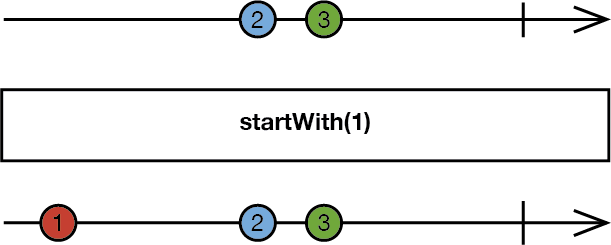
|
||||
*/
|
||||
example("startWith") {
|
||||
let disposeBag = DisposeBag()
|
||||
|
||||
Observable.of("🐶", "🐱", "🐭", "🐹")
|
||||
.startWith("1️⃣")
|
||||
.startWith("2️⃣")
|
||||
.startWith("3️⃣", "🅰️", "🅱️")
|
||||
.subscribe(onNext: { print($0) })
|
||||
.addDisposableTo(disposeBag)
|
||||
}
|
||||
/*:
|
||||
> As this example demonstrates, `startWith` can be chained on a last-in-first-out basis, i.e., each successive `startWith`'s elements will be prepended before the prior `startWith`'s elements.
|
||||
----
|
||||
## `merge`
|
||||
Combines elements from source `Observable` sequences into a single new `Observable` sequence, and will emit each element as it is emitted by each source `Observable` sequence. [More info](http://reactivex.io/documentation/operators/merge.html)
|
||||
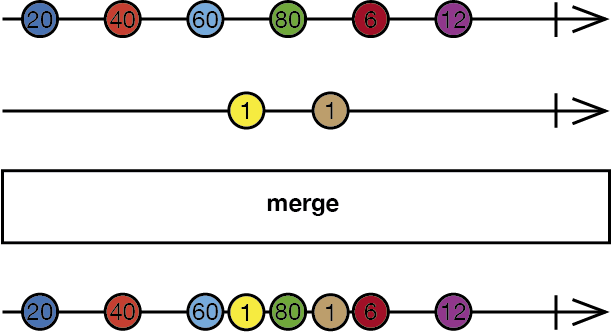
|
||||
*/
|
||||
example("merge") {
|
||||
let disposeBag = DisposeBag()
|
||||
|
||||
let subject1 = PublishSubject<String>()
|
||||
let subject2 = PublishSubject<String>()
|
||||
|
||||
Observable.of(subject1, subject2)
|
||||
.merge()
|
||||
.subscribe(onNext: { print($0) })
|
||||
.addDisposableTo(disposeBag)
|
||||
|
||||
subject1.onNext("🅰️")
|
||||
|
||||
subject1.onNext("🅱️")
|
||||
|
||||
subject2.onNext("①")
|
||||
|
||||
subject2.onNext("②")
|
||||
|
||||
subject1.onNext("🆎")
|
||||
|
||||
subject2.onNext("③")
|
||||
}
|
||||
/*:
|
||||
----
|
||||
## `zip`
|
||||
Combines up to 8 source `Observable` sequences into a single new `Observable` sequence, and will emit from the combined `Observable` sequence the elements from each of the source `Observable` sequences at the corresponding index. [More info](http://reactivex.io/documentation/operators/zip.html)
|
||||
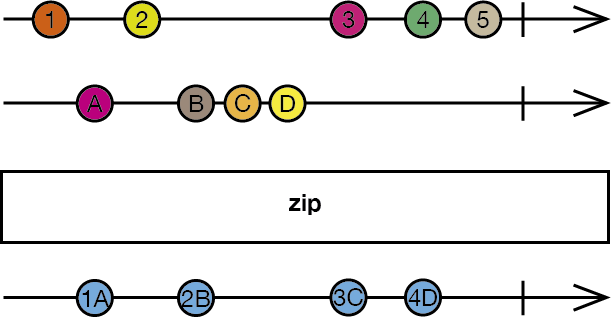
|
||||
*/
|
||||
example("zip") {
|
||||
let disposeBag = DisposeBag()
|
||||
|
||||
let stringSubject = PublishSubject<String>()
|
||||
let intSubject = PublishSubject<Int>()
|
||||
|
||||
Observable.zip(stringSubject, intSubject) { stringElement, intElement in
|
||||
"\(stringElement) \(intElement)"
|
||||
}
|
||||
.subscribe(onNext: { print($0) })
|
||||
.addDisposableTo(disposeBag)
|
||||
|
||||
stringSubject.onNext("🅰️")
|
||||
stringSubject.onNext("🅱️")
|
||||
|
||||
intSubject.onNext(1)
|
||||
|
||||
intSubject.onNext(2)
|
||||
|
||||
stringSubject.onNext("🆎")
|
||||
intSubject.onNext(3)
|
||||
}
|
||||
/*:
|
||||
----
|
||||
## `combineLatest`
|
||||
Combines up to 8 source `Observable` sequences into a single new `Observable` sequence, and will begin emitting from the combined `Observable` sequence the latest elements of each source `Observable` sequence once all source sequences have emitted at least one element, and also when any of the source `Observable` sequences emits a new element. [More info](http://reactivex.io/documentation/operators/combinelatest.html)
|
||||
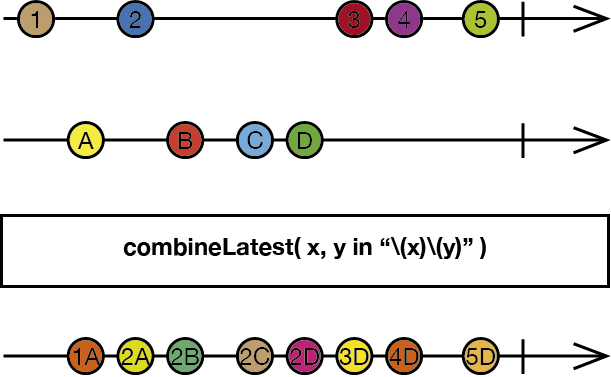
|
||||
*/
|
||||
example("combineLatest") {
|
||||
let disposeBag = DisposeBag()
|
||||
|
||||
let stringSubject = PublishSubject<String>()
|
||||
let intSubject = PublishSubject<Int>()
|
||||
|
||||
Observable.combineLatest(stringSubject, intSubject) { stringElement, intElement in
|
||||
"\(stringElement) \(intElement)"
|
||||
}
|
||||
.subscribe(onNext: { print($0) })
|
||||
.addDisposableTo(disposeBag)
|
||||
|
||||
stringSubject.onNext("🅰️")
|
||||
|
||||
stringSubject.onNext("🅱️")
|
||||
intSubject.onNext(1)
|
||||
|
||||
intSubject.onNext(2)
|
||||
|
||||
stringSubject.onNext("🆎")
|
||||
}
|
||||
//: There is also a `combineLatest` extension on `Array`:
|
||||
example("Array.combineLatest") {
|
||||
let disposeBag = DisposeBag()
|
||||
|
||||
let stringObservable = Observable.just("❤️")
|
||||
let fruitObservable = Observable.from(["🍎", "🍐", "🍊"])
|
||||
let animalObservable = Observable.of("🐶", "🐱", "🐭", "🐹")
|
||||
|
||||
[stringObservable, fruitObservable, animalObservable].combineLatest {
|
||||
"\($0[0]) \($0[1]) \($0[2])"
|
||||
}
|
||||
.subscribe(onNext: { print($0) })
|
||||
.addDisposableTo(disposeBag)
|
||||
}
|
||||
/*:
|
||||
> The `combineLatest` extension on `Array` requires that all source `Observable` sequences are of the same type.
|
||||
----
|
||||
## `switchLatest`
|
||||
Transforms the elements emitted by an `Observable` sequence into `Observable` sequences, and emits elements from the most recent inner `Observable` sequence. [More info](http://reactivex.io/documentation/operators/switch.html)
|
||||
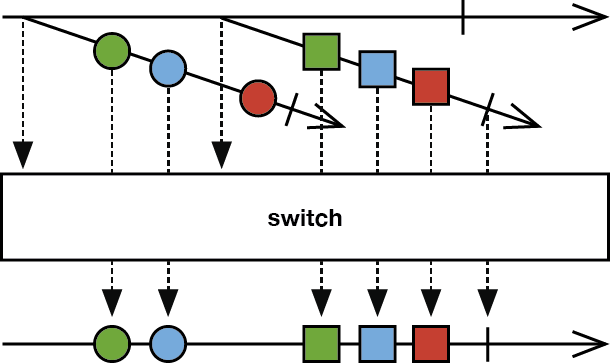
|
||||
*/
|
||||
example("switchLatest") {
|
||||
let disposeBag = DisposeBag()
|
||||
|
||||
let subject1 = BehaviorSubject(value: "⚽️")
|
||||
let subject2 = BehaviorSubject(value: "🍎")
|
||||
|
||||
let variable = Variable(subject1)
|
||||
|
||||
variable.asObservable()
|
||||
.switchLatest()
|
||||
.subscribe(onNext: { print($0) })
|
||||
.addDisposableTo(disposeBag)
|
||||
|
||||
subject1.onNext("🏈")
|
||||
subject1.onNext("🏀")
|
||||
|
||||
variable.value = subject2
|
||||
|
||||
subject1.onNext("⚾️")
|
||||
|
||||
subject2.onNext("🍐")
|
||||
}
|
||||
/*:
|
||||
> In this example, adding ⚾️ onto `subject1` after setting `variable.value` to `subject2` has no effect, because only the most recent inner `Observable` sequence (`subject2`) will emit elements.
|
||||
*/
|
||||
|
||||
//: [Next](@next) - [Table of Contents](Table_of_Contents)
|
||||
|
|
@ -1,133 +0,0 @@
|
|||
/*:
|
||||
> # IMPORTANT: To use **Rx.playground**:
|
||||
1. Open **Rx.xcworkspace**.
|
||||
1. Build the **RxSwift-OSX** scheme (**Product** → **Build**).
|
||||
1. Open **Rx** playground in the **Project navigator**.
|
||||
1. Show the Debug Area (**View** → **Debug Area** → **Show Debug Area**).
|
||||
----
|
||||
[Previous](@previous) - [Table of Contents](Table_of_Contents)
|
||||
*/
|
||||
import RxSwift
|
||||
|
||||
playgroundShouldContinueIndefinitely()
|
||||
/*:
|
||||
## Connectable Operators
|
||||
Connectable `Observable` sequences resembles ordinary `Observable` sequences, except that they not begin emitting elements when subscribed to, but instead, only when their `connect()` method is called. In this way, you can wait for all intended subscribers to subscribe to a connectable `Observable` sequence before it begins emitting elements.
|
||||
> Within each example on this page is a commented-out method. Uncomment that method to run the example, and then comment it out again to stop running the example.
|
||||
#
|
||||
Before learning about connectable operators, let's take a look at an example of a non-connectable operator:
|
||||
*/
|
||||
func sampleWithoutConnectableOperators() {
|
||||
printExampleHeader(#function)
|
||||
|
||||
let interval = Observable<Int>.interval(1, scheduler: MainScheduler.instance)
|
||||
|
||||
_ = interval
|
||||
.subscribe(onNext: { print("Subscription: 1, Event: \($0)") })
|
||||
|
||||
delay(5) {
|
||||
_ = interval
|
||||
.subscribe(onNext: { print("Subscription: 2, Event: \($0)") })
|
||||
}
|
||||
}
|
||||
|
||||
//sampleWithoutConnectableOperators() // ⚠️ Uncomment to run this example; comment to stop running
|
||||
/*:
|
||||
> `interval` creates an `Observable` sequence that emits elements after each `period`, on the specified scheduler. [More info](http://reactivex.io/documentation/operators/interval.html)
|
||||
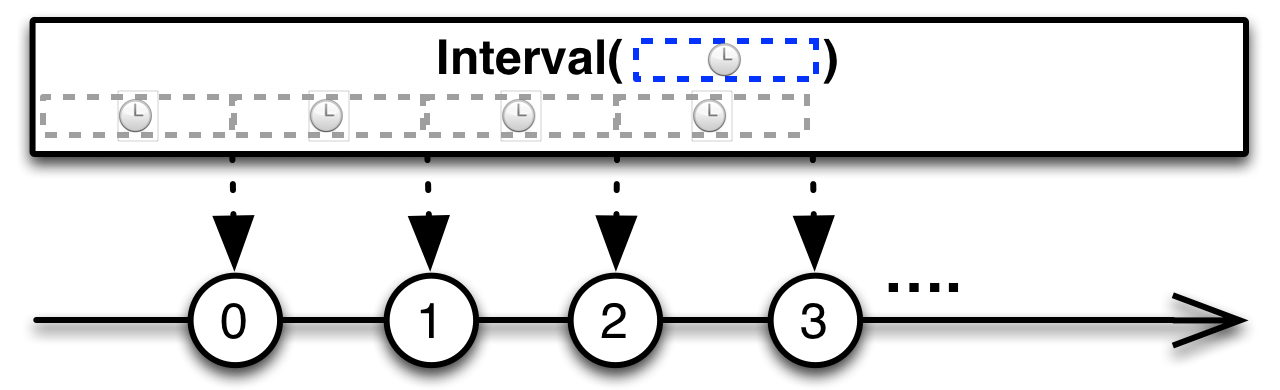
|
||||
----
|
||||
## `publish`
|
||||
Converts the source `Observable` sequence into a connectable sequence. [More info](http://reactivex.io/documentation/operators/publish.html)
|
||||
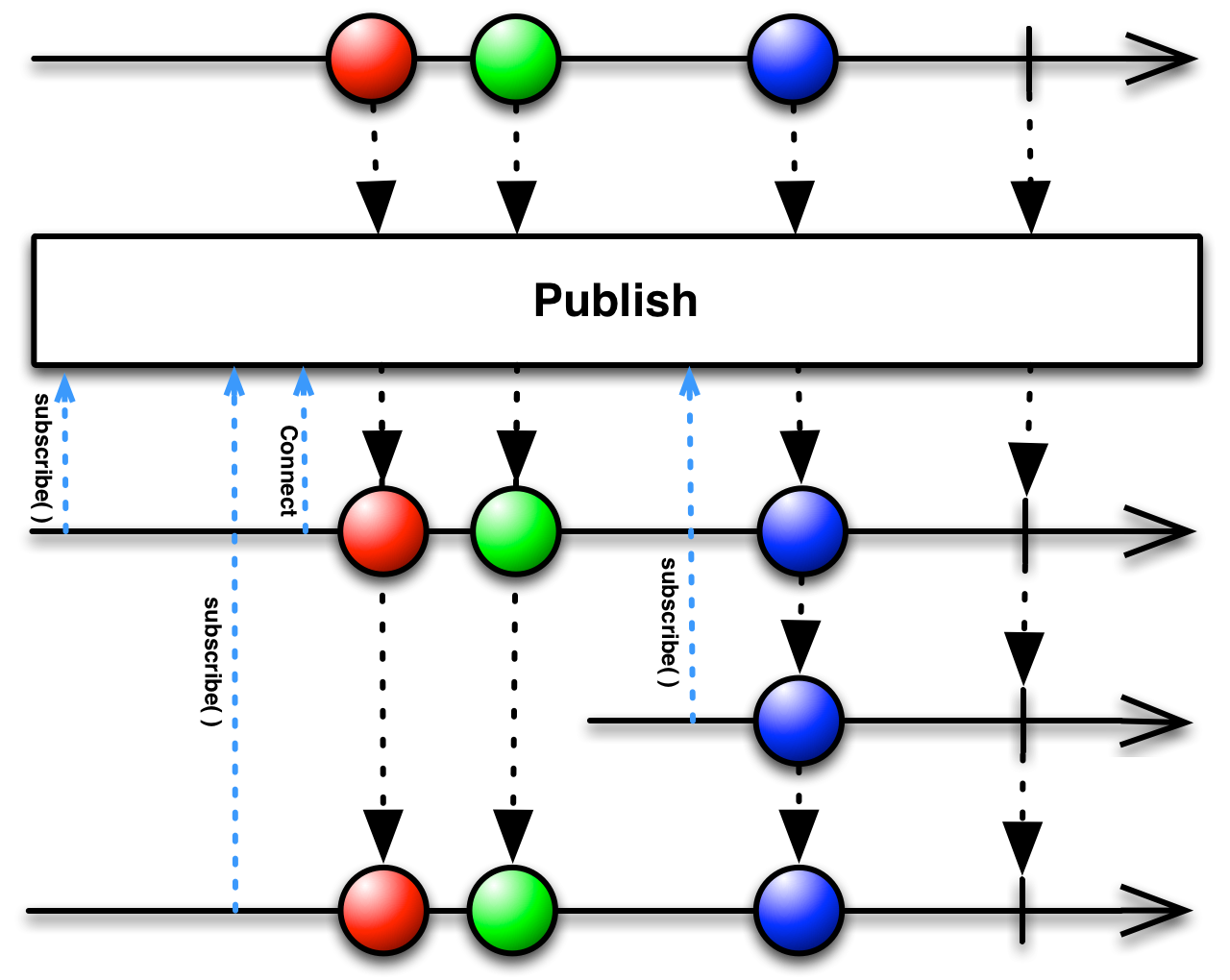
|
||||
*/
|
||||
func sampleWithPublish() {
|
||||
printExampleHeader(#function)
|
||||
|
||||
let intSequence = Observable<Int>.interval(1, scheduler: MainScheduler.instance)
|
||||
.publish()
|
||||
|
||||
_ = intSequence
|
||||
.subscribe(onNext: { print("Subscription 1:, Event: \($0)") })
|
||||
|
||||
delay(2) { _ = intSequence.connect() }
|
||||
|
||||
delay(4) {
|
||||
_ = intSequence
|
||||
.subscribe(onNext: { print("Subscription 2:, Event: \($0)") })
|
||||
}
|
||||
|
||||
delay(6) {
|
||||
_ = intSequence
|
||||
.subscribe(onNext: { print("Subscription 3:, Event: \($0)") })
|
||||
}
|
||||
}
|
||||
|
||||
//sampleWithPublish() // ⚠️ Uncomment to run this example; comment to stop running
|
||||
|
||||
//: > Schedulers are an abstraction of mechanisms for performing work, such as on specific threads or dispatch queues. [More info](https://github.com/ReactiveX/RxSwift/blob/master/Documentation/Schedulers.md)
|
||||
|
||||
/*:
|
||||
----
|
||||
## `replay`
|
||||
Converts the source `Observable` sequence into a connectable sequence, and will replay `bufferSize` number of previous emissions to each new subscriber. [More info](http://reactivex.io/documentation/operators/replay.html)
|
||||
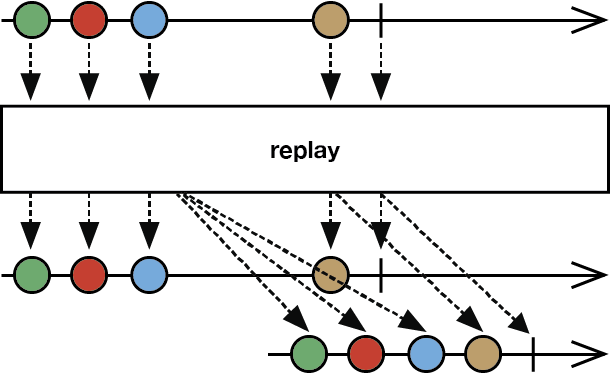
|
||||
*/
|
||||
func sampleWithReplayBuffer() {
|
||||
printExampleHeader(#function)
|
||||
|
||||
let intSequence = Observable<Int>.interval(1, scheduler: MainScheduler.instance)
|
||||
.replay(5)
|
||||
|
||||
_ = intSequence
|
||||
.subscribe(onNext: { print("Subscription 1:, Event: \($0)") })
|
||||
|
||||
delay(2) { _ = intSequence.connect() }
|
||||
|
||||
delay(4) {
|
||||
_ = intSequence
|
||||
.subscribe(onNext: { print("Subscription 2:, Event: \($0)") })
|
||||
}
|
||||
|
||||
delay(8) {
|
||||
_ = intSequence
|
||||
.subscribe(onNext: { print("Subscription 3:, Event: \($0)") })
|
||||
}
|
||||
}
|
||||
|
||||
// sampleWithReplayBuffer() // ⚠️ Uncomment to run this example; comment to stop running
|
||||
|
||||
/*:
|
||||
----
|
||||
## `multicast`
|
||||
Converts the source `Observable` sequence into a connectable sequence, and broadcasts its emissions via the specified `subject`.
|
||||
*/
|
||||
func sampleWithMulticast() {
|
||||
printExampleHeader(#function)
|
||||
|
||||
let subject = PublishSubject<Int>()
|
||||
|
||||
_ = subject
|
||||
.subscribe(onNext: { print("Subject: \($0)") })
|
||||
|
||||
let intSequence = Observable<Int>.interval(1, scheduler: MainScheduler.instance)
|
||||
.multicast(subject)
|
||||
|
||||
_ = intSequence
|
||||
.subscribe(onNext: { print("\tSubscription 1:, Event: \($0)") })
|
||||
|
||||
delay(2) { _ = intSequence.connect() }
|
||||
|
||||
delay(4) {
|
||||
_ = intSequence
|
||||
.subscribe(onNext: { print("\tSubscription 2:, Event: \($0)") })
|
||||
}
|
||||
|
||||
delay(6) {
|
||||
_ = intSequence
|
||||
.subscribe(onNext: { print("\tSubscription 3:, Event: \($0)") })
|
||||
}
|
||||
}
|
||||
|
||||
//sampleWithMulticast() // ⚠️ Uncomment to run this example; comment to stop running
|
||||
|
||||
//: [Next](@next) - [Table of Contents](Table_of_Contents)
|
||||
|
|
@ -1,212 +0,0 @@
|
|||
/*:
|
||||
> # IMPORTANT: To use **Rx.playground**:
|
||||
1. Open **Rx.xcworkspace**.
|
||||
1. Build the **RxSwift-OSX** scheme (**Product** → **Build**).
|
||||
1. Open **Rx** playground in the **Project navigator**.
|
||||
1. Show the Debug Area (**View** → **Debug Area** → **Show Debug Area**).
|
||||
----
|
||||
[Previous](@previous) - [Table of Contents](Table_of_Contents)
|
||||
*/
|
||||
import RxSwift
|
||||
/*:
|
||||
# Creating and Subscribing to `Observable`s
|
||||
There are several ways to create and subscribe to `Observable` sequences.
|
||||
## never
|
||||
Creates a sequence that never terminates and never emits any events. [More info](http://reactivex.io/documentation/operators/empty-never-throw.html)
|
||||
*/
|
||||
example("never") {
|
||||
let disposeBag = DisposeBag()
|
||||
let neverSequence = Observable<String>.never()
|
||||
|
||||
let neverSequenceSubscription = neverSequence
|
||||
.subscribe { _ in
|
||||
print("This will never be printed")
|
||||
}
|
||||
|
||||
neverSequenceSubscription.addDisposableTo(disposeBag)
|
||||
}
|
||||
/*:
|
||||
----
|
||||
## empty
|
||||
Creates an empty `Observable` sequence that only emits a Completed event. [More info](http://reactivex.io/documentation/operators/empty-never-throw.html)
|
||||
*/
|
||||
example("empty") {
|
||||
let disposeBag = DisposeBag()
|
||||
|
||||
Observable<Int>.empty()
|
||||
.subscribe { event in
|
||||
print(event)
|
||||
}
|
||||
.addDisposableTo(disposeBag)
|
||||
}
|
||||
/*:
|
||||
> This example also introduces chaining together creating and subscribing to an `Observable` sequence.
|
||||
----
|
||||
## just
|
||||
Creates an `Observable` sequence with a single element. [More info](http://reactivex.io/documentation/operators/just.html)
|
||||
*/
|
||||
example("just") {
|
||||
let disposeBag = DisposeBag()
|
||||
|
||||
Observable.just("🔴")
|
||||
.subscribe { event in
|
||||
print(event)
|
||||
}
|
||||
.addDisposableTo(disposeBag)
|
||||
}
|
||||
/*:
|
||||
----
|
||||
## of
|
||||
Creates an `Observable` sequence with a fixed number of elements.
|
||||
*/
|
||||
example("of") {
|
||||
let disposeBag = DisposeBag()
|
||||
|
||||
Observable.of("🐶", "🐱", "🐭", "🐹")
|
||||
.subscribe(onNext: { element in
|
||||
print(element)
|
||||
})
|
||||
.addDisposableTo(disposeBag)
|
||||
}
|
||||
/*:
|
||||
> This example also introduces using the `subscribe(onNext:)` convenience method. Unlike `subscribe(_:)`, which subscribes an _event_ handler for all event types (Next, Error, and Completed), `subscribe(onNext:)` subscribes an _element_ handler that will ignore Error and Completed events and only produce Next event elements. There are also `subscribe(onError:)` and `subscribe(onCompleted:)` convenience methods, should you only want to subscribe to those event types. And there is a `subscribe(onNext:onError:onCompleted:onDisposed:)` method, which allows you to react to one or more event types and when the subscription is terminated for any reason, or disposed, in a single call:
|
||||
```
|
||||
someObservable.subscribe(
|
||||
onNext: { print("Element:", $0) },
|
||||
onError: { print("Error:", $0) },
|
||||
onCompleted: { print("Completed") },
|
||||
onDisposed: { print("Disposed") }
|
||||
)
|
||||
```
|
||||
----
|
||||
## from
|
||||
Creates an `Observable` sequence from a `SequenceType`, such as an `Array`, `Dictionary`, or `Set`.
|
||||
*/
|
||||
example("from") {
|
||||
let disposeBag = DisposeBag()
|
||||
|
||||
Observable.from(["🐶", "🐱", "🐭", "🐹"])
|
||||
.subscribe(onNext: { print($0) })
|
||||
.addDisposableTo(disposeBag)
|
||||
}
|
||||
/*:
|
||||
> This example also demonstrates using the default argument name `$0` instead of explicitly naming the argument.
|
||||
----
|
||||
## create
|
||||
Creates a custom `Observable` sequence. [More info](http://reactivex.io/documentation/operators/create.html)
|
||||
*/
|
||||
example("create") {
|
||||
let disposeBag = DisposeBag()
|
||||
|
||||
let myJust = { (element: String) -> Observable<String> in
|
||||
return Observable.create { observer in
|
||||
observer.on(.next(element))
|
||||
observer.on(.completed)
|
||||
return Disposables.create()
|
||||
}
|
||||
}
|
||||
|
||||
myJust("🔴")
|
||||
.subscribe { print($0) }
|
||||
.addDisposableTo(disposeBag)
|
||||
}
|
||||
/*:
|
||||
----
|
||||
## range
|
||||
Creates an `Observable` sequence that emits a range of sequential integers and then terminates. [More info](http://reactivex.io/documentation/operators/range.html)
|
||||
*/
|
||||
example("range") {
|
||||
let disposeBag = DisposeBag()
|
||||
|
||||
Observable.range(start: 1, count: 10)
|
||||
.subscribe { print($0) }
|
||||
.addDisposableTo(disposeBag)
|
||||
}
|
||||
/*:
|
||||
----
|
||||
## repeatElement
|
||||
Creates an `Observable` sequence that emits the given element indefinitely. [More info](http://reactivex.io/documentation/operators/repeat.html)
|
||||
*/
|
||||
example("repeatElement") {
|
||||
let disposeBag = DisposeBag()
|
||||
|
||||
Observable.repeatElement("🔴")
|
||||
.take(3)
|
||||
.subscribe(onNext: { print($0) })
|
||||
.addDisposableTo(disposeBag)
|
||||
}
|
||||
/*:
|
||||
> This example also introduces using the `take` operator to return a specified number of elements from the start of a sequence.
|
||||
----
|
||||
## generate
|
||||
Creates an `Observable` sequence that generates values for as long as the provided condition evaluates to `true`.
|
||||
*/
|
||||
example("generate") {
|
||||
let disposeBag = DisposeBag()
|
||||
|
||||
Observable.generate(
|
||||
initialState: 0,
|
||||
condition: { $0 < 3 },
|
||||
iterate: { $0 + 1 }
|
||||
)
|
||||
.subscribe(onNext: { print($0) })
|
||||
.addDisposableTo(disposeBag)
|
||||
}
|
||||
/*:
|
||||
----
|
||||
## deferred
|
||||
Creates a new `Observable` sequence for each subscriber. [More info](http://reactivex.io/documentation/operators/defer.html)
|
||||
*/
|
||||
example("deferred") {
|
||||
let disposeBag = DisposeBag()
|
||||
var count = 1
|
||||
|
||||
let deferredSequence = Observable<String>.deferred {
|
||||
print("Creating \(count)")
|
||||
count += 1
|
||||
|
||||
return Observable.create { observer in
|
||||
print("Emitting...")
|
||||
observer.onNext("🐶")
|
||||
observer.onNext("🐱")
|
||||
observer.onNext("🐵")
|
||||
return Disposables.create()
|
||||
}
|
||||
}
|
||||
|
||||
deferredSequence
|
||||
.subscribe(onNext: { print($0) })
|
||||
.addDisposableTo(disposeBag)
|
||||
|
||||
deferredSequence
|
||||
.subscribe(onNext: { print($0) })
|
||||
.addDisposableTo(disposeBag)
|
||||
}
|
||||
/*:
|
||||
----
|
||||
## error
|
||||
Creates an `Observable` sequence that emits no items and immediately terminates with an error.
|
||||
*/
|
||||
example("error") {
|
||||
let disposeBag = DisposeBag()
|
||||
|
||||
Observable<Int>.error(TestError.test)
|
||||
.subscribe { print($0) }
|
||||
.addDisposableTo(disposeBag)
|
||||
}
|
||||
/*:
|
||||
----
|
||||
## doOn
|
||||
Invokes a side-effect action for each emitted event and returns (passes through) the original event. [More info](http://reactivex.io/documentation/operators/do.html)
|
||||
*/
|
||||
example("doOn") {
|
||||
let disposeBag = DisposeBag()
|
||||
|
||||
Observable.of("🍎", "🍐", "🍊", "🍋")
|
||||
.do(onNext: { print("Intercepted:", $0) }, onError: { print("Intercepted error:", $0) }, onCompleted: { print("Completed") })
|
||||
.subscribe(onNext: { print($0) })
|
||||
.addDisposableTo(disposeBag)
|
||||
}
|
||||
//: > There are also `doOnNext(_:)`, `doOnError(_:)`, and `doOnCompleted(_:)` convenience methods to intercept those specific events, and `doOn(onNext:onError:onCompleted:)` to intercept one or more events in a single call.
|
||||
|
||||
//: [Next](@next) - [Table of Contents](Table_of_Contents)
|
||||
|
|
@ -1,83 +0,0 @@
|
|||
/*:
|
||||
> # IMPORTANT: To use **Rx.playground**:
|
||||
1. Open **Rx.xcworkspace**.
|
||||
1. Build the **RxSwift-OSX** scheme (**Product** → **Build**).
|
||||
1. Open **Rx** playground in the **Project navigator**.
|
||||
1. Show the Debug Area (**View** → **Debug Area** → **Show Debug Area**).
|
||||
----
|
||||
[Previous](@previous) - [Table of Contents](Table_of_Contents)
|
||||
*/
|
||||
import RxSwift
|
||||
/*:
|
||||
# Debugging Operators
|
||||
Operators to help debug Rx code.
|
||||
## `debug`
|
||||
Prints out all subscriptions, events, and disposals.
|
||||
*/
|
||||
example("debug") {
|
||||
let disposeBag = DisposeBag()
|
||||
var count = 1
|
||||
|
||||
let sequenceThatErrors = Observable<String>.create { observer in
|
||||
observer.onNext("🍎")
|
||||
observer.onNext("🍐")
|
||||
observer.onNext("🍊")
|
||||
|
||||
if count < 5 {
|
||||
observer.onError(TestError.test)
|
||||
print("Error encountered")
|
||||
count += 1
|
||||
}
|
||||
|
||||
observer.onNext("🐶")
|
||||
observer.onNext("🐱")
|
||||
observer.onNext("🐭")
|
||||
observer.onCompleted()
|
||||
|
||||
return Disposables.create()
|
||||
}
|
||||
|
||||
sequenceThatErrors
|
||||
.retry(3)
|
||||
.debug()
|
||||
.subscribe(onNext: { print($0) })
|
||||
.addDisposableTo(disposeBag)
|
||||
}
|
||||
/*:
|
||||
----
|
||||
## `RxSwift.resourceCount`
|
||||
Provides a count of all Rx resource allocations, which is useful for detecting leaks during development.
|
||||
*/
|
||||
#if NOT_IN_PLAYGROUND
|
||||
#else
|
||||
example("RxSwift.resourceCount") {
|
||||
print(RxSwift.resourceCount)
|
||||
|
||||
let disposeBag = DisposeBag()
|
||||
|
||||
print(RxSwift.resourceCount)
|
||||
|
||||
let variable = Variable("🍎")
|
||||
|
||||
let subscription1 = variable.asObservable().subscribe(onNext: { print($0) })
|
||||
|
||||
print(RxSwift.resourceCount)
|
||||
|
||||
let subscription2 = variable.asObservable().subscribe(onNext: { print($0) })
|
||||
|
||||
print(RxSwift.resourceCount)
|
||||
|
||||
subscription1.dispose()
|
||||
|
||||
print(RxSwift.resourceCount)
|
||||
|
||||
subscription2.dispose()
|
||||
|
||||
print(RxSwift.resourceCount)
|
||||
}
|
||||
|
||||
print(RxSwift.resourceCount)
|
||||
#endif
|
||||
//: > `RxSwift.resourceCount` is not enabled by default, and should generally not be enabled in Release builds. [Click here](Enable_RxSwift.resourceCount) for instructions on how to enable it.
|
||||
|
||||
//: [Next](@next) - [Table of Contents](Table_of_Contents)
|
||||
|
|
@ -1,30 +0,0 @@
|
|||
//: [Back](@previous)
|
||||
/*:
|
||||
Follow these instructions to enable `RxSwift.resourceCount` in your project:
|
||||
#
|
||||
**CocoaPods**
|
||||
1. Add a `post_install` hook to your Podfile, e.g.:
|
||||
```
|
||||
target 'AppTarget' do
|
||||
pod 'RxSwift'
|
||||
end
|
||||
|
||||
post_install do |installer|
|
||||
installer.pods_project.targets.each do |target|
|
||||
if target.name == 'RxSwift'
|
||||
target.build_configurations.each do |config|
|
||||
if config.name == 'Debug'
|
||||
config.build_settings['OTHER_SWIFT_FLAGS'] ||= ['-D', 'TRACE_RESOURCES']
|
||||
end
|
||||
end
|
||||
end
|
||||
end
|
||||
end
|
||||
```
|
||||
2. Run `pod update`.
|
||||
3. Build project (**Product** → **Build**).
|
||||
#
|
||||
**Carthage**
|
||||
1. Run `carthage build --configuration Debug`.
|
||||
2. Build project (**Product** → **Build**).
|
||||
*/
|
||||
|
|
@ -1,131 +0,0 @@
|
|||
/*:
|
||||
> # IMPORTANT: To use **Rx.playground**:
|
||||
1. Open **Rx.xcworkspace**.
|
||||
1. Build the **RxSwift-OSX** scheme (**Product** → **Build**).
|
||||
1. Open **Rx** playground in the **Project navigator**.
|
||||
1. Show the Debug Area (**View** → **Debug Area** → **Show Debug Area**).
|
||||
----
|
||||
[Previous](@previous) - [Table of Contents](Table_of_Contents)
|
||||
*/
|
||||
import RxSwift
|
||||
/*:
|
||||
# Error Handling Operators
|
||||
Operators that help to recover from error notifications from an Observable.
|
||||
## `catchErrorJustReturn`
|
||||
Recovers from an Error event by returning an `Observable` sequence that emits a single element and then terminates. [More info](http://reactivex.io/documentation/operators/catch.html)
|
||||
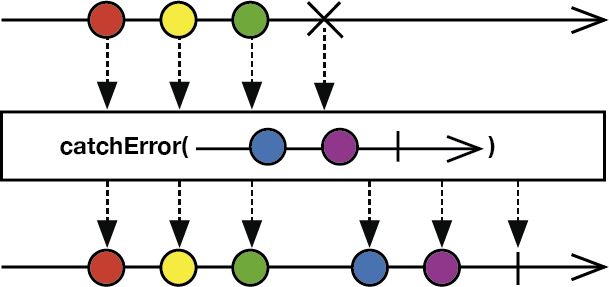
|
||||
*/
|
||||
example("catchErrorJustReturn") {
|
||||
let disposeBag = DisposeBag()
|
||||
|
||||
let sequenceThatFails = PublishSubject<String>()
|
||||
|
||||
sequenceThatFails
|
||||
.catchErrorJustReturn("😊")
|
||||
.subscribe { print($0) }
|
||||
.addDisposableTo(disposeBag)
|
||||
|
||||
sequenceThatFails.onNext("😬")
|
||||
sequenceThatFails.onNext("😨")
|
||||
sequenceThatFails.onNext("😡")
|
||||
sequenceThatFails.onNext("🔴")
|
||||
sequenceThatFails.onError(TestError.test)
|
||||
}
|
||||
/*:
|
||||
----
|
||||
## `catchError`
|
||||
Recovers from an Error event by switching to the provided recovery `Observable` sequence. [More info](http://reactivex.io/documentation/operators/catch.html)
|
||||

|
||||
*/
|
||||
example("catchError") {
|
||||
let disposeBag = DisposeBag()
|
||||
|
||||
let sequenceThatFails = PublishSubject<String>()
|
||||
let recoverySequence = PublishSubject<String>()
|
||||
|
||||
sequenceThatFails
|
||||
.catchError {
|
||||
print("Error:", $0)
|
||||
return recoverySequence
|
||||
}
|
||||
.subscribe { print($0) }
|
||||
.addDisposableTo(disposeBag)
|
||||
|
||||
sequenceThatFails.onNext("😬")
|
||||
sequenceThatFails.onNext("😨")
|
||||
sequenceThatFails.onNext("😡")
|
||||
sequenceThatFails.onNext("🔴")
|
||||
sequenceThatFails.onError(TestError.test)
|
||||
|
||||
recoverySequence.onNext("😊")
|
||||
}
|
||||
/*:
|
||||
----
|
||||
## `retry`
|
||||
Recovers repeatedly Error events by resubscribing to the `Observable` sequence, indefinitely. [More info](http://reactivex.io/documentation/operators/retry.html)
|
||||
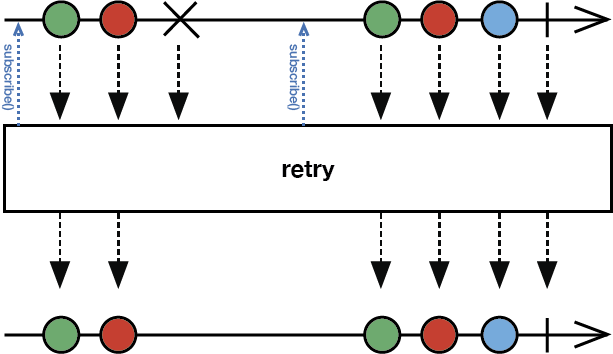
|
||||
*/
|
||||
example("retry") {
|
||||
let disposeBag = DisposeBag()
|
||||
var count = 1
|
||||
|
||||
let sequenceThatErrors = Observable<String>.create { observer in
|
||||
observer.onNext("🍎")
|
||||
observer.onNext("🍐")
|
||||
observer.onNext("🍊")
|
||||
|
||||
if count == 1 {
|
||||
observer.onError(TestError.test)
|
||||
print("Error encountered")
|
||||
count += 1
|
||||
}
|
||||
|
||||
observer.onNext("🐶")
|
||||
observer.onNext("🐱")
|
||||
observer.onNext("🐭")
|
||||
observer.onCompleted()
|
||||
|
||||
return Disposables.create()
|
||||
}
|
||||
|
||||
sequenceThatErrors
|
||||
.retry()
|
||||
.subscribe(onNext: { print($0) })
|
||||
.addDisposableTo(disposeBag)
|
||||
}
|
||||
/*:
|
||||
----
|
||||
## `retry(_:)`
|
||||
Recovers repeatedly from Error events by resubscribing to the `Observable` sequence, up to `maxAttemptCount` number of retries. [More info](http://reactivex.io/documentation/operators/retry.html)
|
||||

|
||||
*/
|
||||
example("retry maxAttemptCount") {
|
||||
let disposeBag = DisposeBag()
|
||||
var count = 1
|
||||
|
||||
let sequenceThatErrors = Observable<String>.create { observer in
|
||||
observer.onNext("🍎")
|
||||
observer.onNext("🍐")
|
||||
observer.onNext("🍊")
|
||||
|
||||
if count < 5 {
|
||||
observer.onError(TestError.test)
|
||||
print("Error encountered")
|
||||
count += 1
|
||||
}
|
||||
|
||||
observer.onNext("🐶")
|
||||
observer.onNext("🐱")
|
||||
observer.onNext("🐭")
|
||||
observer.onCompleted()
|
||||
|
||||
return Disposables.create()
|
||||
}
|
||||
|
||||
sequenceThatErrors
|
||||
.retry(3)
|
||||
.subscribe(onNext: { print($0) })
|
||||
.addDisposableTo(disposeBag)
|
||||
}
|
||||
|
||||
//: [Next](@next) - [Table of Contents](Table_of_Contents)
|
||||
|
|
@ -1,231 +0,0 @@
|
|||
/*:
|
||||
> # IMPORTANT: To use **Rx.playground**:
|
||||
1. Open **Rx.xcworkspace**.
|
||||
1. Build the **RxSwift-OSX** scheme (**Product** → **Build**).
|
||||
1. Open **Rx** playground in the **Project navigator**.
|
||||
1. Show the Debug Area (**View** → **Debug Area** → **Show Debug Area**).
|
||||
----
|
||||
[Previous](@previous) - [Table of Contents](Table_of_Contents)
|
||||
*/
|
||||
import RxSwift
|
||||
/*:
|
||||
# Filtering and Conditional Operators
|
||||
Operators that selectively emit elements from a source `Observable` sequence.
|
||||
## `filter`
|
||||
Emits only those elements from an `Observable` sequence that meet the specified condition. [More info](http://reactivex.io/documentation/operators/filter.html)
|
||||
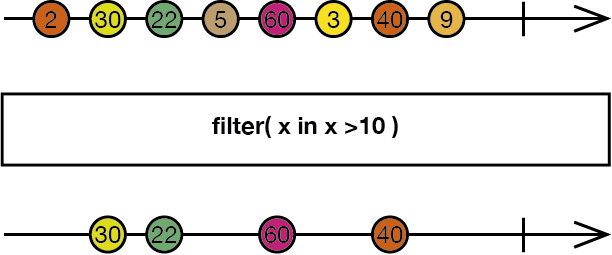
|
||||
*/
|
||||
example("filter") {
|
||||
let disposeBag = DisposeBag()
|
||||
|
||||
Observable.of(
|
||||
"🐱", "🐰", "🐶",
|
||||
"🐸", "🐱", "🐰",
|
||||
"🐹", "🐸", "🐱")
|
||||
.filter {
|
||||
$0 == "🐱"
|
||||
}
|
||||
.subscribe(onNext: { print($0) })
|
||||
.addDisposableTo(disposeBag)
|
||||
}
|
||||
/*:
|
||||
----
|
||||
## `distinctUntilChanged`
|
||||
Suppresses sequential duplicate elements emitted by an `Observable` sequence. [More info](http://reactivex.io/documentation/operators/distinct.html)
|
||||
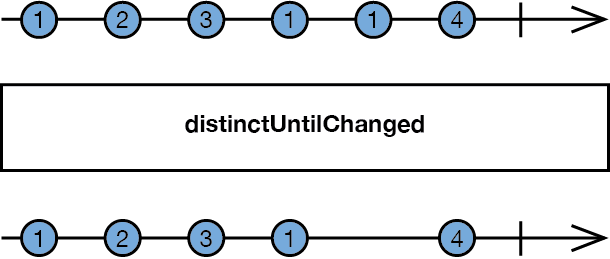
|
||||
*/
|
||||
example("distinctUntilChanged") {
|
||||
let disposeBag = DisposeBag()
|
||||
|
||||
Observable.of("🐱", "🐷", "🐱", "🐱", "🐱", "🐵", "🐱")
|
||||
.distinctUntilChanged()
|
||||
.subscribe(onNext: { print($0) })
|
||||
.addDisposableTo(disposeBag)
|
||||
}
|
||||
/*:
|
||||
----
|
||||
## `elementAt`
|
||||
Emits only the element at the specified index of all elements emitted by an `Observable` sequence. [More info](http://reactivex.io/documentation/operators/elementat.html)
|
||||
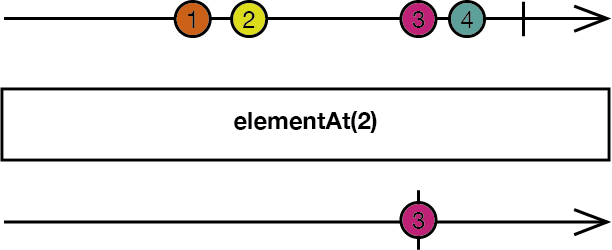
|
||||
*/
|
||||
example("elementAt") {
|
||||
let disposeBag = DisposeBag()
|
||||
|
||||
Observable.of("🐱", "🐰", "🐶", "🐸", "🐷", "🐵")
|
||||
.elementAt(3)
|
||||
.subscribe(onNext: { print($0) })
|
||||
.addDisposableTo(disposeBag)
|
||||
}
|
||||
/*:
|
||||
----
|
||||
## `single`
|
||||
Emits only the first element (or the first element that meets a condition) emitted by an `Observable` sequence. Will throw an error if the `Observable` sequence does not emit exactly one element.
|
||||
*/
|
||||
example("single") {
|
||||
let disposeBag = DisposeBag()
|
||||
|
||||
Observable.of("🐱", "🐰", "🐶", "🐸", "🐷", "🐵")
|
||||
.single()
|
||||
.subscribe(onNext: { print($0) })
|
||||
.addDisposableTo(disposeBag)
|
||||
}
|
||||
|
||||
example("single with conditions") {
|
||||
let disposeBag = DisposeBag()
|
||||
|
||||
Observable.of("🐱", "🐰", "🐶", "🐸", "🐷", "🐵")
|
||||
.single { $0 == "🐸" }
|
||||
.subscribe { print($0) }
|
||||
.addDisposableTo(disposeBag)
|
||||
|
||||
Observable.of("🐱", "🐰", "🐶", "🐱", "🐰", "🐶")
|
||||
.single { $0 == "🐰" }
|
||||
.subscribe { print($0) }
|
||||
.addDisposableTo(disposeBag)
|
||||
|
||||
Observable.of("🐱", "🐰", "🐶", "🐸", "🐷", "🐵")
|
||||
.single { $0 == "🔵" }
|
||||
.subscribe { print($0) }
|
||||
.addDisposableTo(disposeBag)
|
||||
}
|
||||
/*:
|
||||
----
|
||||
## `take`
|
||||
Emits only the specified number of elements from the beginning of an `Observable` sequence. [More info](http://reactivex.io/documentation/operators/take.html)
|
||||

|
||||
*/
|
||||
example("take") {
|
||||
let disposeBag = DisposeBag()
|
||||
|
||||
Observable.of("🐱", "🐰", "🐶", "🐸", "🐷", "🐵")
|
||||
.take(3)
|
||||
.subscribe(onNext: { print($0) })
|
||||
.addDisposableTo(disposeBag)
|
||||
}
|
||||
/*:
|
||||
----
|
||||
## `takeLast`
|
||||
Emits only the specified number of elements from the end of an `Observable` sequence. [More info](http://reactivex.io/documentation/operators/takelast.html)
|
||||
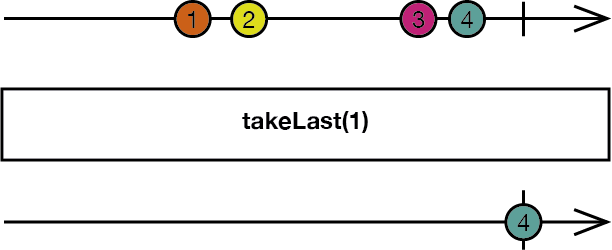
|
||||
*/
|
||||
example("takeLast") {
|
||||
let disposeBag = DisposeBag()
|
||||
|
||||
Observable.of("🐱", "🐰", "🐶", "🐸", "🐷", "🐵")
|
||||
.takeLast(3)
|
||||
.subscribe(onNext: { print($0) })
|
||||
.addDisposableTo(disposeBag)
|
||||
}
|
||||
/*:
|
||||
----
|
||||
## `takeWhile`
|
||||
Emits elements from the beginning of an `Observable` sequence as long as the specified condition evaluates to `true`. [More info](http://reactivex.io/documentation/operators/takewhile.html)
|
||||
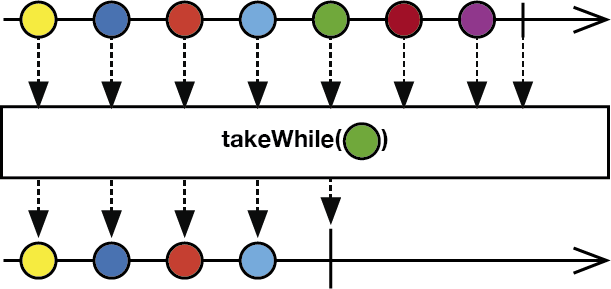
|
||||
*/
|
||||
example("takeWhile") {
|
||||
let disposeBag = DisposeBag()
|
||||
|
||||
Observable.of(1, 2, 3, 4, 5, 6)
|
||||
.takeWhile { $0 < 4 }
|
||||
.subscribe(onNext: { print($0) })
|
||||
.addDisposableTo(disposeBag)
|
||||
}
|
||||
/*:
|
||||
----
|
||||
## `takeUntil`
|
||||
Emits elements from a source `Observable` sequence until a reference `Observable` sequence emits an element. [More info](http://reactivex.io/documentation/operators/takeuntil.html)
|
||||
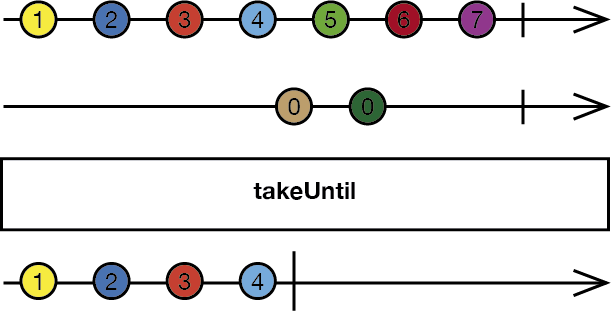
|
||||
*/
|
||||
example("takeUntil") {
|
||||
let disposeBag = DisposeBag()
|
||||
|
||||
let sourceSequence = PublishSubject<String>()
|
||||
let referenceSequence = PublishSubject<String>()
|
||||
|
||||
sourceSequence
|
||||
.takeUntil(referenceSequence)
|
||||
.subscribe { print($0) }
|
||||
.addDisposableTo(disposeBag)
|
||||
|
||||
sourceSequence.onNext("🐱")
|
||||
sourceSequence.onNext("🐰")
|
||||
sourceSequence.onNext("🐶")
|
||||
|
||||
referenceSequence.onNext("🔴")
|
||||
|
||||
sourceSequence.onNext("🐸")
|
||||
sourceSequence.onNext("🐷")
|
||||
sourceSequence.onNext("🐵")
|
||||
}
|
||||
/*:
|
||||
----
|
||||
## `skip`
|
||||
Suppresses emitting the specified number of elements from the beginning of an `Observable` sequence. [More info](http://reactivex.io/documentation/operators/skip.html)
|
||||
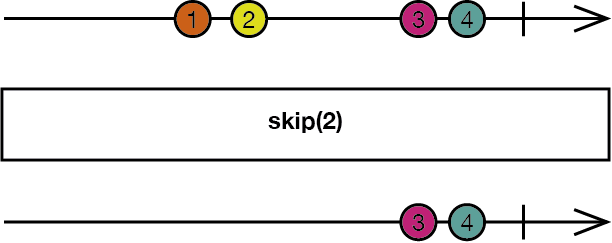
|
||||
*/
|
||||
example("skip") {
|
||||
let disposeBag = DisposeBag()
|
||||
|
||||
Observable.of("🐱", "🐰", "🐶", "🐸", "🐷", "🐵")
|
||||
.skip(2)
|
||||
.subscribe(onNext: { print($0) })
|
||||
.addDisposableTo(disposeBag)
|
||||
}
|
||||
/*:
|
||||
----
|
||||
## `skipWhile`
|
||||
Suppresses emitting the elements from the beginning of an `Observable` sequence that meet the specified condition. [More info](http://reactivex.io/documentation/operators/skipwhile.html)
|
||||
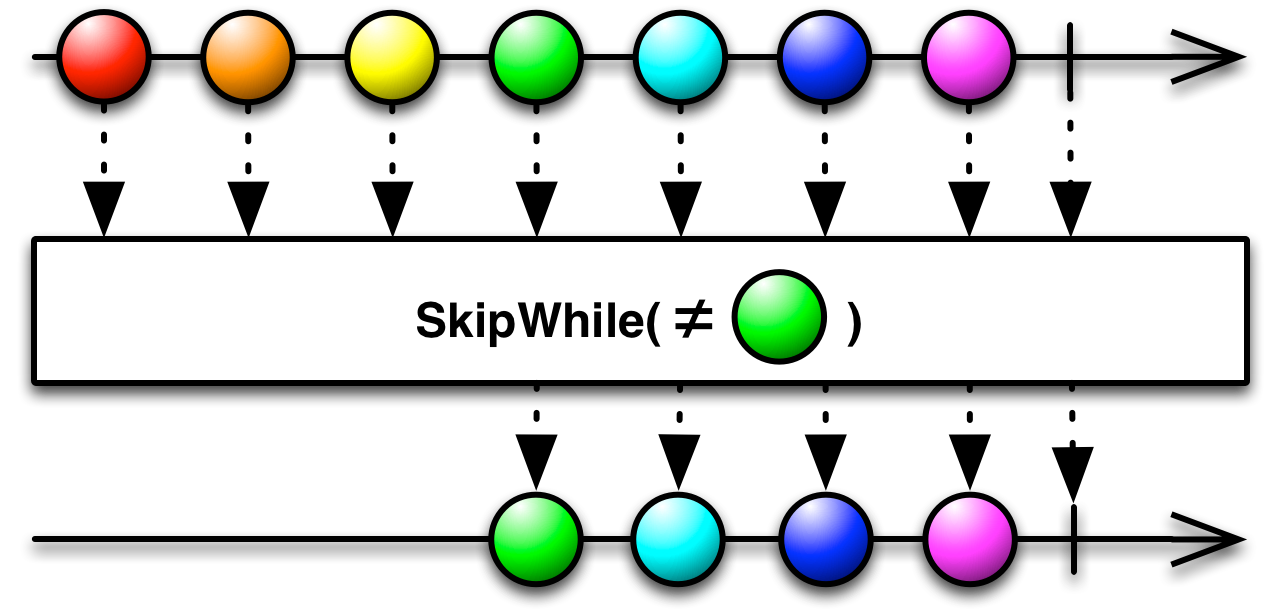
|
||||
*/
|
||||
example("skipWhile") {
|
||||
let disposeBag = DisposeBag()
|
||||
|
||||
Observable.of(1, 2, 3, 4, 5, 6)
|
||||
.skipWhile { $0 < 4 }
|
||||
.subscribe(onNext: { print($0) })
|
||||
.addDisposableTo(disposeBag)
|
||||
}
|
||||
/*:
|
||||
----
|
||||
## `skipWhileWithIndex`
|
||||
Suppresses emitting the elements from the beginning of an `Observable` sequence that meet the specified condition, and emits the remaining elements. The closure is also passed each element's index.
|
||||
*/
|
||||
example("skipWhileWithIndex") {
|
||||
let disposeBag = DisposeBag()
|
||||
|
||||
Observable.of("🐱", "🐰", "🐶", "🐸", "🐷", "🐵")
|
||||
.skipWhileWithIndex { element, index in
|
||||
index < 3
|
||||
}
|
||||
.subscribe(onNext: { print($0) })
|
||||
.addDisposableTo(disposeBag)
|
||||
}
|
||||
/*:
|
||||
----
|
||||
## `skipUntil`
|
||||
Suppresses emitting the elements from a source `Observable` sequence until a reference `Observable` sequence emits an element. [More info](http://reactivex.io/documentation/operators/skipuntil.html)
|
||||
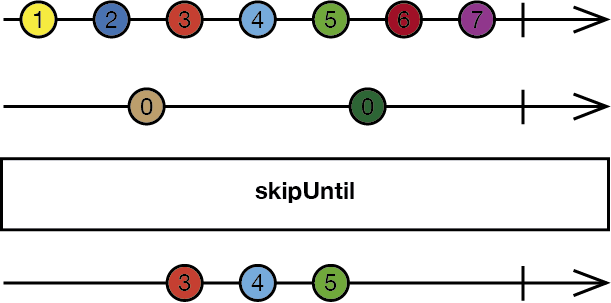
|
||||
*/
|
||||
example("skipUntil") {
|
||||
let disposeBag = DisposeBag()
|
||||
|
||||
let sourceSequence = PublishSubject<String>()
|
||||
let referenceSequence = PublishSubject<String>()
|
||||
|
||||
sourceSequence
|
||||
.skipUntil(referenceSequence)
|
||||
.subscribe(onNext: { print($0) })
|
||||
.addDisposableTo(disposeBag)
|
||||
|
||||
sourceSequence.onNext("🐱")
|
||||
sourceSequence.onNext("🐰")
|
||||
sourceSequence.onNext("🐶")
|
||||
|
||||
referenceSequence.onNext("🔴")
|
||||
|
||||
sourceSequence.onNext("🐸")
|
||||
sourceSequence.onNext("🐷")
|
||||
sourceSequence.onNext("🐵")
|
||||
}
|
||||
|
||||
//: [Next](@next) - [Table of Contents](Table_of_Contents)
|
||||
|
|
@ -1,85 +0,0 @@
|
|||
/*:
|
||||
> # IMPORTANT: To use **Rx.playground**:
|
||||
1. Open **Rx.xcworkspace**.
|
||||
1. Build the **RxSwift-OSX** scheme (**Product** → **Build**).
|
||||
1. Open **Rx** playground in the **Project navigator**.
|
||||
1. Show the Debug Area (**View** → **Debug Area** → **Show Debug Area**).
|
||||
----
|
||||
[Previous](@previous)
|
||||
*/
|
||||
|
||||
import RxSwift
|
||||
|
||||
/*:
|
||||
# Introduction
|
||||
|
||||
## Why use RxSwift?
|
||||
|
||||
A vast majority of the code we write involves responding to external events. When a user manipulates a control, we need to write an `@IBAction` handler to respond. We need to observe notifications to detect when the keyboard changes position. We must provide closures to execute when URL sessions respond with data. And we use KVO to detect changes to variables.
|
||||
All of these various systems makes our code needlessly complex. Wouldn't it be better if there was one consistent system that handled all of our call/response code? Rx is such a system.
|
||||
|
||||
RxSwift is the official implementation of [Reactive Extensions](http://reactivex.io) (aka Rx), which exist for [most major languages and platforms](http://reactivex.io/languages.html).
|
||||
*/
|
||||
/*:
|
||||
## Concepts
|
||||
|
||||
**Every `Observable` instance is just a sequence.**
|
||||
|
||||
The key advantage for an `Observable` sequence vs. Swift's `SequenceType` is that it can also receive elements asynchronously. _This is the essence of RxSwift._ Everything else expands upon this concept.
|
||||
|
||||
* An `Observable` (`ObservableType`) is equivalent to a `SequenceType`.
|
||||
* The `ObservableType.subscribe(_:)` method is equivalent to `SequenceType.generate()`.
|
||||
* `ObservableType.subscribe(_:)` takes an observer (`ObserverType`) parameter, which will be subscribed to automatically receive sequence events and elements emitted by the `Observable`, instead of manually calling `next()` on the returned generator.
|
||||
*/
|
||||
/*:
|
||||
If an `Observable` emits a next event (`Event.next(Element)`), it can continue to emit more events. However, if the `Observable` emits either an error event (`Event.error(ErrorType)`) or a completed event (`Event.completed`), the `Observable` sequence cannot emit additional events to the subscriber.
|
||||
|
||||
Sequence grammar explains this more concisely:
|
||||
|
||||
`next* (error | completed)?`
|
||||
|
||||
And this can also be explained more visually using diagrams:
|
||||
|
||||
`--1--2--3--4--5--6--|----> // "|" = Terminates normally`
|
||||
|
||||
`--a--b--c--d--e--f--X----> // "X" = Terminates with an error`
|
||||
|
||||
`--tap--tap----------tap--> // "|" = Continues indefinitely, such as a sequence of button taps`
|
||||
|
||||
> These diagrams are called marble diagrams. You can learn more about them at [RxMarbles.com](http://rxmarbles.com).
|
||||
*/
|
||||
/*:
|
||||
### Observables and observers (aka subscribers)
|
||||
|
||||
`Observable`s will not execute their subscription closure unless there is a subscriber. In the following example, the closure of the `Observable` will never be executed, because there are no subscribers:
|
||||
*/
|
||||
example("Observable with no subscribers") {
|
||||
_ = Observable<String>.create { observerOfString -> Disposable in
|
||||
print("This will never be printed")
|
||||
observerOfString.on(.next("😬"))
|
||||
observerOfString.on(.completed)
|
||||
return Disposables.create()
|
||||
}
|
||||
}
|
||||
/*:
|
||||
----
|
||||
In the following example, the closure will be executed when `subscribe(_:)` is called:
|
||||
*/
|
||||
example("Observable with subscriber") {
|
||||
_ = Observable<String>.create { observerOfString in
|
||||
print("Observable created")
|
||||
observerOfString.on(.next("😉"))
|
||||
observerOfString.on(.completed)
|
||||
return Disposables.create()
|
||||
}
|
||||
.subscribe { event in
|
||||
print(event)
|
||||
}
|
||||
}
|
||||
/*:
|
||||
> Don't concern yourself with the details of how these `Observable`s were created in these examples. We'll get into that [next](@next).
|
||||
#
|
||||
> `subscribe(_:)` returns a `Disposable` instance that represents a disposable resource such as a subscription. It was ignored in the previous simple example, but it should normally be properly handled. This usually means adding it to a `DisposeBag` instance. All examples going forward will include proper handling, because, well, practice makes _permanent_ 🙂. You can learn more about this in the [Disposing section](https://github.com/ReactiveX/RxSwift/blob/master/Documentation/GettingStarted.md#disposing) of the [Getting Started guide](https://github.com/ReactiveX/RxSwift/blob/master/Documentation/GettingStarted.md).
|
||||
*/
|
||||
|
||||
//: [Next](@next) - [Table of Contents](Table_of_Contents)
|
||||
|
|
@ -1,72 +0,0 @@
|
|||
/*:
|
||||
> # IMPORTANT: To use **Rx.playground**:
|
||||
1. Open **Rx.xcworkspace**.
|
||||
1. Build the **RxSwift-OSX** scheme (**Product** → **Build**).
|
||||
1. Open **Rx** playground in the **Project navigator**.
|
||||
1. Show the Debug Area (**View** → **Debug Area** → **Show Debug Area**).
|
||||
----
|
||||
[Previous](@previous) - [Table of Contents](Table_of_Contents)
|
||||
*/
|
||||
import RxSwift
|
||||
/*:
|
||||
# Mathematical and Aggregate Operators
|
||||
Operators that operate on the entire sequence of items emitted by an `Observable`.
|
||||
## `toArray`
|
||||
Converts an `Observable` sequence into an array, emits that array as a new single-element `Observable` sequence, and then terminates. [More info](http://reactivex.io/documentation/operators/to.html)
|
||||
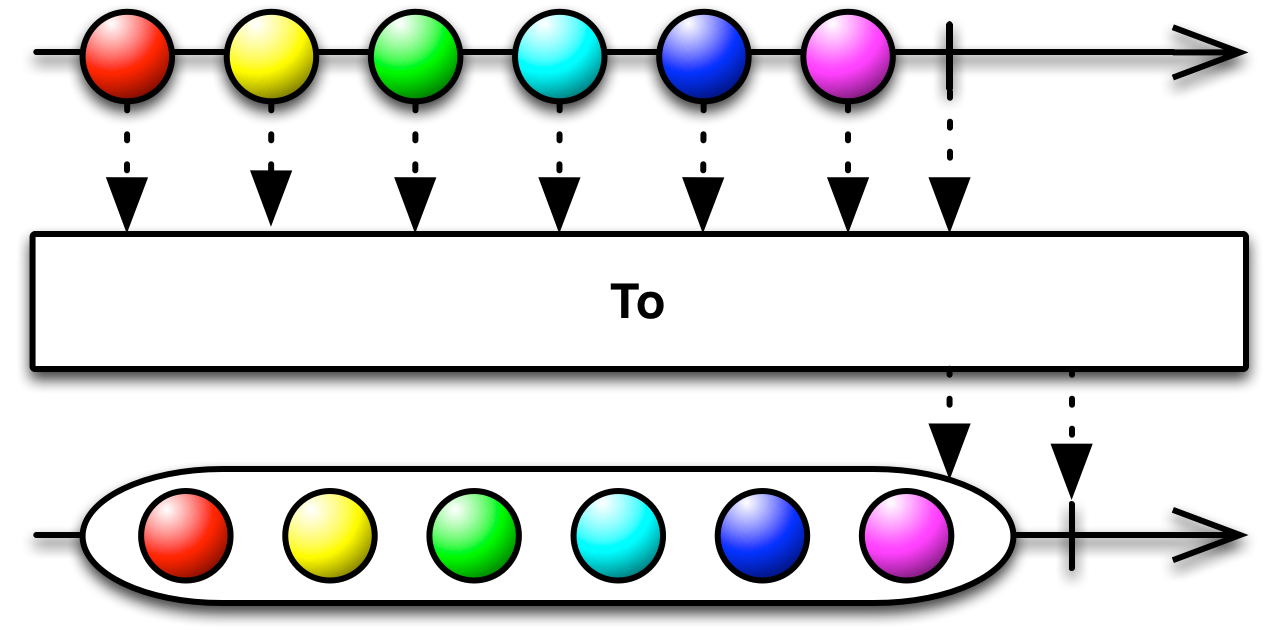
|
||||
*/
|
||||
example("toArray") {
|
||||
let disposeBag = DisposeBag()
|
||||
|
||||
Observable.range(start: 1, count: 10)
|
||||
.toArray()
|
||||
.subscribe { print($0) }
|
||||
.addDisposableTo(disposeBag)
|
||||
}
|
||||
/*:
|
||||
----
|
||||
## `reduce`
|
||||
Begins with an initial seed value, and then applies an accumulator closure to all elements emitted by an `Observable` sequence, and returns the aggregate result as a single-element `Observable` sequence. [More info](http://reactivex.io/documentation/operators/reduce.html)
|
||||
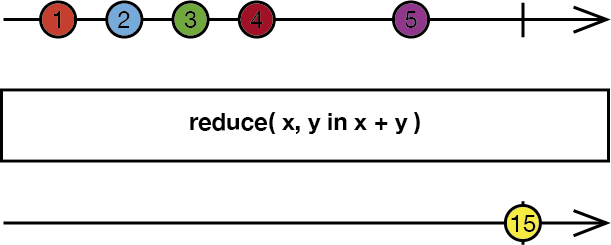
|
||||
*/
|
||||
example("reduce") {
|
||||
let disposeBag = DisposeBag()
|
||||
|
||||
Observable.of(10, 100, 1000)
|
||||
.reduce(1, accumulator: +)
|
||||
.subscribe(onNext: { print($0) })
|
||||
.addDisposableTo(disposeBag)
|
||||
}
|
||||
/*:
|
||||
----
|
||||
## `concat`
|
||||
Joins elements from inner `Observable` sequences of an `Observable` sequence in a sequential manner, waiting for each sequence to terminate successfully before emitting elements from the next sequence. [More info](http://reactivex.io/documentation/operators/concat.html)
|
||||
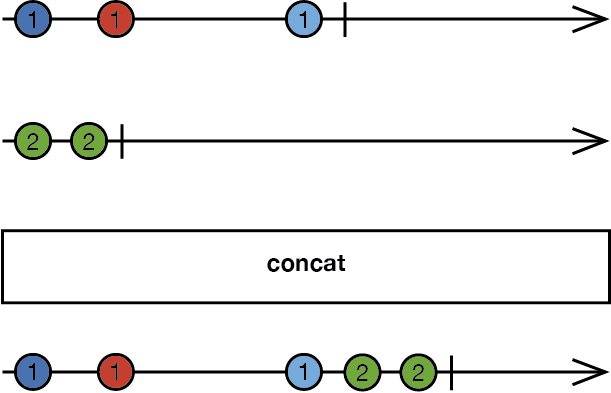
|
||||
*/
|
||||
example("concat") {
|
||||
let disposeBag = DisposeBag()
|
||||
|
||||
let subject1 = BehaviorSubject(value: "🍎")
|
||||
let subject2 = BehaviorSubject(value: "🐶")
|
||||
|
||||
let variable = Variable(subject1)
|
||||
|
||||
variable.asObservable()
|
||||
.concat()
|
||||
.subscribe { print($0) }
|
||||
.addDisposableTo(disposeBag)
|
||||
|
||||
subject1.onNext("🍐")
|
||||
subject1.onNext("🍊")
|
||||
|
||||
variable.value = subject2
|
||||
|
||||
subject2.onNext("I would be ignored")
|
||||
subject2.onNext("🐱")
|
||||
|
||||
subject1.onCompleted()
|
||||
|
||||
subject2.onNext("🐭")
|
||||
}
|
||||
|
||||
//: [Next](@next) - [Table of Contents](Table_of_Contents)
|
||||
|
|
@ -1,21 +0,0 @@
|
|||
/*:
|
||||
> # IMPORTANT: To use **Rx.playground**:
|
||||
1. Open **Rx.xcworkspace**.
|
||||
1. Build the **RxSwift-OSX** scheme (**Product** → **Build**).
|
||||
1. Open **Rx** playground in the **Project navigator**.
|
||||
1. Show the Debug Area (**View** → **Debug Area** → **Show Debug Area**).
|
||||
----
|
||||
## Table of Contents:
|
||||
1. [Introduction](Introduction)
|
||||
1. [Creating and Subscribing to Observables](Creating_and_Subscribing_to_Observables)
|
||||
1. [Working with Subjects](Working_with_Subjects)
|
||||
1. [Combining Operators](Combining_Operators)
|
||||
1. [Transforming Operators](Transforming_Operators)
|
||||
1. [Filtering and Conditional Operators](Filtering_and_Conditional_Operators)
|
||||
1. [Mathematical and Aggregate Operators](Mathematical_and_Aggregate_Operators)
|
||||
1. [Connectable Operators](Connectable_Operators)
|
||||
1. [Error Handling Operators](Error_Handling_Operators)
|
||||
1. [Debugging Operators](Debugging_Operators)
|
||||
*/
|
||||
|
||||
//: [Next](@next)
|
||||
|
|
@ -1,78 +0,0 @@
|
|||
/*:
|
||||
> # IMPORTANT: To use **Rx.playground**:
|
||||
1. Open **Rx.xcworkspace**.
|
||||
1. Build the **RxSwift-OSX** scheme (**Product** → **Build**).
|
||||
1. Open **Rx** playground in the **Project navigator**.
|
||||
1. Show the Debug Area (**View** → **Debug Area** → **Show Debug Area**).
|
||||
----
|
||||
[Previous](@previous) - [Table of Contents](Table_of_Contents)
|
||||
*/
|
||||
import RxSwift
|
||||
/*:
|
||||
# Transforming Operators
|
||||
Operators that transform Next event elements emitted by an `Observable` sequence.
|
||||
## `map`
|
||||
Applies a transforming closure to elements emitted by an `Observable` sequence, and returns a new `Observable` sequence of the transformed elements. [More info](http://reactivex.io/documentation/operators/map.html)
|
||||
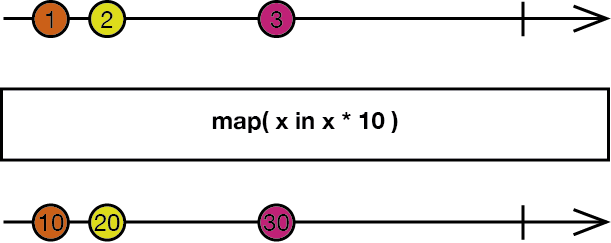
|
||||
*/
|
||||
example("map") {
|
||||
let disposeBag = DisposeBag()
|
||||
Observable.of(1, 2, 3)
|
||||
.map { $0 * $0 }
|
||||
.subscribe(onNext: { print($0) })
|
||||
.addDisposableTo(disposeBag)
|
||||
}
|
||||
/*:
|
||||
----
|
||||
## `flatMap` and `flatMapLatest`
|
||||
Transforms the elements emitted by an `Observable` sequence into `Observable` sequences, and merges the emissions from both `Observable` sequences into a single `Observable` sequence. This is also useful when, for example, when you have an `Observable` sequence that itself emits `Observable` sequences, and you want to be able to react to new emissions from either `Observable` sequence. The difference between `flatMap` and `flatMapLatest` is, `flatMapLatest` will only emit elements from the most recent inner `Observable` sequence. [More info](http://reactivex.io/documentation/operators/flatmap.html)
|
||||
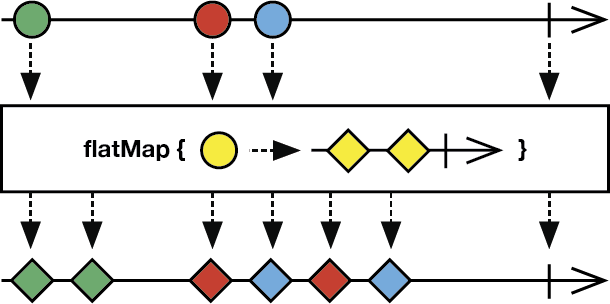
|
||||
*/
|
||||
example("flatMap and flatMapLatest") {
|
||||
let disposeBag = DisposeBag()
|
||||
|
||||
struct Player {
|
||||
var score: Variable<Int>
|
||||
}
|
||||
|
||||
let 👦🏻 = Player(score: Variable(80))
|
||||
let 👧🏼 = Player(score: Variable(90))
|
||||
|
||||
let player = Variable(👦🏻)
|
||||
|
||||
player.asObservable()
|
||||
.flatMap { $0.score.asObservable() } // Change flatMap to flatMapLatest and observe change in printed output
|
||||
.subscribe(onNext: { print($0) })
|
||||
.addDisposableTo(disposeBag)
|
||||
|
||||
👦🏻.score.value = 85
|
||||
|
||||
player.value = 👧🏼
|
||||
|
||||
👦🏻.score.value = 95 // Will be printed when using flatMap, but will not be printed when using flatMapLatest
|
||||
|
||||
👧🏼.score.value = 100
|
||||
}
|
||||
/*:
|
||||
> In this example, using `flatMap` may have unintended consequences. After assigning 👧🏼 to `player.value`, `👧🏼.score` will begin to emit elements, but the previous inner `Observable` sequence (`👦🏻.score`) will also still emit elements. By changing `flatMap` to `flatMapLatest`, only the most recent inner `Observable` sequence (`👧🏼.score`) will emit elements, i.e., setting `👦🏻.score.value` to `95` has no effect.
|
||||
#
|
||||
> `flatMapLatest` is actually a combination of the `map` and `switchLatest` operators.
|
||||
*/
|
||||
/*:
|
||||
----
|
||||
## `scan`
|
||||
Begins with an initial seed value, and then applies an accumulator closure to each element emitted by an `Observable` sequence, and returns each intermediate result as a single-element `Observable` sequence. [More info](http://reactivex.io/documentation/operators/scan.html)
|
||||
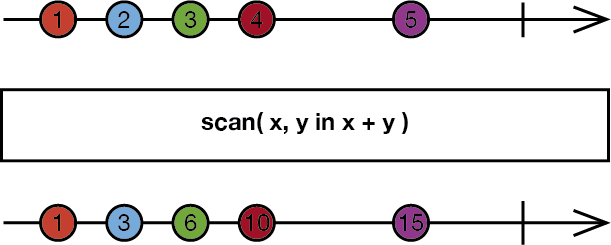
|
||||
*/
|
||||
example("scan") {
|
||||
let disposeBag = DisposeBag()
|
||||
|
||||
Observable.of(10, 100, 1000)
|
||||
.scan(1) { aggregateValue, newValue in
|
||||
aggregateValue + newValue
|
||||
}
|
||||
.subscribe(onNext: { print($0) })
|
||||
.addDisposableTo(disposeBag)
|
||||
}
|
||||
|
||||
//: [Next](@next) - [Table of Contents](Table_of_Contents)
|
||||
|
|
@ -1,110 +0,0 @@
|
|||
/*:
|
||||
> # IMPORTANT: To use **Rx.playground**:
|
||||
1. Open **Rx.xcworkspace**.
|
||||
1. Build the **RxSwift-OSX** scheme (**Product** → **Build**).
|
||||
1. Open **Rx** playground in the **Project navigator**.
|
||||
1. Show the Debug Area (**View** → **Debug Area** → **Show Debug Area**).
|
||||
----
|
||||
[Previous](@previous) - [Table of Contents](Table_of_Contents)
|
||||
*/
|
||||
import RxSwift
|
||||
/*:
|
||||
# Working with Subjects
|
||||
A Subject is a sort of bridge or proxy that is available in some implementations of Rx that acts as both an observer and `Observable`. Because it is an observer, it can subscribe to one or more `Observable`s, and because it is an `Observable`, it can pass through the items it observes by reemitting them, and it can also emit new items. [More info](http://reactivex.io/documentation/subject.html)
|
||||
*/
|
||||
extension ObservableType {
|
||||
|
||||
/**
|
||||
Add observer with `id` and print each emitted event.
|
||||
- parameter id: an identifier for the subscription.
|
||||
*/
|
||||
func addObserver(_ id: String) -> Disposable {
|
||||
return subscribe { print("Subscription:", id, "Event:", $0) }
|
||||
}
|
||||
|
||||
}
|
||||
|
||||
func writeSequenceToConsole<O: ObservableType>(name: String, sequence: O) -> Disposable {
|
||||
return sequence.subscribe { event in
|
||||
print("Subscription: \(name), event: \(event)")
|
||||
}
|
||||
}
|
||||
/*:
|
||||
## PublishSubject
|
||||
Broadcasts new events to all observers as of their time of the subscription.
|
||||
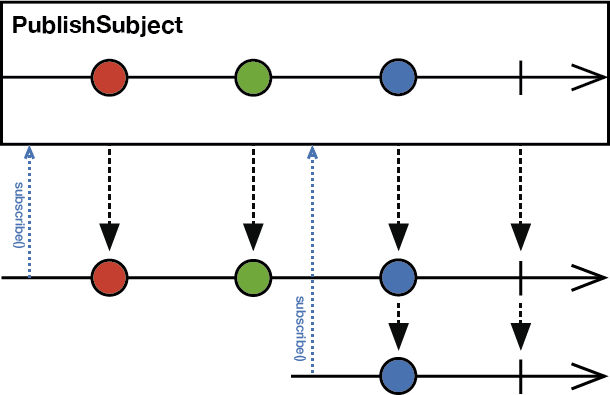
|
||||
*/
|
||||
example("PublishSubject") {
|
||||
let disposeBag = DisposeBag()
|
||||
let subject = PublishSubject<String>()
|
||||
|
||||
subject.addObserver("1").addDisposableTo(disposeBag)
|
||||
subject.onNext("🐶")
|
||||
subject.onNext("🐱")
|
||||
|
||||
subject.addObserver("2").addDisposableTo(disposeBag)
|
||||
subject.onNext("🅰️")
|
||||
subject.onNext("🅱️")
|
||||
}
|
||||
/*:
|
||||
> This example also introduces using the `onNext(_:)` convenience method, equivalent to `on(.next(_:)`, which causes a new Next event to be emitted to subscribers with the provided `element`. There are also `onError(_:)` and `onCompleted()` convenience methods, equivalent to `on(.error(_:))` and `on(.completed)`, respectively.
|
||||
----
|
||||
## ReplaySubject
|
||||
Broadcasts new events to all subscribers, and the specified `bufferSize` number of previous events to new subscribers.
|
||||
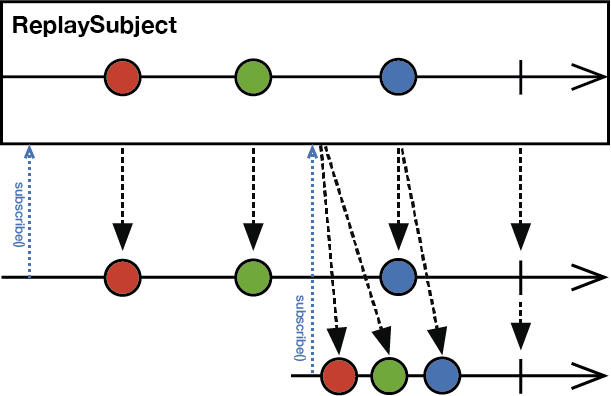
|
||||
*/
|
||||
example("ReplaySubject") {
|
||||
let disposeBag = DisposeBag()
|
||||
let subject = ReplaySubject<String>.create(bufferSize: 1)
|
||||
|
||||
subject.addObserver("1").addDisposableTo(disposeBag)
|
||||
subject.onNext("🐶")
|
||||
subject.onNext("🐱")
|
||||
|
||||
subject.addObserver("2").addDisposableTo(disposeBag)
|
||||
subject.onNext("🅰️")
|
||||
subject.onNext("🅱️")
|
||||
}
|
||||
/*:
|
||||
----
|
||||
## BehaviorSubject
|
||||
Broadcasts new events to all subscribers, and the most recent (or initial) value to new subscribers.
|
||||
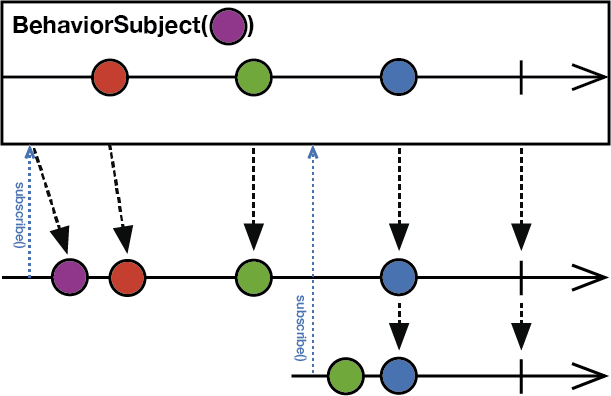
|
||||
*/
|
||||
example("BehaviorSubject") {
|
||||
let disposeBag = DisposeBag()
|
||||
let subject = BehaviorSubject(value: "🔴")
|
||||
|
||||
subject.addObserver("1").addDisposableTo(disposeBag)
|
||||
subject.onNext("🐶")
|
||||
subject.onNext("🐱")
|
||||
|
||||
subject.addObserver("2").addDisposableTo(disposeBag)
|
||||
subject.onNext("🅰️")
|
||||
subject.onNext("🅱️")
|
||||
|
||||
subject.addObserver("3").addDisposableTo(disposeBag)
|
||||
subject.onNext("🍐")
|
||||
subject.onNext("🍊")
|
||||
}
|
||||
/*:
|
||||
> Notice what's missing in these previous examples? A Completed event. `PublishSubject`, `ReplaySubject`, and `BehaviorSubject` do not automatically emit Completed events when they are about to be disposed of.
|
||||
----
|
||||
## Variable
|
||||
Wraps a `BehaviorSubject`, so it will emit the most recent (or initial) value to new subscribers. And `Variable` also maintains current value state. `Variable` will never emit an Error event. However, it will automatically emit a Completed event and terminate on `deinit`.
|
||||
*/
|
||||
example("Variable") {
|
||||
let disposeBag = DisposeBag()
|
||||
let variable = Variable("🔴")
|
||||
|
||||
variable.asObservable().addObserver("1").addDisposableTo(disposeBag)
|
||||
variable.value = "🐶"
|
||||
variable.value = "🐱"
|
||||
|
||||
variable.asObservable().addObserver("2").addDisposableTo(disposeBag)
|
||||
variable.value = "🅰️"
|
||||
variable.value = "🅱️"
|
||||
}
|
||||
//: > Call `asObservable()` on a `Variable` instance in order to access its underlying `BehaviorSubject` sequence. `Variable`s do not implement the `on` operator (or, e.g., `onNext(_:)`), but instead expose a `value` property that can be used to get the current value, and also set a new value. Setting a new value will also add that value onto its underlying `BehaviorSubject` sequence.
|
||||
|
||||
//: [Next](@next) - [Table of Contents](Table_of_Contents)
|
||||
|
|
@ -1,47 +0,0 @@
|
|||
import Foundation
|
||||
|
||||
/**
|
||||
Encloses each code example in its own scope. Prints a `description` header and then executes the `action` closure.
|
||||
- parameter description: example description
|
||||
- parameter action: `Void` closure
|
||||
*/
|
||||
public func example(_ description: String, action: (Void) -> Void) {
|
||||
printExampleHeader(description)
|
||||
action()
|
||||
}
|
||||
|
||||
public func printExampleHeader(_ description: String) {
|
||||
print("\n--- \(description) example ---")
|
||||
}
|
||||
|
||||
public enum TestError: Swift.Error {
|
||||
case test
|
||||
}
|
||||
|
||||
|
||||
/**
|
||||
Executes `closure` on main thread after `delay` seconds.
|
||||
- parameter delay: time in seconds to wait before executing `closure`
|
||||
- parameter closure: `Void` closure
|
||||
*/
|
||||
public func delay(_ delay: Double, closure: @escaping (Void) -> Void) {
|
||||
|
||||
let delayTime = DispatchTime.now() + DispatchTimeInterval.seconds(Int(delay))
|
||||
DispatchQueue.main.asyncAfter(deadline: delayTime) {
|
||||
closure()
|
||||
}
|
||||
}
|
||||
|
||||
#if NOT_IN_PLAYGROUND
|
||||
|
||||
public func playgroundShouldContinueIndefinitely() { }
|
||||
|
||||
#else
|
||||
|
||||
import PlaygroundSupport
|
||||
|
||||
public func playgroundShouldContinueIndefinitely() {
|
||||
PlaygroundPage.current.needsIndefiniteExecution = true
|
||||
}
|
||||
|
||||
#endif
|
||||
|
|
@ -1,12 +0,0 @@
|
|||
[
|
||||
{
|
||||
"file": "/Users/mo/Documents/OpenSource/RxSwift/Rx.playground/Sources/SupportCode.swift",
|
||||
"offset": 276,
|
||||
"remove": 9,
|
||||
},
|
||||
{
|
||||
"file": "/Users/mo/Documents/OpenSource/RxSwift/Rx.playground/Sources/SupportCode.swift",
|
||||
"offset": 733,
|
||||
"text": "@escaping ",
|
||||
}
|
||||
]
|
||||
|
|
@ -1,17 +0,0 @@
|
|||
<?xml version="1.0" encoding="UTF-8" standalone="yes"?>
|
||||
<playground version='6.0' target-platform='osx' display-mode='raw' last-migration='0800'>
|
||||
<pages>
|
||||
<page name='Table_of_Contents'/>
|
||||
<page name='Introduction'/>
|
||||
<page name='Creating_and_Subscribing_to_Observables'/>
|
||||
<page name='Working_with_Subjects'/>
|
||||
<page name='Combining_Operators'/>
|
||||
<page name='Transforming_Operators'/>
|
||||
<page name='Filtering_and_Conditional_Operators'/>
|
||||
<page name='Mathematical_and_Aggregate_Operators'/>
|
||||
<page name='Connectable_Operators'/>
|
||||
<page name='Error_Handling_Operators'/>
|
||||
<page name='Debugging_Operators'/>
|
||||
<page name='Enable_RxSwift.resourceCount'/>
|
||||
</pages>
|
||||
</playground>
|
||||
File diff suppressed because it is too large
Load Diff
|
|
@ -1,80 +0,0 @@
|
|||
<?xml version="1.0" encoding="UTF-8"?>
|
||||
<Scheme
|
||||
LastUpgradeVersion = "0800"
|
||||
version = "1.3">
|
||||
<BuildAction
|
||||
parallelizeBuildables = "YES"
|
||||
buildImplicitDependencies = "YES">
|
||||
<BuildActionEntries>
|
||||
<BuildActionEntry
|
||||
buildForTesting = "YES"
|
||||
buildForRunning = "YES"
|
||||
buildForProfiling = "YES"
|
||||
buildForArchiving = "YES"
|
||||
buildForAnalyzing = "YES">
|
||||
<BuildableReference
|
||||
BuildableIdentifier = "primary"
|
||||
BlueprintIdentifier = "C8F0C04D1BBBFBCE001B112F"
|
||||
BuildableName = "RxBlocking.framework"
|
||||
BlueprintName = "RxBlocking-watchOS"
|
||||
ReferencedContainer = "container:Rx.xcodeproj">
|
||||
</BuildableReference>
|
||||
</BuildActionEntry>
|
||||
</BuildActionEntries>
|
||||
</BuildAction>
|
||||
<TestAction
|
||||
buildConfiguration = "Debug"
|
||||
selectedDebuggerIdentifier = "Xcode.DebuggerFoundation.Debugger.LLDB"
|
||||
selectedLauncherIdentifier = "Xcode.DebuggerFoundation.Launcher.LLDB"
|
||||
shouldUseLaunchSchemeArgsEnv = "YES">
|
||||
<Testables>
|
||||
</Testables>
|
||||
<AdditionalOptions>
|
||||
</AdditionalOptions>
|
||||
</TestAction>
|
||||
<LaunchAction
|
||||
buildConfiguration = "Debug"
|
||||
selectedDebuggerIdentifier = "Xcode.DebuggerFoundation.Debugger.LLDB"
|
||||
selectedLauncherIdentifier = "Xcode.DebuggerFoundation.Launcher.LLDB"
|
||||
launchStyle = "0"
|
||||
useCustomWorkingDirectory = "NO"
|
||||
ignoresPersistentStateOnLaunch = "NO"
|
||||
debugDocumentVersioning = "YES"
|
||||
debugServiceExtension = "internal"
|
||||
allowLocationSimulation = "YES">
|
||||
<MacroExpansion>
|
||||
<BuildableReference
|
||||
BuildableIdentifier = "primary"
|
||||
BlueprintIdentifier = "C8F0C04D1BBBFBCE001B112F"
|
||||
BuildableName = "RxBlocking.framework"
|
||||
BlueprintName = "RxBlocking-watchOS"
|
||||
ReferencedContainer = "container:Rx.xcodeproj">
|
||||
</BuildableReference>
|
||||
</MacroExpansion>
|
||||
<AdditionalOptions>
|
||||
</AdditionalOptions>
|
||||
</LaunchAction>
|
||||
<ProfileAction
|
||||
buildConfiguration = "Release"
|
||||
shouldUseLaunchSchemeArgsEnv = "YES"
|
||||
savedToolIdentifier = ""
|
||||
useCustomWorkingDirectory = "NO"
|
||||
debugDocumentVersioning = "YES">
|
||||
<MacroExpansion>
|
||||
<BuildableReference
|
||||
BuildableIdentifier = "primary"
|
||||
BlueprintIdentifier = "C8F0C04D1BBBFBCE001B112F"
|
||||
BuildableName = "RxBlocking.framework"
|
||||
BlueprintName = "RxBlocking-watchOS"
|
||||
ReferencedContainer = "container:Rx.xcodeproj">
|
||||
</BuildableReference>
|
||||
</MacroExpansion>
|
||||
</ProfileAction>
|
||||
<AnalyzeAction
|
||||
buildConfiguration = "Debug">
|
||||
</AnalyzeAction>
|
||||
<ArchiveAction
|
||||
buildConfiguration = "Release"
|
||||
revealArchiveInOrganizer = "YES">
|
||||
</ArchiveAction>
|
||||
</Scheme>
|
||||
|
|
@ -1,80 +0,0 @@
|
|||
<?xml version="1.0" encoding="UTF-8"?>
|
||||
<Scheme
|
||||
LastUpgradeVersion = "0800"
|
||||
version = "1.3">
|
||||
<BuildAction
|
||||
parallelizeBuildables = "YES"
|
||||
buildImplicitDependencies = "YES">
|
||||
<BuildActionEntries>
|
||||
<BuildActionEntry
|
||||
buildForTesting = "YES"
|
||||
buildForRunning = "YES"
|
||||
buildForProfiling = "YES"
|
||||
buildForArchiving = "YES"
|
||||
buildForAnalyzing = "YES">
|
||||
<BuildableReference
|
||||
BuildableIdentifier = "primary"
|
||||
BlueprintIdentifier = "D2138C741BB9BE9800339B5C"
|
||||
BuildableName = "RxCocoa.framework"
|
||||
BlueprintName = "RxCocoa-tvOS"
|
||||
ReferencedContainer = "container:Rx.xcodeproj">
|
||||
</BuildableReference>
|
||||
</BuildActionEntry>
|
||||
</BuildActionEntries>
|
||||
</BuildAction>
|
||||
<TestAction
|
||||
buildConfiguration = "Debug"
|
||||
selectedDebuggerIdentifier = "Xcode.DebuggerFoundation.Debugger.LLDB"
|
||||
selectedLauncherIdentifier = "Xcode.DebuggerFoundation.Launcher.LLDB"
|
||||
shouldUseLaunchSchemeArgsEnv = "YES">
|
||||
<Testables>
|
||||
</Testables>
|
||||
<AdditionalOptions>
|
||||
</AdditionalOptions>
|
||||
</TestAction>
|
||||
<LaunchAction
|
||||
buildConfiguration = "Debug"
|
||||
selectedDebuggerIdentifier = "Xcode.DebuggerFoundation.Debugger.LLDB"
|
||||
selectedLauncherIdentifier = "Xcode.DebuggerFoundation.Launcher.LLDB"
|
||||
launchStyle = "0"
|
||||
useCustomWorkingDirectory = "NO"
|
||||
ignoresPersistentStateOnLaunch = "NO"
|
||||
debugDocumentVersioning = "YES"
|
||||
debugServiceExtension = "internal"
|
||||
allowLocationSimulation = "YES">
|
||||
<MacroExpansion>
|
||||
<BuildableReference
|
||||
BuildableIdentifier = "primary"
|
||||
BlueprintIdentifier = "D2138C741BB9BE9800339B5C"
|
||||
BuildableName = "RxCocoa.framework"
|
||||
BlueprintName = "RxCocoa-tvOS"
|
||||
ReferencedContainer = "container:Rx.xcodeproj">
|
||||
</BuildableReference>
|
||||
</MacroExpansion>
|
||||
<AdditionalOptions>
|
||||
</AdditionalOptions>
|
||||
</LaunchAction>
|
||||
<ProfileAction
|
||||
buildConfiguration = "Release"
|
||||
shouldUseLaunchSchemeArgsEnv = "YES"
|
||||
savedToolIdentifier = ""
|
||||
useCustomWorkingDirectory = "NO"
|
||||
debugDocumentVersioning = "YES">
|
||||
<MacroExpansion>
|
||||
<BuildableReference
|
||||
BuildableIdentifier = "primary"
|
||||
BlueprintIdentifier = "D2138C741BB9BE9800339B5C"
|
||||
BuildableName = "RxCocoa.framework"
|
||||
BlueprintName = "RxCocoa-tvOS"
|
||||
ReferencedContainer = "container:Rx.xcodeproj">
|
||||
</BuildableReference>
|
||||
</MacroExpansion>
|
||||
</ProfileAction>
|
||||
<AnalyzeAction
|
||||
buildConfiguration = "Debug">
|
||||
</AnalyzeAction>
|
||||
<ArchiveAction
|
||||
buildConfiguration = "Release"
|
||||
revealArchiveInOrganizer = "YES">
|
||||
</ArchiveAction>
|
||||
</Scheme>
|
||||
|
|
@ -1,80 +0,0 @@
|
|||
<?xml version="1.0" encoding="UTF-8"?>
|
||||
<Scheme
|
||||
LastUpgradeVersion = "0800"
|
||||
version = "1.3">
|
||||
<BuildAction
|
||||
parallelizeBuildables = "YES"
|
||||
buildImplicitDependencies = "YES">
|
||||
<BuildActionEntries>
|
||||
<BuildActionEntry
|
||||
buildForTesting = "YES"
|
||||
buildForRunning = "YES"
|
||||
buildForProfiling = "YES"
|
||||
buildForArchiving = "YES"
|
||||
buildForAnalyzing = "YES">
|
||||
<BuildableReference
|
||||
BuildableIdentifier = "primary"
|
||||
BlueprintIdentifier = "C8F0C0041BBBFBB9001B112F"
|
||||
BuildableName = "RxCocoa.framework"
|
||||
BlueprintName = "RxCocoa-watchOS"
|
||||
ReferencedContainer = "container:Rx.xcodeproj">
|
||||
</BuildableReference>
|
||||
</BuildActionEntry>
|
||||
</BuildActionEntries>
|
||||
</BuildAction>
|
||||
<TestAction
|
||||
buildConfiguration = "Debug"
|
||||
selectedDebuggerIdentifier = "Xcode.DebuggerFoundation.Debugger.LLDB"
|
||||
selectedLauncherIdentifier = "Xcode.DebuggerFoundation.Launcher.LLDB"
|
||||
shouldUseLaunchSchemeArgsEnv = "YES">
|
||||
<Testables>
|
||||
</Testables>
|
||||
<AdditionalOptions>
|
||||
</AdditionalOptions>
|
||||
</TestAction>
|
||||
<LaunchAction
|
||||
buildConfiguration = "Debug"
|
||||
selectedDebuggerIdentifier = "Xcode.DebuggerFoundation.Debugger.LLDB"
|
||||
selectedLauncherIdentifier = "Xcode.DebuggerFoundation.Launcher.LLDB"
|
||||
launchStyle = "0"
|
||||
useCustomWorkingDirectory = "NO"
|
||||
ignoresPersistentStateOnLaunch = "NO"
|
||||
debugDocumentVersioning = "YES"
|
||||
debugServiceExtension = "internal"
|
||||
allowLocationSimulation = "YES">
|
||||
<MacroExpansion>
|
||||
<BuildableReference
|
||||
BuildableIdentifier = "primary"
|
||||
BlueprintIdentifier = "C8F0C0041BBBFBB9001B112F"
|
||||
BuildableName = "RxCocoa.framework"
|
||||
BlueprintName = "RxCocoa-watchOS"
|
||||
ReferencedContainer = "container:Rx.xcodeproj">
|
||||
</BuildableReference>
|
||||
</MacroExpansion>
|
||||
<AdditionalOptions>
|
||||
</AdditionalOptions>
|
||||
</LaunchAction>
|
||||
<ProfileAction
|
||||
buildConfiguration = "Release"
|
||||
shouldUseLaunchSchemeArgsEnv = "YES"
|
||||
savedToolIdentifier = ""
|
||||
useCustomWorkingDirectory = "NO"
|
||||
debugDocumentVersioning = "YES">
|
||||
<MacroExpansion>
|
||||
<BuildableReference
|
||||
BuildableIdentifier = "primary"
|
||||
BlueprintIdentifier = "C8F0C0041BBBFBB9001B112F"
|
||||
BuildableName = "RxCocoa.framework"
|
||||
BlueprintName = "RxCocoa-watchOS"
|
||||
ReferencedContainer = "container:Rx.xcodeproj">
|
||||
</BuildableReference>
|
||||
</MacroExpansion>
|
||||
</ProfileAction>
|
||||
<AnalyzeAction
|
||||
buildConfiguration = "Debug">
|
||||
</AnalyzeAction>
|
||||
<ArchiveAction
|
||||
buildConfiguration = "Release"
|
||||
revealArchiveInOrganizer = "YES">
|
||||
</ArchiveAction>
|
||||
</Scheme>
|
||||
|
|
@ -1,99 +0,0 @@
|
|||
<?xml version="1.0" encoding="UTF-8"?>
|
||||
<Scheme
|
||||
LastUpgradeVersion = "0800"
|
||||
version = "1.3">
|
||||
<BuildAction
|
||||
parallelizeBuildables = "YES"
|
||||
buildImplicitDependencies = "YES">
|
||||
<BuildActionEntries>
|
||||
<BuildActionEntry
|
||||
buildForTesting = "YES"
|
||||
buildForRunning = "YES"
|
||||
buildForProfiling = "YES"
|
||||
buildForArchiving = "YES"
|
||||
buildForAnalyzing = "YES">
|
||||
<BuildableReference
|
||||
BuildableIdentifier = "primary"
|
||||
BlueprintIdentifier = "D2EA280B1BB9B5A200880ED3"
|
||||
BuildableName = "RxSwift.framework"
|
||||
BlueprintName = "RxSwift-tvOS"
|
||||
ReferencedContainer = "container:Rx.xcodeproj">
|
||||
</BuildableReference>
|
||||
</BuildActionEntry>
|
||||
</BuildActionEntries>
|
||||
</BuildAction>
|
||||
<TestAction
|
||||
buildConfiguration = "Debug"
|
||||
selectedDebuggerIdentifier = "Xcode.DebuggerFoundation.Debugger.LLDB"
|
||||
selectedLauncherIdentifier = "Xcode.DebuggerFoundation.Launcher.LLDB"
|
||||
shouldUseLaunchSchemeArgsEnv = "YES">
|
||||
<Testables>
|
||||
<TestableReference
|
||||
skipped = "NO">
|
||||
<BuildableReference
|
||||
BuildableIdentifier = "primary"
|
||||
BlueprintIdentifier = "C83509831C38740E0027C24C"
|
||||
BuildableName = "AllTests-tvOS.xctest"
|
||||
BlueprintName = "AllTests-tvOS"
|
||||
ReferencedContainer = "container:Rx.xcodeproj">
|
||||
</BuildableReference>
|
||||
</TestableReference>
|
||||
</Testables>
|
||||
<MacroExpansion>
|
||||
<BuildableReference
|
||||
BuildableIdentifier = "primary"
|
||||
BlueprintIdentifier = "D2EA280B1BB9B5A200880ED3"
|
||||
BuildableName = "RxSwift.framework"
|
||||
BlueprintName = "RxSwift-tvOS"
|
||||
ReferencedContainer = "container:Rx.xcodeproj">
|
||||
</BuildableReference>
|
||||
</MacroExpansion>
|
||||
<AdditionalOptions>
|
||||
</AdditionalOptions>
|
||||
</TestAction>
|
||||
<LaunchAction
|
||||
buildConfiguration = "Debug"
|
||||
selectedDebuggerIdentifier = "Xcode.DebuggerFoundation.Debugger.LLDB"
|
||||
selectedLauncherIdentifier = "Xcode.DebuggerFoundation.Launcher.LLDB"
|
||||
launchStyle = "0"
|
||||
useCustomWorkingDirectory = "NO"
|
||||
ignoresPersistentStateOnLaunch = "NO"
|
||||
debugDocumentVersioning = "YES"
|
||||
debugServiceExtension = "internal"
|
||||
allowLocationSimulation = "YES">
|
||||
<MacroExpansion>
|
||||
<BuildableReference
|
||||
BuildableIdentifier = "primary"
|
||||
BlueprintIdentifier = "D2EA280B1BB9B5A200880ED3"
|
||||
BuildableName = "RxSwift.framework"
|
||||
BlueprintName = "RxSwift-tvOS"
|
||||
ReferencedContainer = "container:Rx.xcodeproj">
|
||||
</BuildableReference>
|
||||
</MacroExpansion>
|
||||
<AdditionalOptions>
|
||||
</AdditionalOptions>
|
||||
</LaunchAction>
|
||||
<ProfileAction
|
||||
buildConfiguration = "Release"
|
||||
shouldUseLaunchSchemeArgsEnv = "YES"
|
||||
savedToolIdentifier = ""
|
||||
useCustomWorkingDirectory = "NO"
|
||||
debugDocumentVersioning = "YES">
|
||||
<MacroExpansion>
|
||||
<BuildableReference
|
||||
BuildableIdentifier = "primary"
|
||||
BlueprintIdentifier = "D2EA280B1BB9B5A200880ED3"
|
||||
BuildableName = "RxSwift.framework"
|
||||
BlueprintName = "RxSwift-tvOS"
|
||||
ReferencedContainer = "container:Rx.xcodeproj">
|
||||
</BuildableReference>
|
||||
</MacroExpansion>
|
||||
</ProfileAction>
|
||||
<AnalyzeAction
|
||||
buildConfiguration = "Debug">
|
||||
</AnalyzeAction>
|
||||
<ArchiveAction
|
||||
buildConfiguration = "Release"
|
||||
revealArchiveInOrganizer = "YES">
|
||||
</ArchiveAction>
|
||||
</Scheme>
|
||||
|
|
@ -1,80 +0,0 @@
|
|||
<?xml version="1.0" encoding="UTF-8"?>
|
||||
<Scheme
|
||||
LastUpgradeVersion = "0800"
|
||||
version = "1.3">
|
||||
<BuildAction
|
||||
parallelizeBuildables = "YES"
|
||||
buildImplicitDependencies = "YES">
|
||||
<BuildActionEntries>
|
||||
<BuildActionEntry
|
||||
buildForTesting = "YES"
|
||||
buildForRunning = "YES"
|
||||
buildForProfiling = "YES"
|
||||
buildForArchiving = "YES"
|
||||
buildForAnalyzing = "YES">
|
||||
<BuildableReference
|
||||
BuildableIdentifier = "primary"
|
||||
BlueprintIdentifier = "C88FA4FD1C25C44800CCFEA4"
|
||||
BuildableName = "RxTests.framework"
|
||||
BlueprintName = "RxTests-iOS"
|
||||
ReferencedContainer = "container:Rx.xcodeproj">
|
||||
</BuildableReference>
|
||||
</BuildActionEntry>
|
||||
</BuildActionEntries>
|
||||
</BuildAction>
|
||||
<TestAction
|
||||
buildConfiguration = "Debug"
|
||||
selectedDebuggerIdentifier = "Xcode.DebuggerFoundation.Debugger.LLDB"
|
||||
selectedLauncherIdentifier = "Xcode.DebuggerFoundation.Launcher.LLDB"
|
||||
shouldUseLaunchSchemeArgsEnv = "YES">
|
||||
<Testables>
|
||||
</Testables>
|
||||
<AdditionalOptions>
|
||||
</AdditionalOptions>
|
||||
</TestAction>
|
||||
<LaunchAction
|
||||
buildConfiguration = "Debug"
|
||||
selectedDebuggerIdentifier = "Xcode.DebuggerFoundation.Debugger.LLDB"
|
||||
selectedLauncherIdentifier = "Xcode.DebuggerFoundation.Launcher.LLDB"
|
||||
launchStyle = "0"
|
||||
useCustomWorkingDirectory = "NO"
|
||||
ignoresPersistentStateOnLaunch = "NO"
|
||||
debugDocumentVersioning = "YES"
|
||||
debugServiceExtension = "internal"
|
||||
allowLocationSimulation = "YES">
|
||||
<MacroExpansion>
|
||||
<BuildableReference
|
||||
BuildableIdentifier = "primary"
|
||||
BlueprintIdentifier = "C88FA4FD1C25C44800CCFEA4"
|
||||
BuildableName = "RxTests.framework"
|
||||
BlueprintName = "RxTests-iOS"
|
||||
ReferencedContainer = "container:Rx.xcodeproj">
|
||||
</BuildableReference>
|
||||
</MacroExpansion>
|
||||
<AdditionalOptions>
|
||||
</AdditionalOptions>
|
||||
</LaunchAction>
|
||||
<ProfileAction
|
||||
buildConfiguration = "Release"
|
||||
shouldUseLaunchSchemeArgsEnv = "YES"
|
||||
savedToolIdentifier = ""
|
||||
useCustomWorkingDirectory = "NO"
|
||||
debugDocumentVersioning = "YES">
|
||||
<MacroExpansion>
|
||||
<BuildableReference
|
||||
BuildableIdentifier = "primary"
|
||||
BlueprintIdentifier = "C88FA4FD1C25C44800CCFEA4"
|
||||
BuildableName = "RxTests.framework"
|
||||
BlueprintName = "RxTests-iOS"
|
||||
ReferencedContainer = "container:Rx.xcodeproj">
|
||||
</BuildableReference>
|
||||
</MacroExpansion>
|
||||
</ProfileAction>
|
||||
<AnalyzeAction
|
||||
buildConfiguration = "Debug">
|
||||
</AnalyzeAction>
|
||||
<ArchiveAction
|
||||
buildConfiguration = "Release"
|
||||
revealArchiveInOrganizer = "YES">
|
||||
</ArchiveAction>
|
||||
</Scheme>
|
||||
|
|
@ -1,80 +0,0 @@
|
|||
<?xml version="1.0" encoding="UTF-8"?>
|
||||
<Scheme
|
||||
LastUpgradeVersion = "0800"
|
||||
version = "1.3">
|
||||
<BuildAction
|
||||
parallelizeBuildables = "YES"
|
||||
buildImplicitDependencies = "YES">
|
||||
<BuildActionEntries>
|
||||
<BuildActionEntry
|
||||
buildForTesting = "YES"
|
||||
buildForRunning = "YES"
|
||||
buildForProfiling = "YES"
|
||||
buildForArchiving = "YES"
|
||||
buildForAnalyzing = "YES">
|
||||
<BuildableReference
|
||||
BuildableIdentifier = "primary"
|
||||
BlueprintIdentifier = "C88FA51F1C25C4C000CCFEA4"
|
||||
BuildableName = "RxTests.framework"
|
||||
BlueprintName = "RxTests-tvOS"
|
||||
ReferencedContainer = "container:Rx.xcodeproj">
|
||||
</BuildableReference>
|
||||
</BuildActionEntry>
|
||||
</BuildActionEntries>
|
||||
</BuildAction>
|
||||
<TestAction
|
||||
buildConfiguration = "Debug"
|
||||
selectedDebuggerIdentifier = "Xcode.DebuggerFoundation.Debugger.LLDB"
|
||||
selectedLauncherIdentifier = "Xcode.DebuggerFoundation.Launcher.LLDB"
|
||||
shouldUseLaunchSchemeArgsEnv = "YES">
|
||||
<Testables>
|
||||
</Testables>
|
||||
<AdditionalOptions>
|
||||
</AdditionalOptions>
|
||||
</TestAction>
|
||||
<LaunchAction
|
||||
buildConfiguration = "Debug"
|
||||
selectedDebuggerIdentifier = "Xcode.DebuggerFoundation.Debugger.LLDB"
|
||||
selectedLauncherIdentifier = "Xcode.DebuggerFoundation.Launcher.LLDB"
|
||||
launchStyle = "0"
|
||||
useCustomWorkingDirectory = "NO"
|
||||
ignoresPersistentStateOnLaunch = "NO"
|
||||
debugDocumentVersioning = "YES"
|
||||
debugServiceExtension = "internal"
|
||||
allowLocationSimulation = "YES">
|
||||
<MacroExpansion>
|
||||
<BuildableReference
|
||||
BuildableIdentifier = "primary"
|
||||
BlueprintIdentifier = "C88FA51F1C25C4C000CCFEA4"
|
||||
BuildableName = "RxTests.framework"
|
||||
BlueprintName = "RxTests-tvOS"
|
||||
ReferencedContainer = "container:Rx.xcodeproj">
|
||||
</BuildableReference>
|
||||
</MacroExpansion>
|
||||
<AdditionalOptions>
|
||||
</AdditionalOptions>
|
||||
</LaunchAction>
|
||||
<ProfileAction
|
||||
buildConfiguration = "Release"
|
||||
shouldUseLaunchSchemeArgsEnv = "YES"
|
||||
savedToolIdentifier = ""
|
||||
useCustomWorkingDirectory = "NO"
|
||||
debugDocumentVersioning = "YES">
|
||||
<MacroExpansion>
|
||||
<BuildableReference
|
||||
BuildableIdentifier = "primary"
|
||||
BlueprintIdentifier = "C88FA51F1C25C4C000CCFEA4"
|
||||
BuildableName = "RxTests.framework"
|
||||
BlueprintName = "RxTests-tvOS"
|
||||
ReferencedContainer = "container:Rx.xcodeproj">
|
||||
</BuildableReference>
|
||||
</MacroExpansion>
|
||||
</ProfileAction>
|
||||
<AnalyzeAction
|
||||
buildConfiguration = "Debug">
|
||||
</AnalyzeAction>
|
||||
<ArchiveAction
|
||||
buildConfiguration = "Release"
|
||||
revealArchiveInOrganizer = "YES">
|
||||
</ArchiveAction>
|
||||
</Scheme>
|
||||
|
|
@ -1,110 +1,64 @@
|
|||
<?xml version="1.0" encoding="UTF-8"?>
|
||||
<Workspace
|
||||
version = "1.0">
|
||||
<FileRef
|
||||
location = "group:Rx.playground">
|
||||
</FileRef>
|
||||
<FileRef
|
||||
location = "group:Package.swift">
|
||||
</FileRef>
|
||||
<FileRef
|
||||
location = "group:LICENSE.md">
|
||||
</FileRef>
|
||||
<FileRef
|
||||
location = "group:README.md">
|
||||
</FileRef>
|
||||
<Group
|
||||
location = "group:Playgrounds"
|
||||
name = "Playgrounds">
|
||||
<FileRef
|
||||
location = "group:Introduction.playground">
|
||||
</FileRef>
|
||||
<FileRef
|
||||
location = "group:Subjects.playground">
|
||||
</FileRef>
|
||||
<Group
|
||||
location = "group:ObservablesOperators"
|
||||
name = "ObservablesOperators">
|
||||
<FileRef
|
||||
location = "group:Observables+Creating.playground">
|
||||
</FileRef>
|
||||
<FileRef
|
||||
location = "group:Observables+Transforming.playground">
|
||||
</FileRef>
|
||||
<FileRef
|
||||
location = "group:Observables+Filtering.playground">
|
||||
</FileRef>
|
||||
<FileRef
|
||||
location = "group:Observables+Combining.playground">
|
||||
</FileRef>
|
||||
<FileRef
|
||||
location = "group:Observables+Error Handling.playground">
|
||||
</FileRef>
|
||||
<FileRef
|
||||
location = "group:Observables+Utility.playground">
|
||||
</FileRef>
|
||||
<FileRef
|
||||
location = "group:Observables+Conditional and Boolean.playground">
|
||||
</FileRef>
|
||||
<FileRef
|
||||
location = "group:Observables+Mathematical and Aggregate.playground">
|
||||
</FileRef>
|
||||
<FileRef
|
||||
location = "group:Observables+Connectable.playground">
|
||||
</FileRef>
|
||||
</Group>
|
||||
</Group>
|
||||
<FileRef
|
||||
location = "group:ISSUE_TEMPLATE.md">
|
||||
location = "group:RxSwift/RxSwift.xcodeproj">
|
||||
</FileRef>
|
||||
<FileRef
|
||||
location = "group:CHANGELOG.md">
|
||||
location = "group:RxCocoa/RxCocoa.xcodeproj">
|
||||
</FileRef>
|
||||
<Group
|
||||
location = "container:"
|
||||
name = "Podspecs">
|
||||
<FileRef
|
||||
location = "group:RxBlocking.podspec">
|
||||
</FileRef>
|
||||
<FileRef
|
||||
location = "group:RxCocoa.podspec">
|
||||
</FileRef>
|
||||
<FileRef
|
||||
location = "group:RxSwift.podspec">
|
||||
</FileRef>
|
||||
<FileRef
|
||||
location = "group:RxTests.podspec">
|
||||
</FileRef>
|
||||
</Group>
|
||||
<Group
|
||||
location = "group:scripts"
|
||||
name = "scripts">
|
||||
<FileRef
|
||||
location = "group:all-tests.sh">
|
||||
</FileRef>
|
||||
<FileRef
|
||||
location = "group:common.sh">
|
||||
</FileRef>
|
||||
<FileRef
|
||||
location = "group:/Users/kzaher/Projects/RxSwift/scripts/package-spm.swift">
|
||||
</FileRef>
|
||||
<FileRef
|
||||
location = "group:test-linux.sh">
|
||||
</FileRef>
|
||||
<FileRef
|
||||
location = "group:validate-headers.swift">
|
||||
</FileRef>
|
||||
<FileRef
|
||||
location = "group:validate-playgrounds.sh">
|
||||
</FileRef>
|
||||
<FileRef
|
||||
location = "group:validate-podspec.sh">
|
||||
</FileRef>
|
||||
<FileRef
|
||||
location = "group:validate-markdown.sh">
|
||||
</FileRef>
|
||||
</Group>
|
||||
<Group
|
||||
location = "group:Documentation"
|
||||
name = "Documentation">
|
||||
<FileRef
|
||||
location = "group:API.md">
|
||||
</FileRef>
|
||||
<FileRef
|
||||
location = "group:DesignRationale.md">
|
||||
</FileRef>
|
||||
<FileRef
|
||||
location = "group:Examples.md">
|
||||
</FileRef>
|
||||
<FileRef
|
||||
location = "group:GettingStarted.md">
|
||||
</FileRef>
|
||||
<FileRef
|
||||
location = "group:HotAndColdObservables.md">
|
||||
</FileRef>
|
||||
<FileRef
|
||||
location = "group:Linux.md">
|
||||
</FileRef>
|
||||
<FileRef
|
||||
location = "group:MathBehindRx.md">
|
||||
</FileRef>
|
||||
<FileRef
|
||||
location = "group:Migration.md">
|
||||
</FileRef>
|
||||
<FileRef
|
||||
location = "group:Schedulers.md">
|
||||
</FileRef>
|
||||
<FileRef
|
||||
location = "group:Subjects.md">
|
||||
</FileRef>
|
||||
<FileRef
|
||||
location = "group:Units.md">
|
||||
</FileRef>
|
||||
<FileRef
|
||||
location = "group:Warnings.md">
|
||||
</FileRef>
|
||||
</Group>
|
||||
<FileRef
|
||||
location = "group:Rx.xcodeproj">
|
||||
location = "group:RxBlocking/RxBlocking.xcodeproj">
|
||||
</FileRef>
|
||||
<FileRef
|
||||
location = "group:RxTests/RxTests.xcodeproj">
|
||||
</FileRef>
|
||||
<FileRef
|
||||
location = "group:Preprocessor/Preprocessor.xcodeproj">
|
||||
|
|
|
|||
|
|
@ -1,28 +1,21 @@
|
|||
Pod::Spec.new do |s|
|
||||
s.name = "RxBlocking"
|
||||
s.version = "3.0.0.alpha.1"
|
||||
s.version = "1.9"
|
||||
s.summary = "RxSwift Blocking operatos"
|
||||
s.description = <<-DESC
|
||||
Set of blocking operators for RxSwift. These operators are mostly intended for unit/integration tests
|
||||
with a couple of other special scenarios where they could be useful.
|
||||
|
||||
E.g.
|
||||
|
||||
Waiting for observable sequence to complete before exiting command line application.
|
||||
Set of blocking operators for unit testing
|
||||
DESC
|
||||
s.homepage = "https://github.com/ReactiveX/RxSwift"
|
||||
s.homepage = "https://github.com/kzaher/RxSwift"
|
||||
s.license = 'MIT'
|
||||
s.author = { "Krunoslav Zaher" => "krunoslav.zaher@gmail.com" }
|
||||
s.source = { :git => "https://github.com/ReactiveX/RxSwift.git", :tag => s.version.to_s }
|
||||
s.source = { :git => "https://github.com/kzaher/RxSwift.git", :tag => s.version.to_s }
|
||||
|
||||
s.requires_arc = true
|
||||
|
||||
s.ios.deployment_target = '8.0'
|
||||
s.osx.deployment_target = '10.10'
|
||||
s.watchos.deployment_target = '2.0'
|
||||
s.tvos.deployment_target = '9.0'
|
||||
s.osx.deployment_target = '10.9'
|
||||
|
||||
s.source_files = 'RxBlocking/**/*.swift'
|
||||
s.source_files = 'RxBlocking/RxBlocking/**/*.swift'
|
||||
|
||||
s.dependency 'RxSwift', '~> 3.0.0.alpha.1'
|
||||
s.dependency 'RxSwift'
|
||||
end
|
||||
|
|
|
|||
|
|
@ -1,236 +0,0 @@
|
|||
//
|
||||
// BlockingObservable+Operators.swift
|
||||
// Rx
|
||||
//
|
||||
// Created by Krunoslav Zaher on 10/19/15.
|
||||
// Copyright © 2015 Krunoslav Zaher. All rights reserved.
|
||||
//
|
||||
|
||||
import Foundation
|
||||
#if !RX_NO_MODULE
|
||||
import RxSwift
|
||||
#endif
|
||||
|
||||
extension BlockingObservable {
|
||||
/**
|
||||
Blocks current thread until sequence terminates.
|
||||
|
||||
If sequence terminates with error, terminating error will be thrown.
|
||||
|
||||
- returns: All elements of sequence.
|
||||
*/
|
||||
public func toArray() throws -> [E] {
|
||||
var elements: [E] = Array<E>()
|
||||
|
||||
var error: Swift.Error?
|
||||
|
||||
let lock = RunLoopLock()
|
||||
|
||||
let d = SingleAssignmentDisposable()
|
||||
|
||||
lock.dispatch {
|
||||
d.disposable = self.source.subscribe { e in
|
||||
if d.isDisposed {
|
||||
return
|
||||
}
|
||||
switch e {
|
||||
case .next(let element):
|
||||
elements.append(element)
|
||||
case .error(let e):
|
||||
error = e
|
||||
d.dispose()
|
||||
lock.stop()
|
||||
case .completed:
|
||||
d.dispose()
|
||||
lock.stop()
|
||||
}
|
||||
}
|
||||
}
|
||||
|
||||
lock.run()
|
||||
|
||||
d.dispose()
|
||||
|
||||
if let error = error {
|
||||
throw error
|
||||
}
|
||||
|
||||
return elements
|
||||
}
|
||||
}
|
||||
|
||||
extension BlockingObservable {
|
||||
/**
|
||||
Blocks current thread until sequence produces first element.
|
||||
|
||||
If sequence terminates with error before producing first element, terminating error will be thrown.
|
||||
|
||||
- returns: First element of sequence. If sequence is empty `nil` is returned.
|
||||
*/
|
||||
public func first() throws -> E? {
|
||||
var element: E?
|
||||
|
||||
var error: Swift.Error?
|
||||
|
||||
let d = SingleAssignmentDisposable()
|
||||
|
||||
let lock = RunLoopLock()
|
||||
|
||||
lock.dispatch {
|
||||
d.disposable = self.source.subscribe { e in
|
||||
if d.isDisposed {
|
||||
return
|
||||
}
|
||||
|
||||
switch e {
|
||||
case .next(let e):
|
||||
if element == nil {
|
||||
element = e
|
||||
}
|
||||
break
|
||||
case .error(let e):
|
||||
error = e
|
||||
default:
|
||||
break
|
||||
}
|
||||
|
||||
d.dispose()
|
||||
lock.stop()
|
||||
}
|
||||
}
|
||||
|
||||
lock.run()
|
||||
|
||||
d.dispose()
|
||||
|
||||
if let error = error {
|
||||
throw error
|
||||
}
|
||||
|
||||
return element
|
||||
}
|
||||
}
|
||||
|
||||
extension BlockingObservable {
|
||||
/**
|
||||
Blocks current thread until sequence terminates.
|
||||
|
||||
If sequence terminates with error, terminating error will be thrown.
|
||||
|
||||
- returns: Last element in the sequence. If sequence is empty `nil` is returned.
|
||||
*/
|
||||
public func last() throws -> E? {
|
||||
var element: E?
|
||||
|
||||
var error: Swift.Error?
|
||||
|
||||
let d = SingleAssignmentDisposable()
|
||||
|
||||
let lock = RunLoopLock()
|
||||
|
||||
lock.dispatch {
|
||||
d.disposable = self.source.subscribe { e in
|
||||
if d.isDisposed {
|
||||
return
|
||||
}
|
||||
switch e {
|
||||
case .next(let e):
|
||||
element = e
|
||||
return
|
||||
case .error(let e):
|
||||
error = e
|
||||
default:
|
||||
break
|
||||
}
|
||||
|
||||
d.dispose()
|
||||
lock.stop()
|
||||
}
|
||||
}
|
||||
|
||||
lock.run()
|
||||
|
||||
d.dispose()
|
||||
|
||||
if let error = error {
|
||||
throw error
|
||||
}
|
||||
|
||||
return element
|
||||
}
|
||||
}
|
||||
|
||||
extension BlockingObservable {
|
||||
/**
|
||||
Blocks current thread until sequence terminates.
|
||||
|
||||
If sequence terminates with error before producing first element, terminating error will be thrown.
|
||||
|
||||
- returns: Returns the only element of an sequence, and reports an error if there is not exactly one element in the observable sequence.
|
||||
*/
|
||||
public func single() throws -> E? {
|
||||
return try single { _ in true }
|
||||
}
|
||||
|
||||
/**
|
||||
Blocks current thread until sequence terminates.
|
||||
|
||||
If sequence terminates with error before producing first element, terminating error will be thrown.
|
||||
|
||||
- parameter predicate: A function to test each source element for a condition.
|
||||
- returns: Returns the only element of an sequence that satisfies the condition in the predicate, and reports an error if there is not exactly one element in the sequence.
|
||||
*/
|
||||
public func single(_ predicate: @escaping (E) throws -> Bool) throws -> E? {
|
||||
var element: E?
|
||||
|
||||
var error: Swift.Error?
|
||||
|
||||
let d = SingleAssignmentDisposable()
|
||||
|
||||
let lock = RunLoopLock()
|
||||
|
||||
lock.dispatch {
|
||||
d.disposable = self.source.subscribe { e in
|
||||
if d.isDisposed {
|
||||
return
|
||||
}
|
||||
switch e {
|
||||
case .next(let e):
|
||||
do {
|
||||
if try !predicate(e) {
|
||||
return
|
||||
}
|
||||
if element == nil {
|
||||
element = e
|
||||
} else {
|
||||
throw RxError.moreThanOneElement
|
||||
}
|
||||
} catch (let err) {
|
||||
error = err
|
||||
d.dispose()
|
||||
lock.stop()
|
||||
}
|
||||
return
|
||||
case .error(let e):
|
||||
error = e
|
||||
case .completed:
|
||||
if element == nil {
|
||||
error = RxError.noElements
|
||||
}
|
||||
}
|
||||
|
||||
d.dispose()
|
||||
lock.stop()
|
||||
}
|
||||
}
|
||||
|
||||
lock.run()
|
||||
d.dispose()
|
||||
|
||||
if let error = error {
|
||||
throw error
|
||||
}
|
||||
|
||||
return element
|
||||
}
|
||||
}
|
||||
|
|
@ -1,24 +0,0 @@
|
|||
//
|
||||
// BlockingObservable.swift
|
||||
// Rx
|
||||
//
|
||||
// Created by Krunoslav Zaher on 10/19/15.
|
||||
// Copyright © 2015 Krunoslav Zaher. All rights reserved.
|
||||
//
|
||||
|
||||
import Foundation
|
||||
#if !RX_NO_MODULE
|
||||
import RxSwift
|
||||
#endif
|
||||
|
||||
/**
|
||||
`BlockingObservable` is a variety of `Observable` that provides blocking operators.
|
||||
|
||||
It can be useful for testing and demo purposes, but is generally inappropriate for production applications.
|
||||
|
||||
If you think you need to use a `BlockingObservable` this is usually a sign that you should rethink your
|
||||
design.
|
||||
*/
|
||||
public struct BlockingObservable<E> {
|
||||
let source: Observable<E>
|
||||
}
|
||||
Binary file not shown.
|
|
@ -1,24 +0,0 @@
|
|||
//
|
||||
// ObservableConvertibleType+Blocking.swift
|
||||
// RxBlocking
|
||||
//
|
||||
// Created by Krunoslav Zaher on 7/12/15.
|
||||
// Copyright © 2015 Krunoslav Zaher. All rights reserved.
|
||||
//
|
||||
|
||||
import Foundation
|
||||
#if !RX_NO_MODULE
|
||||
import RxSwift
|
||||
#endif
|
||||
|
||||
extension ObservableConvertibleType {
|
||||
/**
|
||||
Converts an Observable into a `BlockingObservable` (an Observable with blocking operators).
|
||||
|
||||
- returns: `BlockingObservable` version of `self`
|
||||
*/
|
||||
// @warn_unused_result(message:"http://git.io/rxs.uo")
|
||||
public func toBlocking() -> BlockingObservable<E> {
|
||||
return BlockingObservable(source: self.asObservable())
|
||||
}
|
||||
}
|
||||
|
|
@ -7,17 +7,14 @@ Set of blocking operators for easy unit testing.
|
|||
|
||||
|
||||
```swift
|
||||
extension ObservableType {
|
||||
public func toArray() throws -> [E] {}
|
||||
}
|
||||
public func toArray<E>(source: Observable<E>)
|
||||
-> RxResult<[E]> {}
|
||||
|
||||
extension ObservableType {
|
||||
public func first() throws -> E? {}
|
||||
}
|
||||
public func first<E>(source: Observable<E>)
|
||||
-> RxResult<E?> {}
|
||||
|
||||
extension ObservableType {
|
||||
public func last() throws -> E? {}
|
||||
}
|
||||
public func last<E>(source: Observable<E>)
|
||||
-> RxResult<E?> {}
|
||||
```
|
||||
|
||||
|
||||
|
|
|
|||
|
|
@ -1,72 +0,0 @@
|
|||
//
|
||||
// RunLoopLock.swift
|
||||
// Rx
|
||||
//
|
||||
// Created by Krunoslav Zaher on 11/5/15.
|
||||
// Copyright © 2015 Krunoslav Zaher. All rights reserved.
|
||||
//
|
||||
|
||||
import Foundation
|
||||
#if !RX_NO_MODULE
|
||||
import RxSwift
|
||||
#endif
|
||||
|
||||
typealias AtomicInt = Int32
|
||||
|
||||
#if os(Linux)
|
||||
func AtomicIncrement(increment: UnsafeMutablePointer<AtomicInt>) -> AtomicInt {
|
||||
increment.memory = increment.memory + 1
|
||||
return increment.memory
|
||||
}
|
||||
|
||||
func AtomicDecrement(increment: UnsafeMutablePointer<AtomicInt>) -> AtomicInt {
|
||||
increment.memory = increment.memory - 1
|
||||
return increment.memory
|
||||
}
|
||||
#else
|
||||
let AtomicIncrement = OSAtomicIncrement32
|
||||
let AtomicDecrement = OSAtomicDecrement32
|
||||
#endif
|
||||
|
||||
class RunLoopLock {
|
||||
let currentRunLoop: CFRunLoop
|
||||
|
||||
var calledRun: AtomicInt = 0
|
||||
var calledStop: AtomicInt = 0
|
||||
|
||||
init() {
|
||||
currentRunLoop = CFRunLoopGetCurrent()
|
||||
}
|
||||
|
||||
func dispatch(_ action: @escaping () -> ()) {
|
||||
CFRunLoopPerformBlock(currentRunLoop, CFRunLoopMode.defaultMode.rawValue) {
|
||||
if CurrentThreadScheduler.isScheduleRequired {
|
||||
_ = CurrentThreadScheduler.instance.schedule(()) { _ in
|
||||
action()
|
||||
return Disposables.create()
|
||||
}
|
||||
}
|
||||
else {
|
||||
action()
|
||||
}
|
||||
}
|
||||
CFRunLoopWakeUp(currentRunLoop)
|
||||
}
|
||||
|
||||
func stop() {
|
||||
if AtomicIncrement(&calledStop) != 1 {
|
||||
return
|
||||
}
|
||||
CFRunLoopPerformBlock(currentRunLoop, CFRunLoopMode.defaultMode.rawValue) {
|
||||
CFRunLoopStop(self.currentRunLoop)
|
||||
}
|
||||
CFRunLoopWakeUp(currentRunLoop)
|
||||
}
|
||||
|
||||
func run() {
|
||||
if AtomicIncrement(&calledRun) != 1 {
|
||||
fatalError("Run can be only called once")
|
||||
}
|
||||
CFRunLoopRun()
|
||||
}
|
||||
}
|
||||
Some files were not shown because too many files have changed in this diff Show More
Loading…
Reference in New Issue